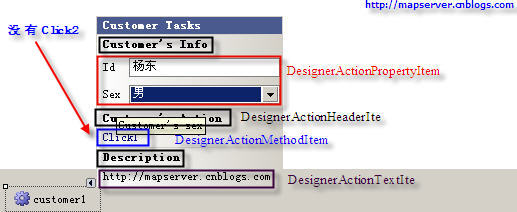
DesignerActionList 與 DesignerAction 讓組件/控件在智能標記面板顯示情境相關資訊與命令,可視為設計器動詞的替代方案。DesignerActionList 為主要互動點,開發者繼承並覆寫 GetSortedActionItems() 回傳 DesignerActionItemCollection。
四種 DesignerActionItem 衍生類別:
DesignerActionMethodItem:方法項,點擊執行方法DesignerActionPropertyItem:屬性項,直接在面板設定屬性DesignerActionTextItem:文字項DesignerActionHeaderItem:標題項,具分組功能[Designer(typeof(CustomerDesigner), typeof(IDesigner))]
public class Customer : Component {
public string Id { get; set; }
public Sex Sex { get; set; }
public string Address { get; set; }
}
public enum Sex { 男 = 0, 女 = 1 }
public class CustomerDesigner : ComponentDesigner {
private DesignerActionListCollection actionLists;
public override DesignerActionListCollection ActionLists {
get {
if (actionLists == null) {
actionLists = new DesignerActionListCollection();
actionLists.Add(new CustomerActionList(this.Component));
}
return actionLists;
}
}
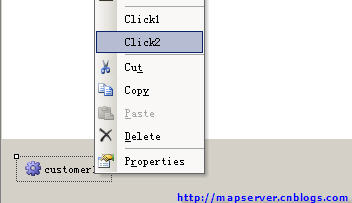
// 右鍵選單項(若覆寫 ActionLists 則不出現在智能標記)
public CustomerDesigner() {
this.Verbs.Add(new DesignerVerb("Click2", OnClick2));
}
void OnClick2(object s, EventArgs e) { MessageBox.Show("Click2."); }
}
public class CustomerActionList : DesignerActionList {
private Customer customer;
public CustomerActionList(IComponent component) : base(component) {
customer = component as Customer;
}
// 透過 TypeDescriptor 讀寫屬性,確保設計時序列化
public string Id {
get { return customer.Id; }
set { TypeDescriptor.GetProperties(typeof(Customer))["Id"].SetValue(customer, value); }
}
public Sex Sex {
get { return customer.Sex; }
set { TypeDescriptor.GetProperties(typeof(Customer))["Sex"].SetValue(customer, value); }
}
public void OnClick1() { MessageBox.Show("Click1."); }
public override DesignerActionItemCollection GetSortedActionItems() {
var items = new DesignerActionItemCollection();
items.Add(new DesignerActionHeaderItem("Customer's Info", "Info"));
items.Add(new DesignerActionHeaderItem("Customer's Action", "Action"));
items.Add(new DesignerActionHeaderItem("Description"));
items.Add(new DesignerActionPropertyItem("Id", "Id", "Info", "Customer's id"));
items.Add(new DesignerActionPropertyItem("Sex", "Sex", "Info", "Customer's sex"));
items.Add(new DesignerActionMethodItem(this, "OnClick1", "Click1", "Action", true));
items.Add(new DesignerActionTextItem("https://mapserver.cnblogs.com", "Description"));
return items;
}
}
效果:智能標記面板顯示分組、屬性編輯、方法按鈕與連結文字。