Designer 為 Component 設計時服務,可修改設計時行為、提供自訂服務。繼承 ComponentDesigner(針對 Component)或 ControlDesigner(針對 Control)即可自訂。
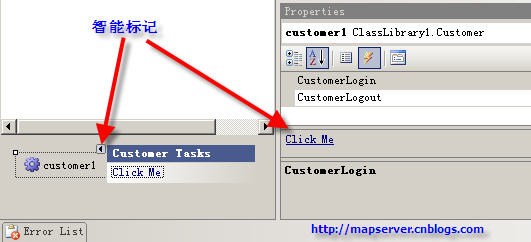
Verbs 屬性回傳 DesignerVerbCollection。DoDefaultAction()。InitializeNewComponent() 設定預設屬性值。PostFilterProperties() 移除/新增屬性。[DefaultEvent("CustomerLogin")]
[Designer(typeof(Class1Designer), typeof(IDesigner)), Editor(typeof(Class1Editor), typeof(ComponentEditor))]
public class Customer : Component {
public string ParentComponentName { get; set; }
public int Age { get; set; }
public string Address { get; set; }
public event EventHandler CustomerLogin;
public event EventHandler CustomerLogout;
}
public class Class1Designer : ComponentDesigner {
public Class1Designer() {
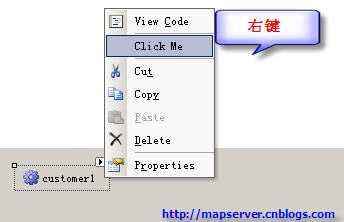
this.Verbs.Add(new DesignerVerb("Click Me", OnChoseMe));
}
void OnChoseMe(object s, EventArgs e) { MessageBox.Show("You clicked."); }
public override void DoDefaultAction() { MessageBox.Show("You double clicked."); }
public override void InitializeNewComponent(IDictionary defaultValues) {
string parentName = ((Component)this.ParentComponent).Site.Name;
((Customer)this.Component).ParentComponentName = parentName;
((Customer)this.Component).Age = 18;
}
protected override void PostFilterProperties(IDictionary properties) {
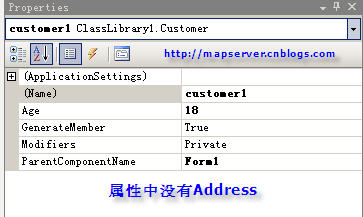
properties.Remove("Address"); // 移除 Address 屬性
}
public override void OnSetComponentDefaults() {
base.OnSetComponentDefaults();
((Customer)this.Component).Age = 18; // 過時方法,保留相容
}
}
效果:右鍵選單顯示自訂命令、雙擊觸發訊息、拖放自動設定父容器名稱與預設年齡、屬性視窗隱藏 Address。