TypeConverterAttribute 指定屬性在設計時的字串與強類型雙向轉換。如 Size="60,70" 透過轉換器自動解析為 Size 物件。.NET 內建多種轉換器,ASP.NET 伺服器控件屬性(僅能以字串儲存於 aspx)在設計/執行時亦依賴此機制。
public class Class1 : Component {
    private Size _size;
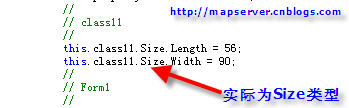
    [DesignerSerializationVisibility(DesignerSerializationVisibility.Content)]
    [TypeConverter(typeof(SizeConverter))]
    public Size Size {
        get { return _size; }
        set { _size = value; }
    }
}

public class SizeConverter : TypeConverter {
    public override bool CanConvertFrom(ITypeDescriptorContext context, Type sourceType) {
        return sourceType == typeof(string) || base.CanConvertFrom(context, sourceType);
    }
    public override object ConvertFrom(ITypeDescriptorContext context, CultureInfo culture, object value) {
        if (value == null || value.ToString().Length == 0) return new Size();
        char sep = culture.TextInfo.ListSeparator[0];
        string[] parts = ((string)value).Split(sep);
        var intConv = new Int32Converter();
        return new Size(
            (int)intConv.ConvertFromString(context, culture, parts[0]),
            (int)intConv.ConvertFromString(context, culture, parts[1]));
    }
    public override bool CanConvertTo(ITypeDescriptorContext context, Type destinationType) {
        return destinationType == typeof(string) || base.CanConvertTo(context, destinationType);
    }
    public override object ConvertTo(ITypeDescriptorContext context, CultureInfo culture, object value, Type destinationType) {
        if (value == null) return string.Empty;
        if (destinationType == typeof(string)) {
            Size sz = (Size)value;
            var intConv = TypeDescriptor.GetConverter(typeof(int));
            char sep = culture.TextInfo.ListSeparator[0];
            return string.Join(sep.ToString(), new[] {
                intConv.ConvertToString(context, culture, sz.Length),
                intConv.ConvertToString(context, culture, sz.Width)
            });
        }
        return base.ConvertTo(context, culture, value, destinationType);
    }
}

[TypeConverter(typeof(SizeConverter))]
public class Size {
    public int Length { get; set; }
    public int Width { get; set; }
    public Size(int l, int w) { Length = l; Width = w; }
    public Size() : this(0,0) {}
}
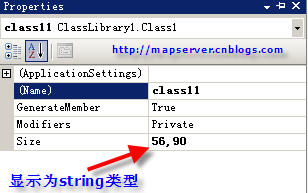
效果:屬性視窗顯示 "60,70" 格式,支援雙向編輯。
下一篇將講解 Component Designer。
隨文原始碼:https://www.bianceng.net/dotnet/201212/663.htm