Windows Workflow Foundation (WF) 不僅是業務流程引擎,其流程圖模型天然適合表達複雜的邏輯依賴與約束規則。本文以「設備啟停邏輯控制」為例,展示如何用 WF 4.0 流程圖建模具備依賴順序、互斥條件、安全約束的控制演算法,並對比 C# 硬編碼、狀態機、規則引擎等多種實現方式。
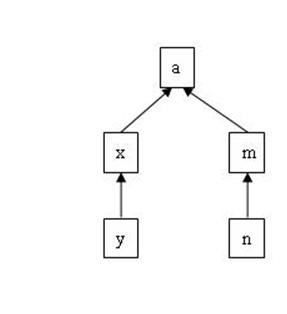
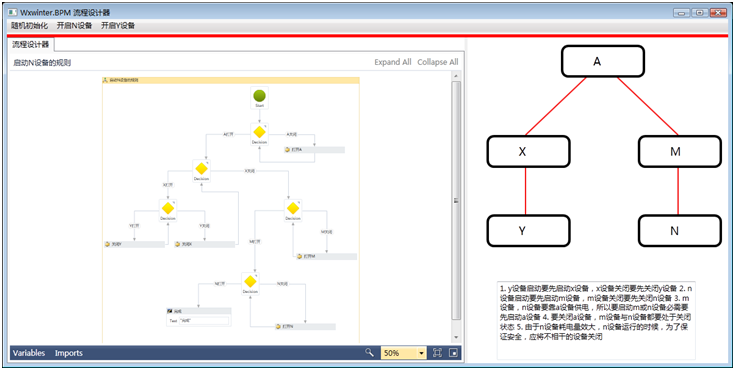
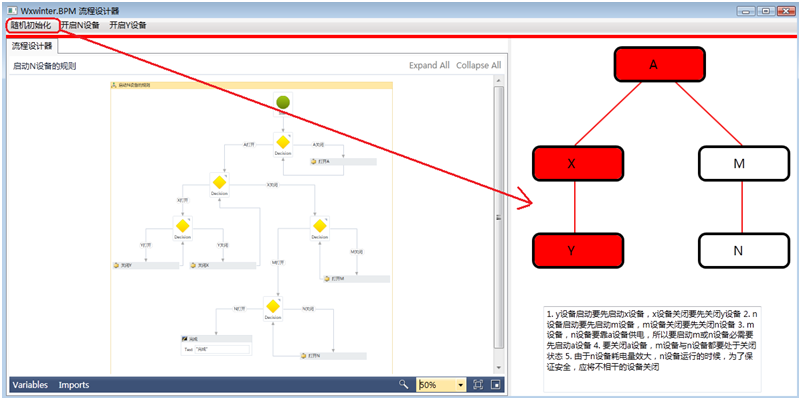
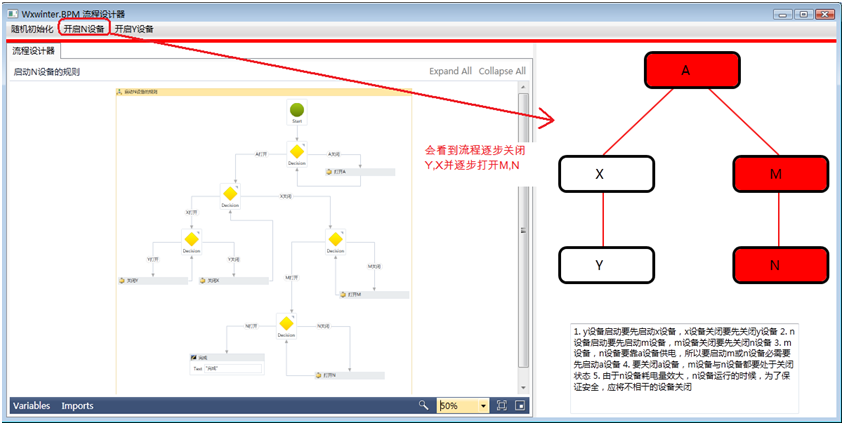
五台設備(A, M, N, X, Y)具備以下物理約束:
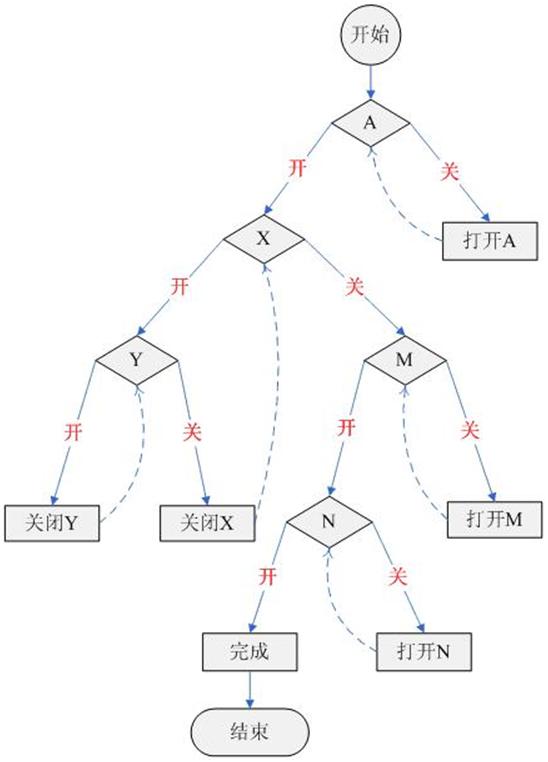
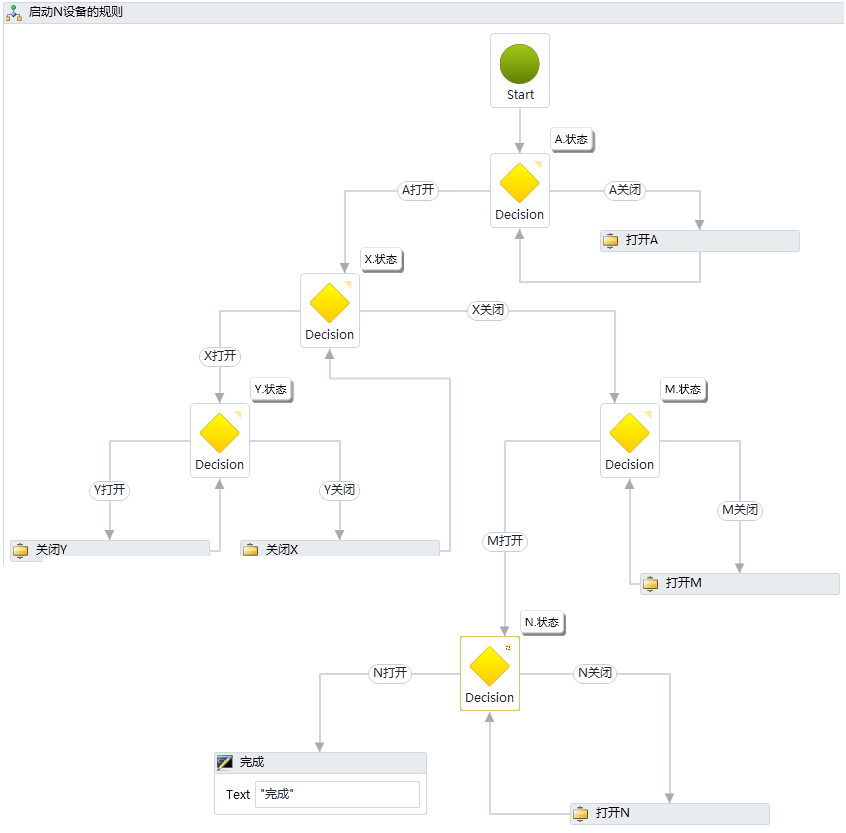
採用 Flowchart 活動作為根節點,以 FlowDecision 表達條件判斷,FlowStep 串接執行步驟,Parallel 處理可並行操作。
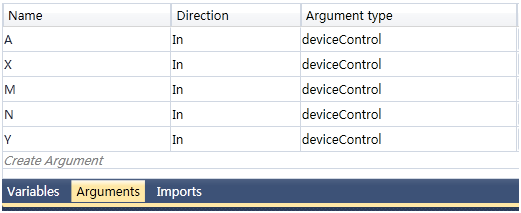
public sealed class CheckDependencyActivity : CodeActivity<bool> {
    [RequiredArgument] public InArgument<string> TargetDevice { get; set; }
    [RequiredArgument] public InArgument<DeviceAction> Action { get; set; }
    [RequiredArgument] public InArgument<DeviceContext> Context { get; set; }

    protected override bool Execute(CodeActivityContext context) {
        var device = TargetDevice.Get(context);
        var action = Action.Get(context);
        var ctx = Context.Get(context);

        // 依賴規則表(可外部化配置)
        var rules = new Dictionary<string, string[]> {
            ["Y"] = new[] { "X" }, ["N"] = new[] { "M" }, ["M"] = new[] { "A" }, ["N"] = new[] { "A" }
        };

        if (action == DeviceAction.Start && rules.ContainsKey(device)) {
            foreach (var dep in rules[device]) {
                if (ctx.GetDeviceState(dep) != DeviceState.Running) {
                    ctx.AddViolation($"啟動 {device} 需先啟動 {dep}");
                    return false;
                }
            }
        }
        // 關閉依賴反向檢查...
        return true;
    }
}public sealed class ExecuteDeviceActionActivity : CodeActivity {
[RequiredArgument] public InArgument<string> DeviceId { get; set; }
[RequiredArgument] public InArgument<DeviceAction> Action { get; set; }
[RequiredArgument] public InArgument<DeviceContext> Context { get; set; }
protected override void Execute(CodeActivityContext context) {
var id = DeviceId.Get(context);
var action = Action.Get(context);
var ctx = Context.Get(context);
// 呼叫實際硬體控制 API 或模擬器
ctx.ExecuteHardwareCommand(id, action);
ctx.UpdateDeviceState(id, action == DeviceAction.Start ? DeviceState.Running : DeviceState.Stopped);
}
}
| 維度 | C# 硬編碼 | WF 狀態機 (3.x) | 規則引擎 | WF 4.0 流程圖 |
|---|---|---|---|---|
| 可視化程度 | 無 | 高(狀態轉移圖) | 低(規則集) | 最高(流程圖直觀) |
| 規則外部化 | 困難 | 中等 | 極佳 | 良好(活動參數化) |
| 動態修改流程 | 重新編譯 | 困難 | 支援 | 支援(XAML 熱載入) |
| 長時間執行/持久化 | 自行實現 | 內建 | 需整合 | 內建 |
| 並行/同步控制 | 手動鎖 | 有限 | 無 | Parallel/FlowDecision 原生 |
| 學習曲線 | 低 | 中 | 高 | 中 |
| 適用場景 | 固定簡單邏輯 | 狀態驅動業務 | 複雜業務規則 | 複雜依賴/約束邏輯 |
Parallel、Pick、FlowDecision 直觀表達並發與選擇完整範例包含流程圖定義、自訂活動、WPF 測試主機:
本文配套源碼下載連結
將複雜邏輯約束轉化為可視化流程圖,是 WF 4.0 區別於傳統編程的核心價值。對於工控互鎖、業務規則引擎、智能決策流程等場景,流程圖模型提供了「所見即所得」的建模體驗與強大的運行時保障。