繫結連接 來源** 物件與 **目標** UI 元素屬性。來源可以是任何 CLR 物件;目標必須是 FrameworkElement 的 DependencyProperty。繫結引擎透過 Binding 物件協調:
Path)Mode)Converter)| 模式 | 行為 | 適用場景 |
|---|---|---|
OneTime | 初始化時從來源讀取一次 | 靜態資料、效能敏感 |
OneWay | 初始化 + 來源變更時更新目標 (預設) | 唯讀顯示、清單綁定 |
TwoWay | 雙向同步:任一方變更更新另方 | 表單編輯、輸入控制項 |
<TextBox x:Name="MyTextBox" Text="Text" Foreground="{Binding Brush1, Mode=OneWay}" />
var textcolor = new MyColors { Brush1 = new SolidColorBrush(Colors.Red) };
MyTextBox.DataContext = textcolor;
父元素設定 DataContext,子元素自動繼承,可透過 Binding.Path 針對特定屬性。
public class MyColors : INotifyPropertyChanged
{
    private SolidColorBrush _brush1;
    public event PropertyChangedEventHandler PropertyChanged;

    public SolidColorBrush Brush1
    {
        get { return _brush1; }
        set { _brush1 = value; NotifyPropertyChanged("Brush1"); }
    }

    public void NotifyPropertyChanged(string propertyName)
    {
        if (PropertyChanged != null)
            PropertyChanged(this, new PropertyChangedEventArgs(propertyName));
    }
}
public class DateToStringConverter : IValueConverter
{
    public object Convert(object value, Type targetType, object parameter, string language)
    {
        var dt = (DateTime)value;
        return new[] { "January", "February", /*...*/ }[dt.Month - 1];
    }
    public object ConvertBack(object value, Type targetType, object parameter, string language)
    {
        throw new NotImplementedException(); // OneWay 可不實作
    }
}
<UserControl.Resources>
    <local:DateToStringConverter x:Key="Converter1"/>
</UserControl.Resources>
<TextBlock Text="{Binding Month, Converter={StaticResource Converter1}}" />
ConverterParameter:傳遞自訂參數給轉換邏輯。ConverterLanguage:指定文化特性 (如 "zh-TW")。錯誤處理建議:回傳 DependencyProperty.UnsetValue 而非拋出例外,避免中斷繫結管線。
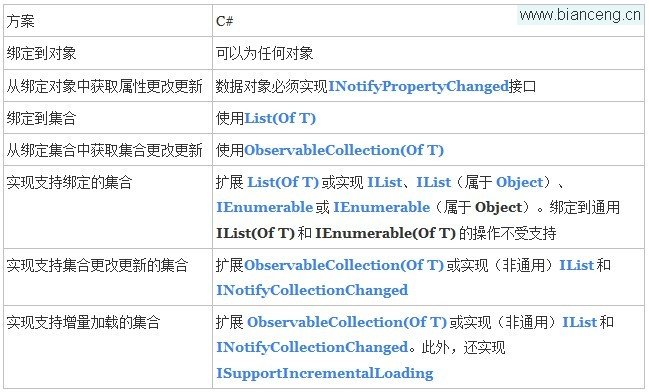
包含:CLR 物件、動態物件、ADO.NET DataTable、XML (XPath)、集合 (IEnumerable)、DependencyObject 等。
資料繫結是 XAML 應用的靈魂。掌握 Mode 選擇、INotifyPropertyChanged 通知、IValueConverter 轉換與 DataContext 繼承機制,即可建構低耦合、高維護性的 UI 層。善用 Binding 擴展標記語法與除錯工具 (輸出視窗繫結錯誤) 提升開發效率。