所有框架學習的起點都是「Hello World」。本篇帶你從零建立一個最精簡的 WCF 服務,涵蓋契約定義、服務實作、IIS 裝載設定、用戶端 Proxy 產生與呼叫完整端到端流程。掌握這個最小模型,後續所有進階功能 (繫結、安全、例外、串流、雙向…) 皆在此基礎上延伸。
https://localhost:3502/ServiceHost/Sample/Hello.svc)basicHttpBinding)IHello.SayHello)Endpoint = A + B + C。服務可暴露多個 Endpoint,滿足不同用戶端需求。
// IHello.cs
using System.ServiceModel;

namespace WCF.ServiceLib.Sample
{
    /// 服務契約介面
    [ServiceContract]
    public interface IHello
    {
        /// 操作契約:定義單一公開方法
        [OperationContract]
        string SayHello(string name);
    }
}
// Hello.cs
namespace WCF.ServiceLib.Sample
{
    /// 服務實作類別
    public class Hello : IHello
    {
        public string SayHello(string name) => $"Hello: {name}";
    }
}
<!-- Hello.svc -->
<%@ ServiceHost Language="C#" Debug="true" Service="WCF.ServiceLib.Sample.Hello" %>
<!-- Web.config -->
<?xml version="1.0"?>
<configuration>
  <system.serviceModel>
    <behaviors>
      <serviceBehaviors>
        <behavior name="SampleBehavior">
          <!-- 發布中繼資料,讓用戶端可透過 Add Service Reference 產生 Proxy -->
          <serviceMetadata httpGetEnabled="true" />
        </behavior>
      </serviceBehaviors>
    </behaviors>

    <services>
      <service name="WCF.ServiceLib.Sample.Hello" behaviorConfiguration="SampleBehavior">
        <!-- 端點:Address="" 表示使用基底位址,Binding=basicHttpBinding, Contract=IHello -->
        <endpoint address="" binding="basicHttpBinding" contract="WCF.ServiceLib.Sample.IHello" />
      </service>
    </services>
  </system.serviceModel>
</configuration>
https://localhost:3502/ServiceHost/Sample/Hello.svc → 應顯示服務說明頁面並含 WSDL 連結https://localhost:3502/ServiceHost/Sample/Hello.svc → GoSample → OK<system.serviceModel>
<client>
<endpoint address="https://localhost:3502/ServiceHost/Sample/Hello.svc"
binding="basicHttpBinding"
contract="Sample.IHello" />
</client>
</system.serviceModel>
// Hello.aspx
<%@ Page Language="C#" AutoEventWireup="true" CodeFile="Hello.aspx.cs" Inherits="Sample_Hello" %>
<asp:TextBox ID="txtName" runat="server" Text="webabcd" />
<asp:Button ID="btnSayHello" runat="server" Text="Hello" OnClick="btnSayHello_Click" />

// Hello.aspx.cs
public partial class Sample_Hello : System.Web.UI.Page
{
    protected void btnSayHello_Click(object sender, EventArgs e)
    {
        // 使用產生的 Proxy 類別
        var proxy = new Sample.HelloClient();
        try
        {
            string result = proxy.SayHello(txtName.Text);
            ClientScript.RegisterStartupScript(GetType(), "msg", $"alert('{result}');", true);
        }
        finally
        {
            // 正確關閉通道模式
            if (proxy.State == System.ServiceModel.CommunicationState.Faulted)
                proxy.Abort();
            else
                proxy.Close();
        }
    }
}
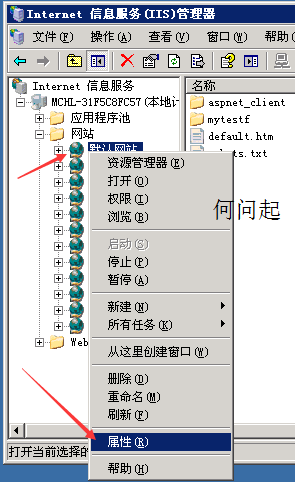
控制台 → 程式集 → 開啟或關閉 Windows 功能 → WCF Services → HTTP Activation| 方向 | 修改點 | 對應教學篇章 |
|---|---|---|
| 換繫結 (TCP/HTTPS/命名管道) | Web.config <binding>、端點 address | 第 3 篇 Binding |
| 傳遞複雜物件 (List、繼承類別) | 加 [DataContract]/[DataMember]/[KnownType] | 第 2 篇 Contract |
| 錯誤處理與 FaultException | 介面加 [FaultContract]、實作拋 FaultException<T> | 第 4 篇 例外處理 |
| 大檔案上傳/串流 | binding transferMode="Streamed"、MessageContract+Stream | 第 8 篇 串流傳輸 |
Solution.sln
├─ WCF.ServiceLib          (契約與實作,Class Library,可共用給用戶端)
│  ├─ Sample
│  │  ├─ IHello.cs
│  │  └─ Hello.cs
│  └─ ...
├─ WCF.ServiceHost         (IIS 裝載專案,Web Site)
│  ├─ Sample
│  │  ├─ Hello.svc
│  │  └─ Web.config
│  └─ ...
└─ Client.Web              (用戶端專案,ASP.NET / WPF / Console)
   ├─ Service References/Sample/ (Add Service Reference 產生)
   └─ ...