Fluent Ribbon 是 WPF 實現 Office 2010/2013 風格 Ribbon 介面的成熟開源庫。本文從「File → New Project」開始,手把手建立第一個 RibbonWindow,並說明三種內建主題 (Silver/Blue/Black) 切換機制。
Install-Package Fluent.Ribbon (或從 CodePlex 下載對應版本 DLL)。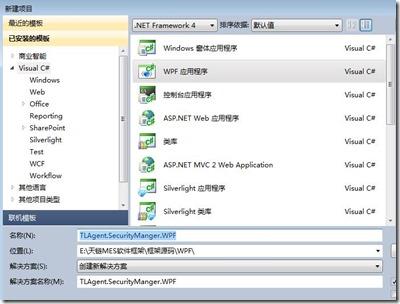
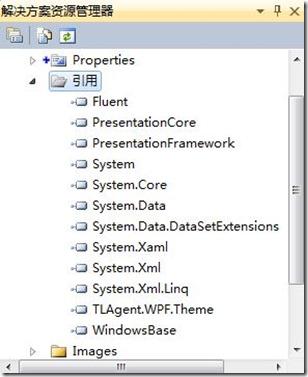
<Fluent:RibbonWindow x:Class="TLAgent.SecurityManager.WPF.MainWindow"
        xmlns="https://schemas.microsoft.com/winfx/2006/xaml/presentation"
        xmlns:x="https://schemas.microsoft.com/winfx/2006/xaml"
        xmlns:Fluent="clr-namespace:Fluent;assembly=Fluent"
        Title="MainWindow" Height="350" Width="525">
    <Grid></Grid>
</Fluent:RibbonWindow>
using Fluent;

namespace TLAgent.SecurityManager.WPF
{
    public partial class MainWindow : RibbonWindow
    {
        public MainWindow()
        {
            InitializeComponent();
        }
    }
}
<Application x:Class="TLAgent.SecurityManager.WPF.App"
             xmlns="https://schemas.microsoft.com/winfx/2006/xaml/presentation"
             xmlns:x="https://schemas.microsoft.com/winfx/2006/xaml"
             StartupUri="MainWindow.xaml">
    <Application.Resources>
        <ResourceDictionary>
            <ResourceDictionary.MergedDictionaries>
                <ResourceDictionary Source="/Fluent;Component/Themes/Generic.xaml" />
                <ResourceDictionary Source="/Fluent;Component/Themes/Office2010/Silver.xaml" />
            </ResourceDictionary.MergedDictionaries>
        </ResourceDictionary>
    </Application.Resources>
</Application>
Silver (預設)**: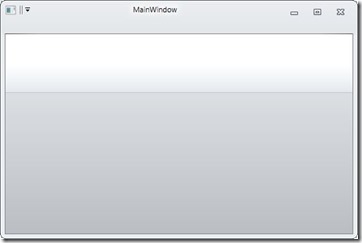
Blue**: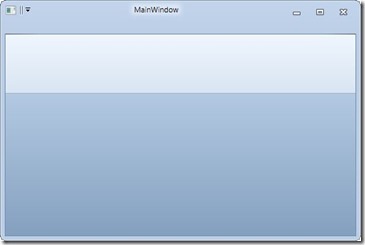
Black**: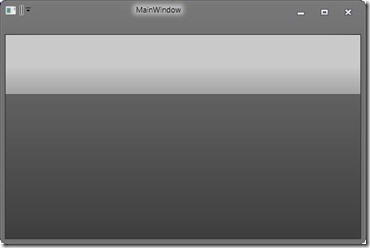
// ThemeStyle.cs
public enum ThemeStyle { Silver, Blue, Black }

// ThemeManager.cs
public static class ThemeManager
{
    public static void ChangeTheme(ThemeStyle style)
    {
        var dict = new ResourceDictionary();
        switch (style)
        {
            case ThemeStyle.Blue:
                dict.Source = new Uri("/Fluent;Component/Themes/Office2010/Blue.xaml", UriKind.Relative);
                break;
            case ThemeStyle.Black:
                dict.Source = new Uri("/Fluent;Component/Themes/Office2010/Black.xaml", UriKind.Relative);
                break;
            default:
                dict.Source = new Uri("/Fluent;Component/Themes/Office2010/Silver.xaml", UriKind.Relative);
                break;
        }

        // 替換應用程式層級主題字典
        var appDict = Application.Current.Resources.MergedDictionaries
                          .FirstOrDefault(d => d.Source != null && d.Source.OriginalString.Contains("Office2010"));
        if (appDict != null)
            Application.Current.Resources.MergedDictionaries.Remove(appDict);
        Application.Current.Resources.MergedDictionaries.Add(dict);
    }
}

// App.xaml.cs 啟動時指定
public partial class App : Application
{
    protected override void OnStartup(StartupEventArgs e)
    {
        ThemeManager.ChangeTheme(ThemeStyle.Silver);
        base.OnStartup(e);
    }
}
RibbonWindow 繼承自 Window,新增非客戶區繪製支援,讓 Ribbon 延伸至標題列。ResourceDictionary,切換即替換 MergedDictionaries 中對應項目。Office2010 三色主題,亦可自訂 ResourceDictionary 實現企業品牌色。RibbonTabItem、RibbonGroupBox、Button、Backstage、QuickAccessToolbar 構建完整導航。範例原始碼**:TLAgent.SecurityManager.WPF.rar