最簡易的捕獲邏輯:滑鼠經過 QXSpirit 物件時游標變為 1 號,否則為 0 號。程式碼極短:
private void Window_MouseMove(object sender, MouseEventArgs e)
{
    this.Cursor = e.Source is QXSpirit ? Super.getCursor(1) : Super.getCursor(0);
}實測發現並不準確:滑鼠明顯不在怪物實體上,游標卻顯示 1 號。原因在於精靈圖片為背景透明的 PNG/GIF,以「絕對無敵」為例,每幀 200×200 像素:
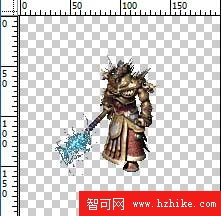
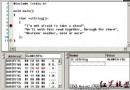
其有效實體僅佔圖片中央區域,四周有大量透明無效區域。雖然透明區不顯示,但整張 200×200 的 Image 控件實際存在,滑鼠只要在這範圍內移動就會觸發 1 號游標,完全忽略是否落在實體部分。
對拾取物件的圖片源進行逐點顏色檢測,判斷滑鼠位置對應像素是否透明。核心方法:
public static Color getImagePointColor(BitmapSource bitmapsource, int x, int y)
{
    CroppedBitmap crop = new CroppedBitmap(bitmapsource as BitmapSource, new Int32Rect(x, y, 1, 1));
    byte[] pixels = new byte[4];
    try
    {
        crop.CopyPixels(pixels, 4, 0);
        crop = null;
    }
    catch (Exception ee)
    {
        MessageBox.Show(ee.ToString());
    }
    // 藍 pixels[0] 綠 pixels[1] 紅 pixels[2] 透明度 pixels[3]
    return Color.FromArgb(pixels[3], pixels[2], pixels[1], pixels[0]);
}
此法優點在於精確到像素,缺點是僅限 WPF、效能差、且必須包在 try-catch 中。下一節將介紹更優雅的 EfficaciousSection 方案與 HitTest 技術。