本節將前幾章的 count 改為 FrameCounter(幀推進器),語意更清晰且動態效果更佳。在生命執行緒事件中,首先判斷主角動作狀態是否改變(如從待機轉為跑動),若有變化則呼叫 ChangeAction() 更新相關參數。
private void ChangeAction()
{
    switch (Action)
    {
        case Actions.Stop:
            Timer.Interval = TimeSpan.FromMilliseconds(150);
            CurrentStartFrame = 0;
            CurrentEndFrame = EachActionFrameRange[0] - 1;
            OldAction = Actions.Stop;
            break;
        case Actions.Run:
            Timer.Interval = TimeSpan.FromMilliseconds(150);
            CurrentStartFrame = EachActionFrameRange[0];
            CurrentEndFrame = EachActionFrameRange[0] + EachActionFrameRange[1] - 1;
            OldAction = Actions.Run;
            break;
        case Actions.Attack:
            Timer.Interval = TimeSpan.FromMilliseconds(120);
            CurrentStartFrame = EachActionFrameRange[0] + EachActionFrameRange[1];
            CurrentEndFrame = EachActionFrameRange[0] + EachActionFrameRange[1] + EachActionFrameRange[2] - 1;
            OldAction = Actions.Attack;
            break;
        case Actions.Magic:
            Timer.Interval = TimeSpan.FromMilliseconds(100);
            CurrentStartFrame = EachActionFrameRange[0] + EachActionFrameRange[1] + EachActionFrameRange[2];
            CurrentEndFrame = EachActionFrameRange[0] + EachActionFrameRange[1] + EachActionFrameRange[2] + EachActionFrameRange[3] - 1;
            OldAction = Actions.Magic;
            break;
        case Actions.Death:
            Timer.Interval = TimeSpan.FromMilliseconds(150);
            CurrentStartFrame = EachActionFrameRange[0] + EachActionFrameRange[1] + EachActionFrameRange[2] + EachActionFrameRange[3];
            CurrentEndFrame = EachActionFrameRange[0] + EachActionFrameRange[1] + EachActionFrameRange[2] + EachActionFrameRange[3] + EachActionFrameRange[4] - 1;
            OldAction = Actions.Death;
            break;
    }
    FrameCounter = CurrentStartFrame;
}
此方法依據目前動作狀態(5 大動作之一),設定對應的計時器間隔、起始幀、結束幀,並記錄舊動作,最後將幀推進器重置為起始幀。
Timer_Tick 事件中,判斷完動作狀態後,動態配置精靈圖片源:
Body.Source = Source[(int)Direction, FrameCounter];Source 為二維陣列,第一維為朝向(0~7),第二維為幀索引。此處用到 Direction 屬性,它是一個相依性屬性(參考第十五節):
public double Direction
{
    get { return (double)GetValue(DirectionProperty); }
    set { SetValue(DirectionProperty, value); }
}
public static readonly DependencyProperty DirectionProperty = DependencyProperty.Register(
    "Direction", typeof(double), typeof(QXSpirit));
之所以定義為相依性屬性,是因為要在 Storyboard 移動動畫中即時修改朝向,使尋路動畫更平滑。本例仍沿用 DoubleAnimation 逐幀動畫而非 ObjectAnimation,故 Direction 設為 double 型別以兼容前幾章架構。
主角終於能顯示待機動作:

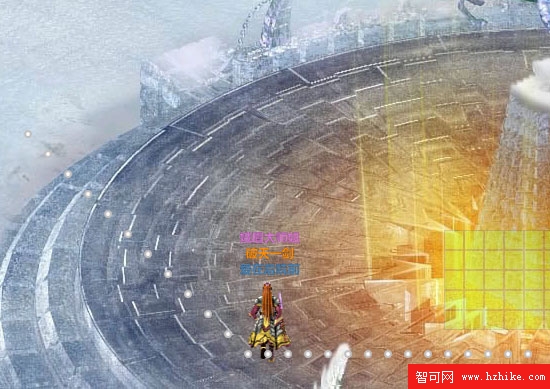
雖可點擊地圖移動,但主角朝向始終朝北(0)。下一節將利用 Direction 相依性屬性,讓主角在任意動作中顯示正確朝向。