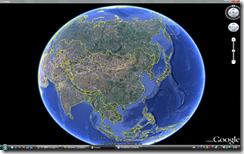
承接第一篇 Hello World,本文解決核心整合需求:隱藏 Google Earth 原生視窗,將 3D 渲染畫面重定向嵌入自訂 WinForms 容器。使用 Windows API (SetParent, MoveWindow, SetWindowPos) 實現無縫嵌入,為後續互動功能奠基。
ApplicationGEClass 實例,取得主視窗控制代碼 (GetMainHwnd) 與渲染視窗控制代碼 (GetRenderHwnd)SetWindowPos(HWND_BOTTOM, ..., SWP_HIDEWINDOW | SWP_NOSIZE)GetParent),將其重新設定父視窗為自訂容器 (SetParent)MoveWindow)WM_QUIT 正確關閉 GE 進程
using System;
using System.Windows.Forms;
using EARTHLib;
using System.Runtime.InteropServices;

namespace GEDemo
{
    public partial class Form2 : Form
    {
        private const int WM_QUIT = 0x0012;

        private IntPtr GEHWnd = IntPtr.Zero;
        private IntPtr GEHrender = IntPtr.Zero;
        private ApplicationGEClass GeApp;

        public Form2()
        {
            InitializeComponent();
        }

        protected override void OnLoad(EventArgs e)
        {
            base.OnLoad(e);
            if (DesignMode) return;

            // 1. 建立 GE 實例
            GeApp = new ApplicationGEClass();

            // 2. 取得主視窗並隱藏
            GEHWnd = (IntPtr)GeApp.GetMainHwnd();
            NativeMethods.SetWindowPos(GEHWnd, NativeMethods.HWND_BOTTOM, 0, 0, 0, 0,
                NativeMethods.SWP_NOSIZE | NativeMethods.SWP_HIDEWINDOW);

            // 3. 取得渲染視窗
            GEHrender = (IntPtr)GeApp.GetRenderHwnd();
            IntPtr oldParent = NativeMethods.GetParent(GEHrender);

            // 4. 先調整大小再重定向父視窗 (避免閃爍)
            NativeMethods.MoveWindow(GEHrender, 0, 0, this.Width, this.Height, true);
            NativeMethods.SetParent(GEHrender, this.Handle);
        }

        protected override void OnResize(EventArgs e)
        {
            base.OnResize(e);
            if (GEHrender != IntPtr.Zero)
                NativeMethods.MoveWindow(GEHrender, 0, 0, this.Width, this.Height, true);
        }

        protected override void OnClosing(CancelEventArgs e)
        {
            base.OnClosing(e);
            if (GEHWnd != IntPtr.Zero)
                NativeMethods.PostMessage((int)GEHWnd, WM_QUIT, 0, 0);
        }
    }
}
using System;
using System.Runtime.InteropServices;

namespace GEDemo
{
    public static class NativeMethods
    {
        [DllImport("user32.dll", CharSet = CharSet.Auto, SetLastError = true)]
        public static extern bool SetWindowPos(IntPtr hWnd, IntPtr hWndInsertAfter, int x, int y, int cx, int cy, uint uFlags);

        [DllImport("user32.dll", CharSet = CharSet.Auto)]
        public static extern IntPtr PostMessage(IntPtr hWnd, int msg, int wParam, int lParam);

        [DllImport("user32.dll", CharSet = CharSet.Auto)]
        public static extern IntPtr GetParent(IntPtr hWnd);

        [DllImport("user32.dll", CharSet = CharSet.Auto)]
        public static extern bool MoveWindow(IntPtr hWnd, int x, int y, int nWidth, int nHeight, bool bRepaint);

        [DllImport("user32.dll", CharSet = CharSet.Auto)]
        public static extern IntPtr SetParent(IntPtr hWndChild, IntPtr hWndNewParent);

        // 常數定義
        public static readonly IntPtr HWND_BOTTOM = new IntPtr(1);
        public static readonly IntPtr HWND_TOP = IntPtr.Zero;
        public const uint SWP_NOSIZE = 0x0001;
        public const uint SWP_HIDEWINDOW = 0x0080;
        public const uint SWP_FRAMECHANGED = 0x0020;
    }
}
| API | 用途 | 關鍵參數 |
|---|---|---|
| SetWindowPos | 設定視窗位置、大小、Z-order、顯示狀態 | SWP_HIDEWINDOW 隱藏主視窗 |
| GetRenderHwnd | 取得 GE 內部 OpenGL/Qt 渲染子視窗控制代碼 | 此視窗為實際 3D 畫面載體 |
| SetParent | 變更子視窗父視窗 | 新父視窗 = 自訂 Form.Handle |
| MoveWindow | 移動並調整視窗大小 | 座標相對新父視窗客戶區 |
| PostMessage(WM_QUIT) | 通知 GE 進程正常退出 | 避免殘留 googleearth.exe 進程 |
MoveWindow 再 SetParent,或在 OnResize 中重複 MoveWindowOnClosing 送出 WM_QUIT,不可直接 Process.KilldpiAware 或使用 SetProcessDpiAwarenessEARTHLib (Google Earth 1.0 Type Library),版本號需匹配透過 SetParent 重定向渲染視窗父視窗,配合 MoveWindow 同步大小,即可將 Google Earth 3D 引擎無縫整合進 WinForms 應用。此技術同樣適用於其他基於 Qt、OpenGL 或獨立渲染視窗的第三方元件嵌入場景。下一步將加入滑鼠互動、座標轉換與圖層管理,構建完整 GIS 應用框架。