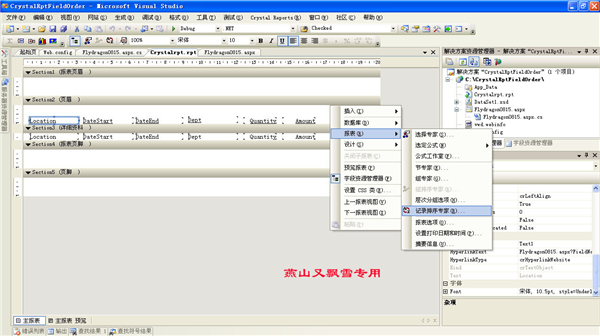
在 Crystal Reports 中實現互動式排序:使用者點擊報表列標題,頁面回傳並以該欄位切換升/降序重新渲染。核心做法是將列標題設為超連結,帶上欄位名參數回傳至同一頁面,後端動態修改 ReportDocument.DataDefinition.SortFields。
ReportPage.aspx?FieldName=欄位名(如 FieldName=Location)。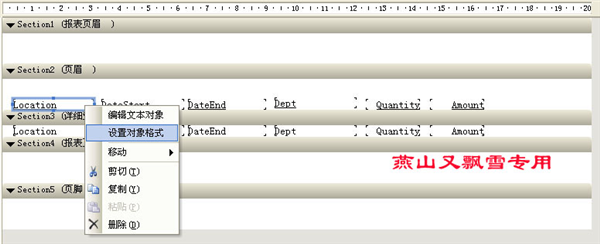
public partial class ReportPage : System.Web.UI.Page
{
    private static ReportDocument _reportDoc = new ReportDocument();
    private static bool _isAscending = true;      // 排序方向切換旗標
    private static bool _isPagingPostBack = false; // 分頁回傳標記

    protected void Page_Load(object sender, EventArgs e) { }

    protected override void OnPreRender(EventArgs e)
    {
        base.OnPreRender(e);

        if (IsPostBack)
        {
            // 1. 從 Session 還原報表文檔(避免重新查詢資料庫)
            _reportDoc = Session["Report"] as ReportDocument;
            if (_reportDoc == null) BindReport();

            crystalReportViewer.ReportSource = _reportDoc;
            _isPagingPostBack = true;
        }

        if (_isPagingPostBack)
        {
            _isPagingPostBack = false;
            return;
        }

        // 2. 處理排序參數回傳
        string fieldName = Request.QueryString["FieldName"];
        if (!string.IsNullOrEmpty(fieldName) && _reportDoc != null)
        {
            ApplySort(fieldName);
        }
    }

    private void ApplySort(string fieldName)
    {
        try
        {
            // 取得欄位定義
            FieldDefinition fieldDef = _reportDoc.Database.Tables[0].Fields[fieldName];
            _reportDoc.DataDefinition.SortFields[0].Field = fieldDef;

            // 切換排序方向
            _reportDoc.DataDefinition.SortFields[0].SortDirection =
                _isAscending ? SortDirection.AscendingOrder : SortDirection.DescendingOrder;
            _isAscending = !_isAscending;

            // 重新綁定並重置頁碼
            crystalReportViewer.ReportSource = _reportDoc;
            crystalReportViewer.ShowFirstPage();
        }
        catch (Exception ex)
        {
            Response.Write($"排序錯誤: {ex.Message}");
        }
    }

    private void BindReport()
    {
        string sql = @"SELECT ct.XK_TEXT as Location, pt.XK_RECEIPT_DATE_TIME as DateStart,
            pt.XK_PLU as Dept, pt.XK_RECEIPT_NUM as ReceiptNo, p.XK_TEXT as ItemNo,
            pt.XK_QUANTITY as Qty, pt.XK_AMOUNT as Amount
            FROM XK_CASH_TERMINAL ct
            LEFT JOIN XK_POS_TRANSACTION pt ON ct.XK_ID = pt.XK_CASH_TERMINAL_ID
            LEFT JOIN XK_PRODUCT p ON pt.XK_PROD_CODE = p.XK_CODE
            WHERE pt.XK_STATUS IS NULL";

        using (var conn = new SqlConnection(ConfigurationManager.ConnectionStrings["MyConn"].ConnectionString))
        using (var adapter = new SqlDataAdapter(sql, conn))
        {
            var ds = new DataSet();
            adapter.Fill(ds);

            _reportDoc.Load(Server.MapPath("CrystalReport.rpt"));
            _reportDoc.SetDataSource(ds.Tables[0]);
            Session["Report"] = _reportDoc;
        }
    }

    protected void btnRefresh_Click(object sender, EventArgs e)
    {
        BindReport();
        crystalReportViewer.ReportSource = _reportDoc;
    }
}
| 技術點 | 處理方式 |
|---|---|
| 報表物件持久化 | 存入 Session["Report"],避免每次回傳重查 DB |
| 排序方向切換 | 靜態旗標 _isAscending 記錄狀態,每次點擊翻轉 |
| 分頁與排序區分 | _isPagingPostBack 標記區分 CrystalReportViewer 內部分頁回傳 |
| 動態修改排序 | 操作 DataDefinition.SortFields[0],僅修改 Field 與 SortDirection |