滑鼠移動時實時顯示目標坐標下窗口的:標題、句柄、類名、矩形區域縮略圖。
[DllImport("User32.dll")] public static extern IntPtr WindowFromPoint(int x, int y);
[DllImport("User32.dll")] public static extern int GetWindowText(IntPtr hWnd, StringBuilder lpString, int nMaxCount);
[DllImport("User32.dll")] public static extern int GetClassName(IntPtr hWnd, StringBuilder lpString, int nMaxCount);
[DllImport("User32.dll")] public static extern bool GetWindowRect(IntPtr hWnd, out RECT lpRect);

[StructLayout(LayoutKind.Sequential)]
public struct RECT { public int left, top, right, bottom; }
Timer (300ms) 輪詢 Cursor.Position 獲取滑鼠坐標WindowFromPoint 取得窗口句柄GetWindowText/GetClassName 取標題/類名GetWindowRect 取矩形,Graphics.CopyFromScreen 截取縮略圖顯示在 PictureBoxprivate void Timer_Tick(object sender, EventArgs e) {
IntPtr hWnd = WindowFromPoint(Cursor.Position.X, Cursor.Position.Y);
if (hWnd != IntPtr.Zero) {
var sbText = new StringBuilder(260);
var sbClass = new StringBuilder(256);
GetWindowText(hWnd, sbText, sbText.Capacity);
GetClassName(hWnd, sbClass, sbClass.Capacity);
lblLocation.Text = $"{Cursor.Position.X}, {Cursor.Position.Y}";
lblHandle.Text = hWnd.ToString();
lblTitle.Text = sbText.ToString();
lblClass.Text = sbClass.ToString();
DrawThumbnail(hWnd);
}
}
private Bitmap _bmp;
private void DrawThumbnail(IntPtr hWnd) {
if (_bmp != null) _bmp.Dispose();
if (GetWindowRect(hWnd, out RECT rect)) {
_bmp = new Bitmap(rect.right - rect.left, rect.bottom - rect.top);
using (var g = Graphics.FromImage(_bmp))
g.CopyFromScreen(rect.left, rect.top, 0, 0, _bmp.Size, CopyPixelOperation.SourceCopy);
pictureBox1.Image = _bmp;
}
}
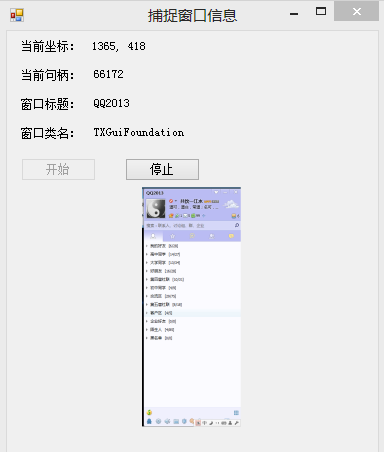
可見視窗標題、句柄、類名、縮略圖隨滑鼠移動即時刷新,類似 Spy++ 但更輕量。