主表單 frmMain 包含:
CheckBox:自動關機 / 倒數執行 / 定時報警DateTimePicker 設定日期/時間TextBox 輸入倒數秒數ProgressBar、Label 顯示狀態Timer 元件 (Interval=100ms) 即時更新時間與檢查觸發條件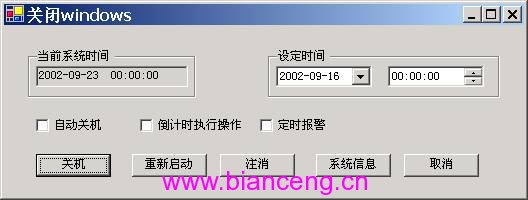
using System.Runtime.InteropServices;
using System.Text;

public class WinAPI
{
    [DllImport("user32.dll")]
    public static extern int ExitWindowsEx(int uFlags, int dwReserved);

    [DllImport("shell32.dll")]
    public static extern int ShellAbout(int hWnd, string szApp, string szOtherStuff, int hIcon);

    // 系統資訊用 API
    [DllImport("kernel32.dll")]
    public static extern void GetWindowsDirectory(StringBuilder lpBuffer, int uSize);
    [DllImport("kernel32.dll")]
    public static extern void GetSystemDirectory(StringBuilder lpBuffer, int uSize);
    [DllImport("kernel32.dll")]
    public static extern void GetSystemInfo(ref CPU_INFO lpSystemInfo);
    [DllImport("kernel32.dll")]
    public static extern void GlobalMemoryStatus(ref MEMORY_INFO lpBuffer);
    [DllImport("kernel32.dll")]
    public static extern void GetSystemTime(ref SYSTEMTIME lpSystemTime);
}const int EWX_LOGOFF = 0;
const int EWX_SHUTDOWN = 1;
const int EWX_REBOOT = 2;
const int EWX_FORCE = 4;private void Shutdown() => WinAPI.ExitWindowsEx(EWX_SHUTDOWN, 0);
private void Reboot() => WinAPI.ExitWindowsEx(EWX_REBOOT, 0);
private void Logoff() => WinAPI.ExitWindowsEx(EWX_LOGOFF, 0);private void timer1_Tick(object sender, EventArgs e)
{
string nowDate = DateTime.Now.ToShortDateString();
string nowTime = DateTime.Now.ToLongTimeString();
lblCurrentTime.Text = $"{nowDate} {nowTime}";
// 定時關機檢查
if (chkSchedule.Checked &&
nowDate == dtpDate.Value.ToShortDateString() &&
nowTime == dtpTime.Value.ToLongTimeString())
{
Shutdown();
}
// 倒數計時邏輯(略)...
}定義三個結構對應 API 回傳資料:
[StructLayout(LayoutKind.Sequential)]
public struct CPU_INFO
{
    public uint dwOemId, dwPageSize, lpMinimumApplicationAddress,
                lpMaximumApplicationAddress, dwActiveProcessorMask,
                dwNumberOfProcessors, dwProcessorType, dwAllocationGranularity,
                dwProcessorLevel, dwProcessorRevision;
}

[StructLayout(LayoutKind.Sequential)]
public struct MEMORY_INFO
{
    public uint dwLength, dwMemoryLoad, dwTotalPhys, dwAvailPhys,
                dwTotalPageFile, dwAvailPageFile, dwTotalVirtual, dwAvailVirtual;
}

[StructLayout(LayoutKind.Sequential)]
public struct SYSTEMTIME
{
    public ushort wYear, wMonth, wDayOfWeek, wDay,
                  wHour, wMinute, wSecond, wMilliseconds;
}
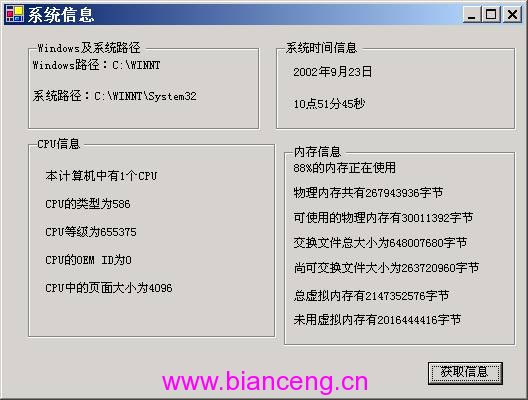
按鈕點擊一次性查詢並填入介面:
private void btnQuerySysInfo_Click(object sender, EventArgs e)
{
    // Windows/系統路徑
    var sb = new StringBuilder(128);
    WinAPI.GetWindowsDirectory(sb, 128);
    txtWinDir.Text = "Windows路徑:" + sb.ToString();
    WinAPI.GetSystemDirectory(sb, 128);
    txtSysDir.Text = "系統路徑:" + sb.ToString();

    // CPU 資訊
    CPU_INFO cpu = new CPU_INFO();
    WinAPI.GetSystemInfo(ref cpu);
    txtCpuCount.Text = $"CPU 數量:{cpu.dwNumberOfProcessors}";
    txtCpuType.Text = $"CPU 型別:{cpu.dwProcessorType}";
    txtCpuLevel.Text = $"CPU 等級:{cpu.dwProcessorLevel}";

    // 記憶體資訊
    MEMORY_INFO mem = new MEMORY_INFO { dwLength = (uint)Marshal.SizeOf(typeof(MEMORY_INFO)) };
    WinAPI.GlobalMemoryStatus(ref mem);
    txtMemLoad.Text = $"{mem.dwMemoryLoad}% 使用中";
    txtTotalPhys.Text = $"實體記憶體:{mem.dwTotalPhys} 位元組";
    txtAvailPhys.Text = $"可用實體:{mem.dwAvailPhys} 位元組";

    // 系統時間 (UTC,需 +8 小時)
    SYSTEMTIME st = new SYSTEMTIME();
    WinAPI.GetSystemTime(ref st);
    txtDate.Text = $"{st.wYear}年{st.wMonth}月{st.wDay}日";
    txtTime.Text = $"{(st.wHour + 8) % 24}時{st.wMinute}分{st.wSecond}秒";
}
本專案完整示範 C# 透過 P/Invoke 呼叫 user32.dll、kernel32.dll、shell32.dll 實現系統級操作,涵蓋關機控制、系統資訊查詢、定時器邏輯與 WinForms 介面設計。有 API 基礎的開發者可快速舉一反三,延伸更多系統管理功能。