System.Threading.Thread 是手動管理線程的核心類。構造函數接受 ThreadStart(無參無返回)或 ParameterizedThreadStart(帶參數)委托:
// 靜態方法
Thread t1 = new Thread(MyStaticMethod);
t1.Start();

// 實例方法
Thread t2 = new Thread(new MyClass().MyInstanceMethod);
t2.Start();

// 匿名委托 / Lambda
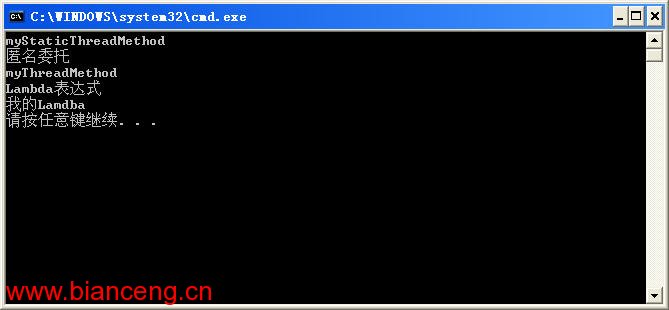
Thread t3 = new Thread(delegate { Console.WriteLine("匿名"); });
Thread t4 = new Thread(() => Console.WriteLine("Lambda"));
t3.Start(); t4.Start();

// 設置線程名稱便於調試
Thread t5 = new Thread(() => Console.WriteLine(Thread.CurrentThread.Name));
t5.Name = "我的Lambda";
t5.Start();
abstract class MyThread
{
    Thread thread = null;
    abstract public void Run();
    public void Start()
    {
        if (thread == null) thread = new Thread(Run);
        thread.Start();
    }
}

// 使用示例
class NewThread : MyThread
{
    public override void Run() => Console.WriteLine("使用 MyThread 運行線程");
}
new NewThread().Start();
static void Method(object obj) => Console.WriteLine(obj);
Thread t = new Thread(Method);
t.Start("參數值");
class MyData { public string S; public int I; public void Run() => Console.WriteLine($"{S},{I}"); }
MyData data = new MyData { S = "abcd", I = 1234 };
Thread t = new Thread(data.Run);
t.Start();
class NewThread : MyThread
{
    string p1; int p2;
    public NewThread(string p1, int p2) { this.p1 = p1; this.p2 = p2; }
    public override void Run() => Console.WriteLine($"{p1},{p2}");
}
new NewThread("hello", 4321).Start();
thread.IsBackground = true。所有前台線程結束後,進程立即終止,不管後台線程是否完成。
Thread t = new Thread(() => Thread.Sleep(3000));
// t.IsBackground = true; // 註釋掉則等待 3 秒,打開則立即退出
t.Start();
必須在 Start() 前設置,啟動後不可更改。
class ThreadCounter : MyThread
{
    static int count = 0;
    int ms;
    public ThreadCounter(int ms) { this.ms = ms; Interlocked.Increment(ref count); }
    public override void Run()
    {
        Thread.Sleep(ms);
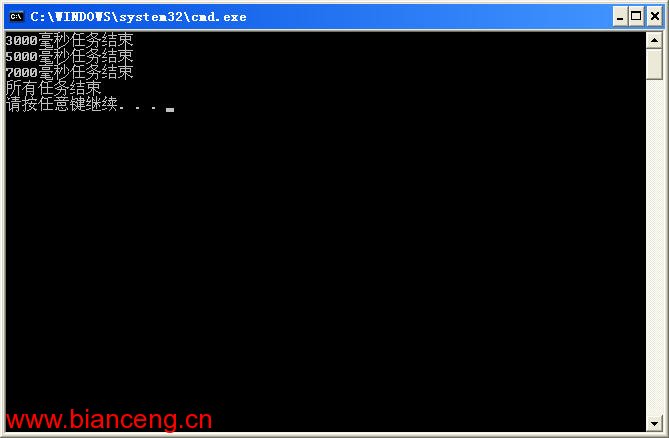
        Console.WriteLine($"{ms}ms 任務結束");
        if (Interlocked.Decrement(ref count) == 0) Console.WriteLine("所有任務結束");
    }
}
new ThreadCounter(3000).Start();
new ThreadCounter(5000).Start();
new ThreadCounter(7000).Start();
注意:計數器初始化應在構造函數中,避免競態條件。
static void ThreadMethod(object obj)
{
    Thread.Sleep(int.Parse(obj.ToString()));
    Console.WriteLine($"{obj}ms 任務結束");
}
static void JoinAll(object obj)
{
    foreach (Thread t in (Thread[])obj) t.Join();
    Console.WriteLine("所有線程結束");
}
Thread t1 = new Thread(ThreadMethod), t2 = new Thread(ThreadMethod), t3 = new Thread(ThreadMethod);
t1.Start(3000); t2.Start(5000); t3.Start(7000);
new Thread(JoinAll).Start(new Thread[] { t1, t2, t3 });
Join 會阻塞調用線程直到目標線程結束,適合在專門的監控線程中使用。