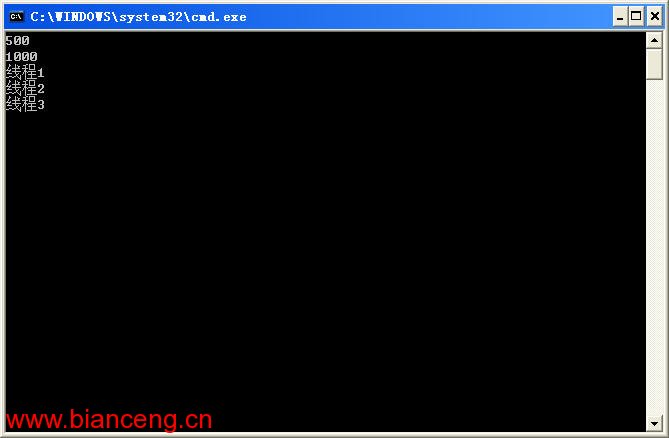
頻繁創建銷毀線程會消耗大量系統資源。線程池預先創建一組線程,任務到來時直接複用,大幅降低開銷。.NET 默認最大 500 工作線程 + 1000 I/O 線程(視 CPU 核心數與框架版本而定)。
private static void Execute(object state)
{
    Console.WriteLine(state);
}

static void Main()
{
    int workerThreads, completionPortThreads;
    ThreadPool.GetMaxThreads(out workerThreads, out completionPortThreads);
    Console.WriteLine($"工作線程上限: {workerThreads}");
    Console.WriteLine($"I/O 線程上限: {completionPortThreads}");

    ThreadPool.QueueUserWorkItem(Execute, "線程1");
    ThreadPool.QueueUserWorkItem(Execute, "線程2");
    ThreadPool.QueueUserWorkItem(Execute, "線程3");
    Console.ReadLine();
}
注意:線程池線程均為後台線程,主線程結束時會自動終止。
利用 TcpListener 監聽端口,每個客戶端請求派發給線程池處理:
class FileServer
{
    private String root;
    private Thread listenerThread;

    private void Worker(object state)
    {
        TcpClient client = state as TcpClient;
        try
        {
            client.ReceiveTimeout = 2000;
            Stream stream = client.GetStream();
            StreamReader sr = new StreamReader(stream);
            String line = sr.ReadLine(); // HTTP GET 請求行
            String[] array = line.Split(' ');
            String path = array[1].Replace('/', '\\');
            String filename = root + path;

            if (File.Exists(filename))
            {
                FileStream fs = new FileStream(filename, FileMode.Open, FileAccess.Read, FileShare.Read);
                byte[] buffer = new byte[8192];
                int count;
                String header = "HTTP/1.1 200 OK\r\n" +
                                "Content-Type:application/octet-stream\r\n" +
                                $"Content-Disposition:attachment;filename={Path.GetFileName(filename)}\r\n\r\n";
                byte[] headerBytes = Encoding.ASCII.GetBytes(header);
                stream.Write(headerBytes, 0, headerBytes.Length);
                while ((count = fs.Read(buffer, 0, buffer.Length)) > 0)
                {
                    stream.Write(buffer, 0, count);
                }
                Console.WriteLine($"{filename} 下載完成");
            }
            else
            {
                String resp = "HTTP/1.1 200 OK\r\nContent-Type:text/plain;charset=utf-8\r\n\r\n文件不存在";
                byte[] buf = Encoding.UTF8.GetBytes(resp);
                stream.Write(buf, 0, buf.Length);
            }
        }
        catch (Exception e)
        {
            Console.WriteLine(e.Message);
        }
        finally
        {
            client?.Close();
        }
    }

    private void Listener()
    {
        TcpListener listener = new TcpListener(1234);
        listener.Start();
        while (true)
        {
            TcpClient client = listener.AcceptTcpClient();
            client.ReceiveTimeout = 2000;
            ThreadPool.QueueUserWorkItem(Worker, client);
        }
    }

    public FileServer(String root) { this.root = root; }
    public void Start() { listenerThread = new Thread(Listener); listenerThread.Start(); }
}
FileServer fs = new FileServer(@"d:\download");
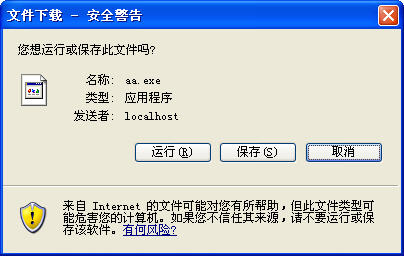
fs.Start(); // 瀏覽器訪問 https://localhost:1234/aa.exe