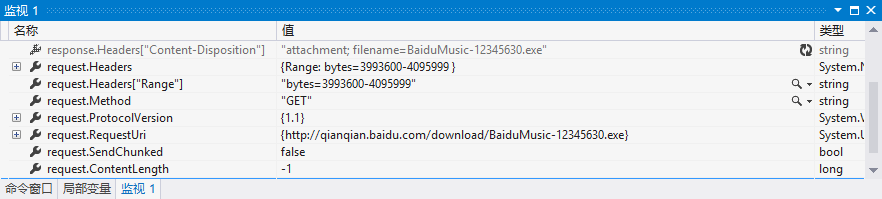
斷點續傳核心在於 HTTP/1.1 Range 標頭:客戶端告知伺服器「我要第 100-199 位元組」,伺服器回應 206 Partial Content 與 Content-Range。本文完整實作單執行緒斷點續傳下載器,含暫停/繼續、進度條、Request/Response 標頭檢視。
| 標頭 | 方向 | 格式範例 | 說明 |
|---|---|---|---|
Range | Request | bytes=100-199 | 請求指定位元組區間 |
Content-Range | Response | bytes 100-199/7421120 | 回應實際傳送區間與總長度 |
Accept-Ranges | Response | bytes | 伺服器宣告支援範圍請求 |
常見區間寫法:100-(第 100 到結尾)、-100(最後 100 位元組)、0-499,500-999(多區間,較少用)。
public class Downloader {
    private string _url;
    private long _totalSize, _currentSize, _step = 1024 * 1024; // 1MB 片段
    private FileStream _fs;
    private byte[] _buffer = new byte[4096];
    private bool _isFinished;

    public void Download() {
        long from = _currentSize;
        long to = _currentSize + _step - 1;
        if (to >= _totalSize && _totalSize > 0) to = _totalSize - 1;
        Download(from, to);
    }

    public void Download(long from, long to) {
        if (_totalSize == 0) GetTotalSize(); // HEAD 請求取得 Content-Length
        if (from >= _totalSize) { _isFinished = true; return; }

        var req = (HttpWebRequest)WebRequest.Create(_url);
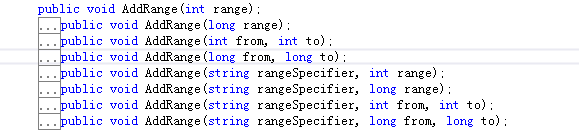
        req.AddRange("bytes", from, to); // 關鍵:設定 Range 標頭

        using (var resp = (HttpWebResponse)req.GetResponse()) {
            if (resp.StatusCode != HttpStatusCode.PartialContent &&
                resp.StatusCode != HttpStatusCode.OK) return;

            using (var stream = resp.GetResponseStream()) {
                int read, totalRead = 0;
                while ((read = stream.Read(_buffer, 0, _buffer.Length)) > 0) {
                    _fs.Write(_buffer, 0, read);
                    totalRead += read;
                }
                _currentSize += totalRead;
            }

            // 伺服器不支援 Range 會回 200 OK + 全檔案
            if (resp.Headers["Content-Range"] == null) _isFinished = true;
        }
    }

    private void GetTotalSize() {
        var req = (HttpWebRequest)WebRequest.Create(_url);
        req.Method = "HEAD";
        using (var resp = (HttpWebResponse)req.GetResponse())
            _totalSize = resp.ContentLength;
    }
}

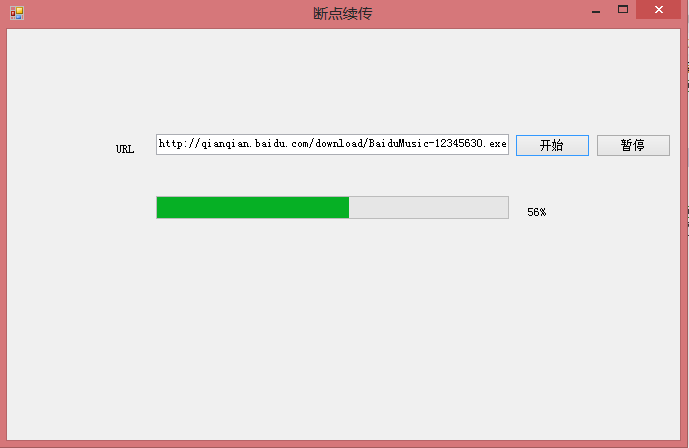
_totalSize 切分 N 區間,每區間啟動一個 Downloader 執行緒。_fs.Seek(from, SeekOrigin.Begin) 再寫入,或使用 FileStream 同步鎖。MD5/SHA256 確保完整性。HttpClient + HttpCompletionOption.ResponseHeadersRead 現代化 API(.NET Core 2.1+)。DownloadSample.rar 含 WinForms 完整專案、暫停/繼續按鈕、進度條綁定。
200 OK),導致重複下載。AddRange 的 from/to 為 **長整數**,大檔案(>2GB)務必用 long。WebException,記錄 _currentSize 供下次繼續。掌握 Range/Content-Range 與 HttpWebRequest.AddRange,即可打造專業級下載器。下一篇將探討非同步程式設計模式(APM/EAP/TAP)在下載器中的應用。