承接上章,FindDialog 完整實作原始碼與解析。
#include <QtGui>
#include "finddialog.h"

FindDialog::FindDialog(QWidget *parent) : QDialog(parent) {
    label = new QLabel(tr("Find &what:"));
    lineEdit = new QLineEdit;
    label->setBuddy(lineEdit);

    caseCheckBox = new QCheckBox(tr("Match &case"));
    backwardCheckBox = new QCheckBox(tr("Search &backward"));

    findButton = new QPushButton(tr("&Find"));
    findButton->setDefault(true);
    findButton->setEnabled(false);

    closeButton = new QPushButton(tr("Close"));

    connect(lineEdit, SIGNAL(textChanged(const QString&)), this, SLOT(enableFindButton(const QString&)));
    connect(findButton, SIGNAL(clicked()), this, SLOT(findClicked()));
    connect(closeButton, SIGNAL(clicked()), this, SLOT(close()));

    QHBoxLayout *topLeftLayout = new QHBoxLayout;
    topLeftLayout->addWidget(label);
    topLeftLayout->addWidget(lineEdit);

    QVBoxLayout *leftLayout = new QVBoxLayout;
    leftLayout->addLayout(topLeftLayout);
    leftLayout->addWidget(caseCheckBox);
    leftLayout->addWidget(backwardCheckBox);

    QVBoxLayout *rightLayout = new QVBoxLayout;
    rightLayout->addWidget(findButton);
    rightLayout->addWidget(closeButton);
    rightLayout->addStretch();

    QHBoxLayout *mainLayout = new QHBoxLayout;
    mainLayout->addLayout(leftLayout);
    mainLayout->addLayout(rightLayout);
    setLayout(mainLayout);

    setWindowTitle(tr("Find"));
    setFixedHeight(sizeHint().height());
}

void FindDialog::findClicked() {
    QString text = lineEdit->text();
    Qt::CaseSensitivity cs = caseCheckBox->isChecked() ? Qt::CaseInsensitive : Qt::CaseSensitive;
    if (backwardCheckBox->isChecked()) {
        emit findPrevious(text, cs);
    } else {
        emit findNext(text, cs);
    }
}

void FindDialog::enableFindButton(const QString &text) {
    findButton->setEnabled(!text.isEmpty());
}
#include <QtGui>:引入整個 QtGui 模組(開發期方便,正式專案建議精確引入)tr():QObject::tr() 國際化標記,含 Q_OBJECT 宏的類別自動擁有& 設定快捷鍵:&what → Alt+W,&Find → Alt+FsetBuddy():Label 獲得焦點時轉移給指定元件setDefault(true):Enter 鍵觸發該按鈕QHBoxLayout + QVBoxLayout + addStretch() 彈簧效果sizeHint() 取得建議尺寸,setFixedHeight() 固定高度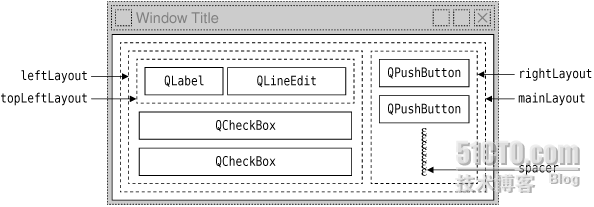
#include <QApplication>
#include "finddialog.h"

int main(int argc, char *argv[]) {
    QApplication app(argc, argv);
    FindDialog *dialog = new FindDialog;
    dialog->show();
    return app.exec();
}
雖無實質查找功能,但已掌握對話框建立完整流程與思路。