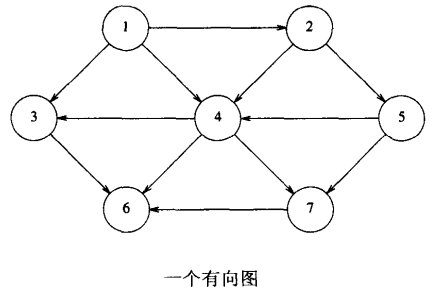
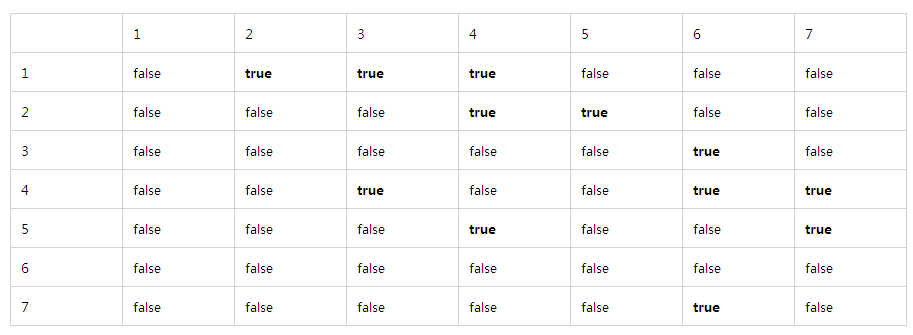
對於有向圖的一種簡單表示方法是使用二維陣列,稱為鄰接矩陣。
若為無向圖,對每條邊 (u, v),將二維陣列元素 arr[u][v] 設為 true;否則為 false。
若為有向圖,對每條邊 (u, v),將 arr[u][v] 設為該邊權重;否則設為極大或極小值(視具體情境)。
雖然鄰接矩陣簡單,但需要空間較大,適合稠密圖。
另一種方法是鄰接表,適合稀疏圖。
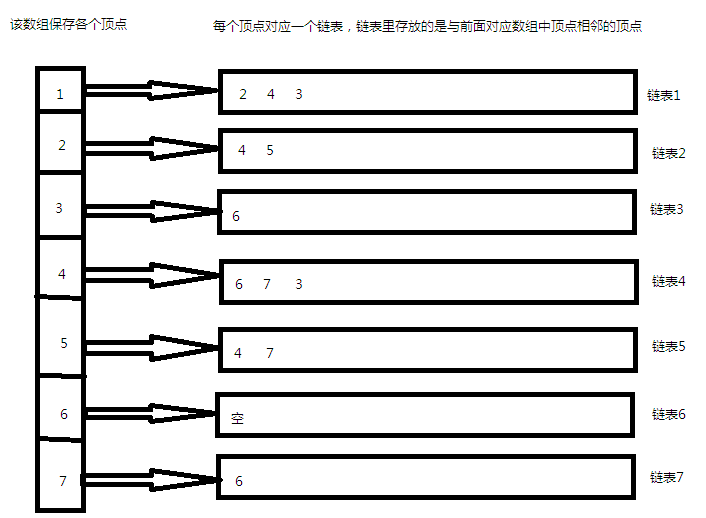
其實左邊陣列也可以不用,若有需要可加上保存各頂點資訊。一般實作根據右邊鏈結串列陣列順序即可知道每個頂點對應的鏈結串列。
// 圖節點資訊
typedef struct Node {
    int edge_num; // 邊號
    int src;      // 起點
    int vertex;   // 自身(終點)
    int weight;   // 邊權重
} Node;/*******************************************************
* 類別名稱:鄰接表圖
*******************************************************/
class Graph {
private:
int edge_num; // 圖邊數量
int vertex_num; // 圖頂點數
list* graph_list; // 鄰接表
public:
Graph() {}
Graph(char* graph[], int edgenum);
~Graph();
void print(); // 以鄰接表形式列印圖資訊
private:
vector get_graph_value(char* graph[], int columns); // 取得每條邊資料
void addEdge(char* graph[], int columns);
}; 檔案中資料格式如下:
0,0,1,1
1,0,2,2
2,0,3,1
第 1 欄為邊標號,第 2 欄為起點,第 3 欄為終點,第 4 欄為權重。
/****************************************************************
 * 函式名稱:read_file
 * 功能描述: 讀取檔案中的圖資料資訊
 * 參數列表: buff 將檔案讀取的圖資訊保存到 buff 指向的二維陣列
 *           spec 檔案中圖最大允許邊數
 *           filename 要開啟的圖檔案
 * 返回結果:實際讀取行數
 *****************************************************************/
int read_file(char** const buff, const unsigned int spec, const char* const filename) {
    FILE* fp = fopen(filename, "r");
    if (fp == NULL) {
        printf("Fail to open file %s, %s.\n", filename, strerror(errno));
        return 0;
    }
    printf("Open file %s OK.\n", filename);
    char line[MAX_LINE_LEN + 2];
    unsigned int cnt = 0;
    while ((cnt < spec) && !feof(fp)) {
        line[0] = 0;
        fgets(line, MAX_LINE_LEN + 2, fp);
        if (line[0] == 0) continue;
        buff[cnt] = (char*)malloc(MAX_LINE_LEN + 2);
        strncpy(buff[cnt], line, MAX_LINE_LEN + 2 - 1);
        buff[cnt][4001] = 0;
        cnt++;
    }
    fclose(fp);
    printf("There are %d lines in file %s.\n", cnt, filename);
    return cnt;
}/****************************************************************
* 函式名稱:release_buff
* 功能描述: 釋放剛才讀取的檔案中的圖資料資訊
* 參數列表: buff 指向檔案讀取的圖資訊
* valid_item_num 圖中邊數量
* 返回結果:void
*****************************************************************/
void release_buff(char** const buff, const int valid_item_num) {
for (int i = 0; i < valid_item_num; i++) free(buff[i]);
}int main(int argc, char* argv[]) {
char* topo[5000];
int edge_num;
char* topo_file = argv[1];
edge_num = read_file(topo, 5000, topo_file);
if (edge_num == 0) {
printf("Please input valid topo file.\n");
return -1;
}
Graph G(topo, edge_num); // 建立圖物件 G
G.print(); // 以鄰接表形式列印圖資訊
release_buff(topo, edge_num);
return 0;
}#ifndef GRAPH_H
#define GRAPH_H
#include
#include
#include
#include
#include
#include
#include
#include
#include
#include
using namespace std;
#define MAX_VERTEX_NUM 600
typedef struct Node {
int edge_num;
int src;
int vertex;
int weight;
} Node;
class Graph {
private:
int edge_num;
int vertex_num;
list* graph_list;
public:
Graph() {}
Graph(char* graph[], int edgenum);
~Graph();
void print();
private:
vector get_graph_value(char* graph[], int columns);
void addEdge(char* graph[], int columns);
};
/*************************************************
* 函式名稱:print
* 功能描述:將圖資訊以鄰接表形式輸出到標準輸出
* 參數列表:無
* 返回結果:無
*************************************************/
void Graph::print() {
cout << "******************************************************************" << endl;
for (int i = 0; i < vertex_num; ++i) {
if (graph_list[i].begin() != graph_list[i].end()) {
cout << i << "-->";
for (list::iterator it = graph_list[i].begin(); it != graph_list[i].end(); ++it) {
cout << (*it).vertex << "(邊號:" << (*it).edge_num << ",權重:" << (*it).weight << ")-->";
}
cout << "NULL" << endl;
}
}
cout << "******************************************************************" << endl;
}
/*************************************************
* 函式名稱:get_graph_value
* 功能描述:將圖每條邊資訊保存到陣列
* 參數列表: graph 指向圖資訊二維陣列, columns 圖第幾條邊
* 返回結果:包含邊資訊的向量
*************************************************/
vector Graph::get_graph_value(char* graph[], int columns) {
vector v;
char buff[20];
int i = 0, j = 0, val;
memset(buff, 0, 20);
while ((graph[columns][i] != '\n') && (graph[columns][i] != '\0')) {
if (graph[columns][i] != ',') {
buff[j] = graph[columns][i];
j++;
} else {
j = 0;
val = atoi(buff);
v.push_back(val);
memset(buff, 0, 20);
}
i++;
}
val = atoi(buff);
v.push_back(val);
return v;
}
/*************************************************
* 函式名稱:addEdge
* 功能描述:將圖每條邊資訊加入鄰接表
* 參數列表:graph 指向圖資訊二維陣列, columns 圖第幾條邊
* 返回結果:無
*************************************************/
void Graph::addEdge(char* graph[], int columns) {
Node node;
vector v = get_graph_value(graph, columns);
node.edge_num = v[0];
node.src = v[1];
node.vertex = v[2];
node.weight = v[3];
if (node.vertex > vertex_num) vertex_num = node.vertex;
// 考慮重複邊但權重不同
for (list::iterator it = graph_list[node.src].begin(); it != graph_list[node.src].end(); ++it) {
if ((*it).vertex == node.vertex) {
if ((*it).weight > node.weight) (*it).weight = node.weight;
return;
}
}
graph_list[node.src].push_back(node);
}
/*************************************************
* 函式名稱:建構函式
* 功能描述:以鄰接表形式保存圖資訊
* 參數列表:graph 指向圖資訊二維陣列, edgenum 圖邊數
* 返回結果:無
*************************************************/
Graph::Graph(char* graph[], int edgenum) {
edge_num = edgenum;
vertex_num = 0;
graph_list = new list[MAX_VERTEX_NUM + 1];
for (int i = 0; i < edgenum; ++i) addEdge(graph, i);
vertex_num++;
}
/*************************************************
* 函式名稱:解構函式
* 功能描述:釋放動態分配記憶體
* 參數列表:無
* 返回結果:無
*************************************************/
Graph::~Graph() {
delete[] graph_list;
}
#endif
#include
#include
#include
#include
#include
#include
#include
#include
#include
#include "graph.h"
#define MAX_LINE_LEN 4000

int read_file(char** const buff, const unsigned int spec, const char* const filename);
void release_buff(char** const buff, const int valid_item_num);

int main(int argc, char* argv[]) {
    char* topo[5000];
    int edge_num;
    char* topo_file = argv[1];
    edge_num = read_file(topo, 5000, topo_file);
    if (edge_num == 0) {
        printf("Please input valid topo file.\n");
        return -1;
    }
    Graph G(topo, edge_num);
    G.print();
    release_buff(topo, edge_num);
    return 0;
}
// read_file 和 release_buff 實作同上... 0,0,1,1
1,0,2,2
2,0,3,1
3,2,1,3
4,3,1,1
5,2,3,1
6,3,2,1
7,3,0,10,0,13,15
1,0,8,17
2,0,19,1
...(共 45 行)./testGraph ./case0/topo.csv
Open file ./case0/topo.csv OK.
There are 8 lines in file ./case0/topo.csv.
******************************************************************
0-->1(邊號:0,權重:1)-->2(邊號:1,權重:2)-->3(邊號:2,權重:1)-->NULL
2-->1(邊號:3,權重:3)-->3(邊號:5,權重:1)-->NULL
3-->1(邊號:4,權重:1)-->2(邊號:6,權重:1)-->0(邊號:7,權重:1)-->NULL
******************************************************************
./testGraph ./case1/topo.csv
Open file ./case1/topo.csv OK.
There are 45 lines in file ./case1/topo.csv.
******************************************************************
0-->13(邊號:0,權重:15)-->8(邊號:1,權重:17)-->19(邊號:2,權重:1)-->4(邊號:3,權重:8)-->NULL
1-->0(邊號:4,權重:4)-->NULL
2-->9(邊號:5,權重:19)-->15(邊號:6,權重:8)-->3(邊號:36,權重:20)-->NULL
...(完整輸出見原文)
******************************************************************輸出結果每行第一欄為各頂點標號。例如:
0-->13(邊號:0,權重:15)-->8(邊號:1,權重:17)-->19(邊號:2,權重:1)-->4(邊號:3,權重:8)-->NULL
表示頂點 0 到 13 邊號 0 權重 15,到 8 邊號 1 權重 17,到 19 邊號 2 權重 1,到 4 邊號 3 權重 8。