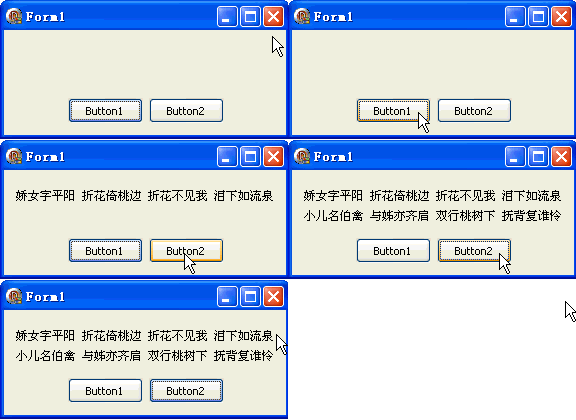
GDI+ 文字輸出核心是 DrawString 方法與 TGPFont 字體物件。本文示範兩種建立字體的方式:直接指定名稱/大小與從 VCL Canvas 借用字體屬性。
procedure TForm1.Button1Click(Sender: TObject);
var g: TGPGraphics; sb: TGPSolidBrush; font: TGPFont;
begin
  g := TGPGraphics.Create(Canvas.Handle);
  sb := TGPSolidBrush.Create(aclBlack);
  font := TGPFont.Create('宋體', 9);  {字體名 + 點大小}
  g.DrawString('嬌女字平陽 折花倚桃邊 折花不見我 淚下如流泉', -1, font, MakePoint(10.0, 20), sb);
  font.Free; sb.Free; g.Free;
end;
procedure TForm1.Button2Click(Sender: TObject);
var g: TGPGraphics; sb: TGPSolidBrush; font: TGPFont;
begin
  g := TGPGraphics.Create(Canvas.Handle);
  sb := TGPSolidBrush.Create(aclBlack);
  Canvas.Font.Name := '宋體';
  Canvas.Font.Size := 9;
  font := TGPFont.Create(Canvas.Handle);  {從 DC 借用}
  g.DrawString('小兒名伯禽 與姊亦齊肩 雙行桃樹下 撫背復誰憐', -1, font, MakePoint(10.0, 40), sb);
  font.Free; sb.Free; g.Free;
end;
| 特性 | 直接建立 | Canvas 借用 |
|---|---|---|
| 字體屬性完整度 | 完整控制 | 可能遺失顏色、字符集等 |
| 跨平台一致性 | 高 | 依賴 VCL Canvas 狀態 |
| 程式碼簡潔度 | 簡潔 | 需先設定 Canvas.Font |
| 動態字體切換 | 容易 | 需同步 Canvas.Font |
object Form1: TForm1
  Left = 0
  Top = 0
  Caption = 'Form1'
  ClientHeight = 105
  ClientWidth = 282
  Color = clBtnFace
  Font.Charset = DEFAULT_CHARSET
  Font.Color = clWindowText
  Font.Height = -11
  Font.Name = 'Tahoma'
  Font.Style = []
  OldCreateOrder = False
  Position = poDesktopCenter
  PixelsPerInch = 96
  TextHeight = 13
  object Button1: TButton ... {直接建立}
  object Button2: TButton ... {Canvas 借用}
end