TDIB.Greyscale 將彩色影像轉為灰階,並支援色階數壓縮(量化),可產生從平滑灰階到極少色階的藝術效果。本文提供四種色階數對比範例。
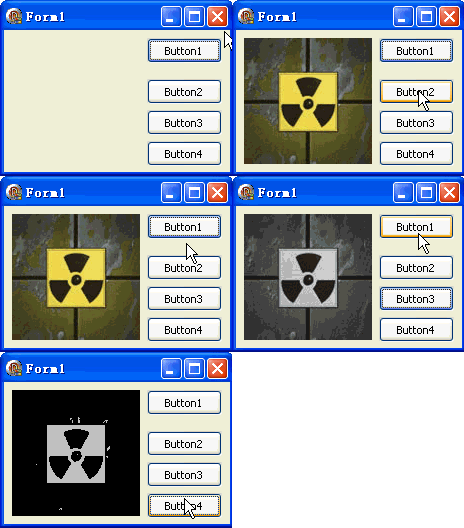
unit Unit1;
interface
uses Windows, Messages, SysUtils, Variants, Classes, Graphics, Controls, Forms,
  Dialogs, DIB, StdCtrls;
type
  TForm1 = class(TForm)
    DXPaintBox1: TDXPaintBox;
    Button1: TButton; // 載入圖片
    Button2: TButton; // 32 階灰階
    Button3: TButton; // 4 階灰階
    Button4: TButton; // 2 階(黑白)灰階
    procedure Button1Click(Sender: TObject);
    procedure Button2Click(Sender: TObject);
    procedure Button3Click(Sender: TObject);
    procedure Button4Click(Sender: TObject);
  end;
var Form1: TForm1;
implementation {$R *.dfm}

procedure TForm1.Button1Click(Sender: TObject);
const ImgPath1 = 'C:\Temp\DX.jpg';
begin
  DXPaintBox1.DIB.LoadFromFile(ImgPath1);
  DXPaintBox1.Width := DXPaintBox1.DIB.Width;
  DXPaintBox1.Height := DXPaintBox1.DIB.Height;
  DXPaintBox1.Repaint;
end;

procedure TForm1.Button2Click(Sender: TObject);
begin
  // Greyscale(Levels: Integer)
  DXPaintBox1.DIB.Greyscale(32);
  DXPaintBox1.Repaint;
end;

procedure TForm1.Button3Click(Sender: TObject);
begin
  DXPaintBox1.DIB.Greyscale(4);
  DXPaintBox1.Repaint;
end;

procedure TForm1.Button4Click(Sender: TObject);
begin
  DXPaintBox1.DIB.Greyscale(1);
  DXPaintBox1.Repaint;
end;
end.
| Levels | 色階數 | 視覺效果 | 應用 |
|---|---|---|---|
| 256 | 256 | 平滑灰階 | 標準黑白照片 |
| 64 | 64 | 輕微階梯感 | 漫畫網點預處理 |
| 32 | 32 | 明顯色帶 | 海報化、藝術效果 |
| 16 | 16 | 強烈色帶 | 復古遊戲畫面 |
| 4 | 4 | 僅 4 階調 | 極簡風格、圖示化 |
| 2 | 2 | 純黑白(無灰) | 閾值二值化、OCR 前置 |
| 1 | 1 | 全白/全黑 | 特效遮罩 |
Gray = 0.299*R + 0.587*G + 0.114*B(ITU-R BT.601)Quantized = Round(Gray / 255 * (Levels-1)) * (255 / (Levels-1))單純量化會產生色帶。Floyd-Steinberg 抖動可在低色階下保留更多細節:
procedure GreyscaleDithered(DIB: TDIB; Levels: Integer);
var x, y: Integer; c: TRGBQuad; gray, quant, err: Integer;
    errR, errG, errB: array of array of Integer;
begin
  SetLength(errR, DIB.Width, DIB.Height); // 簡化:僅灰階誤差
  for y := 0 to DIB.Height - 1 do
    for x := 0 to DIB.Width - 1 do begin
      c := DIB.Pixels[x, y];
      gray := Round(0.299*c.rgbRed + 0.587*c.rgbGreen + 0.114*c.rgbBlue) + errR[x, y];
      quant := Round(gray / 255 * (Levels-1)) * (255 / (Levels-1));
      err := gray - quant;
      // 擴散到右、下、左下、右下
      if x+1 < DIB.Width then errR[x+1, y] := errR[x+1, y] + Round(err * 7/16);
      if y+1 < DIB.Height then begin
        if x-1 >= 0 then errR[x-1, y+1] := errR[x-1, y+1] + Round(err * 3/16);
        errR[x, y+1] := errR[x, y+1] + Round(err * 5/16);
        if x+1 < DIB.Width then errR[x+1, y+1] := errR[x+1, y+1] + Round(err * 1/16);
      end;
      c.rgbRed := quant; c.rgbGreen := quant; c.rgbBlue := quant;
      DIB.Pixels[x, y] := c;
    end;
end;