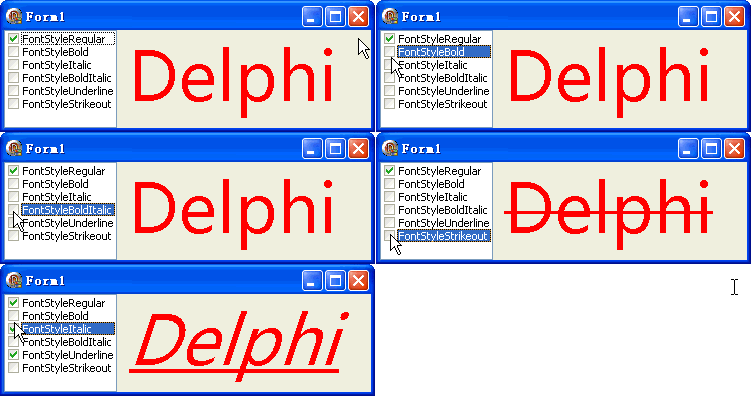
TGPFont 的 FontStyle 參數支援位元組合,六種基本樣式可任意疊加。本文提供 CheckListBox 即時勾選組合,展示「微軟雅黑」50pt 的複合樣式效果。
| 常數 | 數值 | 二進位 | 效果 |
|---|---|---|---|
| FontStyleRegular | 0 | 000000 | 普通(基準) |
| FontStyleBold | 1 | 000001 | 加粗 |
| FontStyleItalic | 2 | 000010 | 傾斜 |
| FontStyleBoldItalic | 3 | 000011 | 加粗+傾斜(預設組合) |
| FontStyleUnderline | 4 | 000100 | 下劃線 |
| FontStyleStrikeout | 8 | 001000 | 刪除線 |
var fs: Integer;

procedure TForm1.CheckListBox1Click(Sender: TObject);
const
  fsArr: array[0..5] of Integer = (
    FontStyleRegular, FontStyleBold, FontStyleItalic,
    FontStyleBoldItalic, FontStyleUnderline, FontStyleStrikeout);
var i: Integer;
begin
  fs := 0;
  for i := 0 to CheckListBox1.Items.Count - 1 do
    if CheckListBox1.Checked[i] then
      fs := fs or fsArr[i];  {位元或運算組合}
  Repaint;
end;

procedure TForm1.FormPaint(Sender: TObject);
var g: TGPGraphics; sb: TGPSolidBrush; font: TGPFont;
begin
  g := TGPGraphics.Create(Canvas.Handle);
  sb := TGPSolidBrush.Create(aclRed);
  font := TGPFont.Create('微軟雅黑', 50, fs);  {fs 為組合後的樣式}
  g.DrawString('Delphi', -1, font, MakePoint(CheckListBox1.Width + 0.0, 0), sb);
  font.Free; sb.Free; g.Free;
end;
| 組合 | 數值 | 用途 |
|---|---|---|
| Bold + Underline | 5 | 標題強調 |
| Italic + Underline | 6 | 引用、書名 |
| Bold + Strikeout | 9 | 已完成任務、舊價格 |
| Bold + Italic + Underline | 7 | 超級強調 |
| 全開 | 15 | 測試/特效 |
object Form1: TForm1
  Left = 0
  Top = 0
  Caption = 'Form1'
  ClientHeight = 98
  ClientWidth = 367
  Color = clBtnFace
  Font.Charset = DEFAULT_CHARSET
  Font.Color = clWindowText
  Font.Height = -11
  Font.Name = 'Tahoma'
  Font.Style = []
  OldCreateOrder = False
  Position = poDesktopCenter
  OnCreate = FormCreate
  OnPaint = FormPaint
  PixelsPerInch = 96
  TextHeight = 13
  object CheckListBox1: TCheckListBox ... {左側六項樣式}
end