GDI+ 文字輸出不限於純色,DrawString 接受任意 TGPBrush 衍生類別。本文對比四種筆刷填充文字效果:實心、陰影、紋理、線性漸層。
| 筆刷類型 | 建立方式 | 視覺效果 | 適用場景 |
|---|---|---|---|
| 實心畫刷 | TGPSolidBrush.Create(color) | 單一純色 | 標準 UI 文字 |
| 陰影畫刷 | TGPHatchBrush.Create(style, fore, back) | 規則圖案填充 | 強調標題、列印優化 |
| 紋理畫刷 | TGPTextureBrush.Create(image) | 圖片平鋪/拉伸填充 | 藝術字、材質文字 |
| 線性漸層 | TGPLinearGradientBrush.Create(pt1, pt2, c1, c2) | 兩色線性過渡 | 現代 UI、標題強調 |
procedure TForm1.FormPaint(Sender: TObject);
var
  g: TGPGraphics;
  font: TGPFont;
  img: TGPImage;
  b: TGPBrush;
begin
  g := TGPGraphics.Create(Canvas.Handle);
  img := TGPImage.Create('c:\temp\small.jpg');  {需存在圖片檔}
  case RadioGroup1.ItemIndex of
    0: b := TGPSolidBrush.Create(aclRed);
    1: b := TGPHatchBrush.Create(HatchStyleCross, aclSilver, aclRed);
    2: b := TGPTextureBrush.Create(img);
    3: b := TGPLinearGradientBrush.Create(
      MakePoint(0,0),
      MakePoint(ClientWidth - RadioGroup1.Width, ClientHeight),
      aclYellow, aclRed);
  end;
  font := TGPFont.Create('Arial Black', 60, FontStyleBold);
  g.DrawString('Delphi', -1, font, MakePoint(0.0, 0), b);
  img.Free; b.Free; font.Free; g.Free;
end;
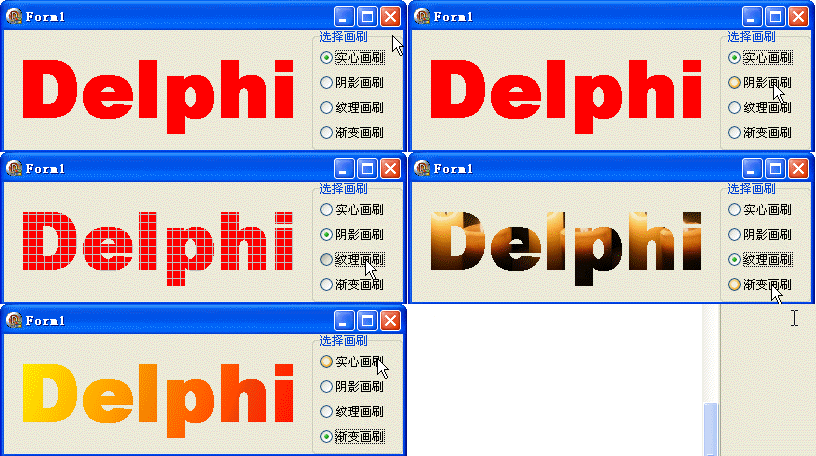
WrapModeTile 平鋪,可用 SetWrapMode 改為 Clamp/FlipHatchStyle 可選,HatchStyleCross 為十字交叉object Form1: TForm1
Left = 0
Top = 0
Caption = 'Form1'
ClientHeight = 120
ClientWidth = 399
Color = clBtnFace
Font.Charset = DEFAULT_CHARSET
Font.Color = clWindowText
Font.Height = -11
Font.Name = 'Tahoma'
Font.Style = []
OldCreateOrder = False
Position = poDesktopCenter
OnCreate = FormCreate
OnPaint = FormPaint
PixelsPerInch = 96
TextHeight = 13
object RadioGroup1: TRadioGroup ... {右側四項筆刷類型}
end