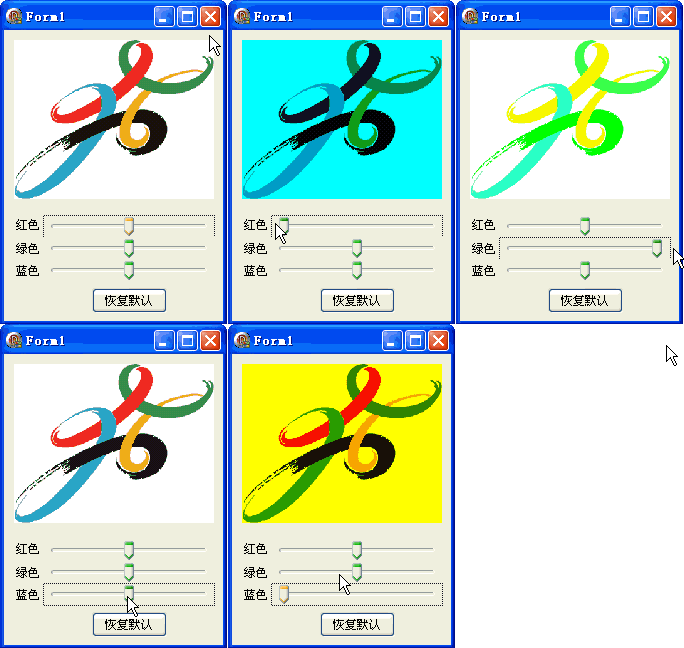
利用 TColorMatrix 第 5 行 (索引 4) 的平移分量,獨立調整紅、綠、藍三色通道的亮度偏移。
ColorMatrix: TColorMatrix = (
  (1.0, 0.0, 0.0, 0.0, 0.0), { R' = 1*R + 0*G + 0*B + 0*A + tR }
  (0.0, 1.0, 0.0, 0.0, 0.0), { G' = 0*R + 1*G + 0*B + 0*A + tG }
  (0.0, 0.0, 1.0, 0.0, 0.0), { B' = 0*R + 0*G + 1*B + 0*A + tB }
  (0.0, 0.0, 0.0, 1.0, 0.0), { A' = 0*R + 0*G + 0*B + 1*A + tA }
  (0.0, 0.0, 0.0, 0.0, 1.0)  { W  = 1 (齊次座標) }
);
| 矩陣位置 | 影響通道 | TrackBar 對應 | 數值範圍 |
|---|---|---|---|
ColorMatrix[4,0] | 紅色偏移 | TrackBar1 | -1.0 ~ +1.0 (-100~100) |
ColorMatrix[4,1] | 綠色偏移 | TrackBar2 | -1.0 ~ +1.0 |
ColorMatrix[4,2] | 藍色偏移 | TrackBar3 | -1.0 ~ +1.0 |
var img: TGPImage; { 表單層級持有,Create/Free 管理 }

procedure TForm1.FormCreate(Sender: TObject);
begin
  img := TGPImage.Create('c:\temp\test.png'); { 專用色彩測試圖 }
  { 三個 TrackBar: Min=-100, Max=100, Position=0 }
  DoubleBuffered := True;
end;

procedure TForm1.FormPaint(Sender: TObject);
var g: TGPGraphics; ImageAttributes: TGPImageAttributes;
begin
  g := TGPGraphics.Create(Canvas.Handle);
  ImageAttributes := TGPImageAttributes.Create;
  ColorMatrix[4,0] := TrackBar1.Position / 100; { -1.0 到 1.0 }
  ColorMatrix[4,1] := TrackBar2.Position / 100;
  ColorMatrix[4,2] := TrackBar3.Position / 100;
  ImageAttributes.SetColorMatrix(ColorMatrix);
  g.DrawImage(img, MakeRect(10, 10, img.GetWidth, img.GetHeight), 0, 0, img.GetWidth, img.GetHeight, UnitPixel, ImageAttributes);
  ImageAttributes.Free; g.Free;
end;

procedure TForm1.Button1Click(Sender: TObject); { 重設按鈕 }
begin TrackBar1.Position := 0; TrackBar2.Position := 0; TrackBar3.Position := 0; Repaint; end;
R' = R + tR
G' = G + tG
B' = B + tB
{ tR/tG/tB 為 -1.0 到 1.0,對應 -255 到 +255 亮度偏移 }

{ 齊次座標系統:第五行平移分量實現加法偏移 }
此技術利用仿射變換中的平移分量,以極低運算成本實現通道級亮度獨立控制,是即時圖像處理的高效手段。