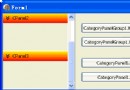
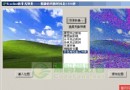
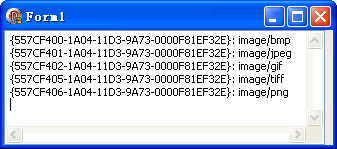
透過 TColorMatrix 實現 RGB 三通道兩兩繞第三通道旋轉,同時驗證 GDI+ 原生支援 PNG/GIF/TIF 透明圖片顯示。
ColorMatrix: TColorMatrix = (
  (Cos(r), Sin(r), 0.0, 0.0, 0.0),
  (-Sin(r), Cos(r), 0.0, 0.0, 0.0),
  (0.0, 0.0, 1.0, 0.0, 0.0),
  (0.0, 0.0, 0.0, 1.0, 0.0),
  (0.0, 0.0, 0.0, 0.0, 1.0)
);
ColorMatrix: TColorMatrix = (
  (1.0, 0.0, 0.0, 0.0, 0.0),
  (0.0, Cos(r), Sin(r), 0.0, 0.0),
  (0.0, -Sin(r), Cos(r), 0.0, 0.0),
  (0.0, 0.0, 0.0, 1.0, 0.0),
  (0.0, 0.0, 0.0, 0.0, 1.0)
);
ColorMatrix: TColorMatrix = (
  (Cos(r), 0.0, Sin(r), 0.0, 0.0),
  (-Sin(r), 0.0, Cos(r), 0.0, 0.0),
  (0.0, 0.0, 1.0, 0.0, 0.0),
  (0.0, 0.0, 0.0, 1.0, 0.0),
  (0.0, 0.0, 0.0, 0.0, 1.0)
);
unit Unit1;

interface
uses Windows, Messages, SysUtils, Variants, Classes, Graphics, Controls, Forms, Dialogs, StdCtrls, ComCtrls, ExtCtrls;

type TForm1 = class(TForm)
  TrackBar1: TTrackBar;
  RadioGroup1: TRadioGroup;
  procedure FormCreate(Sender: TObject);
  procedure FormPaint(Sender: TObject);
  procedure CheckBox1Click(Sender: TObject);
  procedure TrackBar1Change(Sender: TObject);
  procedure RadioGroup1Click(Sender: TObject);
end;

var Form1: TForm1;

implementation
{$R *.dfm}
uses GDIPOBJ, GDIPAPI;

const Matrix: TColorMatrix = ( ... ); { 單位矩陣 }

procedure TForm1.FormCreate(Sender: TObject);
begin
  TrackBar1.Height := 23;
  TrackBar1.ShowSelRange := False;
  TrackBar1.Min := -180;
  TrackBar1.Max := 180;
  TrackBar1.Position := 0;
  with RadioGroup1.Items do
  begin
    Add('紅色與綠色繞藍色旋轉');
    Add('紅色與藍色繞綠色旋轉');
    Add('綠色與藍色繞紅色旋轉');
  end;
  RadioGroup1.ItemIndex := 0;
  DoubleBuffered := True;
end;

procedure TForm1.FormPaint(Sender: TObject);
var g: TGPGraphics; img: TGPImage; ImageAttributes: TGPImageAttributes; r: Single; ColorMatrix: TColorMatrix;
begin
  g := TGPGraphics.Create(Canvas.Handle);
  img := TGPImage.Create('c:\temp\test.png');
  ImageAttributes := TGPImageAttributes.Create;
  r := TrackBar1.Position * pi / 180; { 角度轉弧度 }
  ColorMatrix := Matrix; { 重置為單位矩陣 }
  case RadioGroup1.ItemIndex of
    0: { 紅綠繞藍 } begin ColorMatrix[0,0] := Cos(r); ColorMatrix[0,1] := Sin(r); ColorMatrix[1,0] := -Sin(r); ColorMatrix[1,1] := Cos(r); end;
    1: { 紅藍繞綠 } begin ColorMatrix[0,0] := Cos(r); ColorMatrix[0,2] := Sin(r); ColorMatrix[2,0] := -Sin(r); ColorMatrix[2,2] := Cos(r); end;
    2: { 綠藍繞紅 } begin ColorMatrix[1,1] := Cos(r); ColorMatrix[1,2] := Sin(r); ColorMatrix[2,1] := -Sin(r); ColorMatrix[2,2] := Cos(r); end;
  end;
  ImageAttributes.SetColorMatrix(ColorMatrix);
  g.DrawImage(img, MakeRect(4, 4, img.GetWidth, img.GetHeight), 0, 0, img.GetWidth, img.GetHeight, UnitPixel, ImageAttributes);
  ImageAttributes.Free; img.Free; g.Free;
end;

procedure TForm1.RadioGroup1Click(Sender: TObject); begin Repaint; end;
procedure TForm1.TrackBar1Change(Sender: TObject); begin Repaint; end;
procedure TForm1.CheckBox1Click(Sender: TObject); begin Repaint; end;
end.
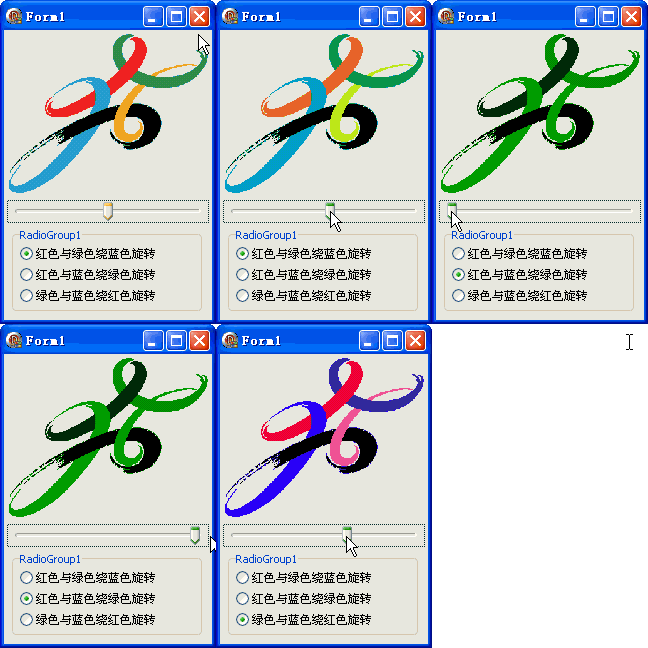
TColorMatrix 為 5x5 矩陣,前 3x3 控制 RGB 線性變換[cos -sin; sin cos] 放置於對應通道位置TGPImageAttributes.SetColorMatrix 套用至繪圖管線TrackBar 控制角度 (-180°~180°),即時重繪此範例展示了 GDI+ 強大的色彩空間線性代數操作能力,可應用於圖像特效、色彩校正、藝術濾鏡等領域。