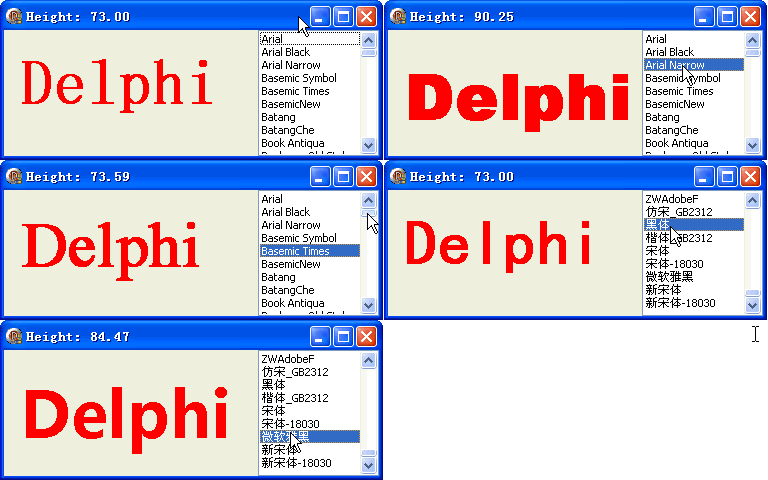
TGPFontFamily 封裝字體家族資訊。本文示範如何列舉系統安裝字體(排除 @ 開頭的垂直字體),透過 ListBox 即時切換預覽,並顯示字體實際繪製高度。
var FontName: string = '宋體';

procedure TForm1.FormCreate(Sender: TObject);
var str: string;
begin
  ListBox1.Align := alRight;
  for str in Screen.Fonts do
    if str[1] <> '@' then  {排除垂直字體}
      ListBox1.Items.Add(str);
end;

procedure TForm1.FormPaint(Sender: TObject);
var
  g: TGPGraphics;
  b: TGPBrush;
  font: TGPFont;
  fontFamily: TGPFontFamily;
begin
  g := TGPGraphics.Create(Canvas.Handle);
  b := TGPSolidBrush.Create(aclRed);
  fontFamily := TGPFontFamily.Create(FontName);
  font := TGPFont.Create(fontFamily, 48, FontStyleBold);
  g.DrawString('Delphi', -1, font, MakePoint(5.0, 20.0), b);
  Caption := Format('Height: %.2f', [font.GetHeight(g)]);  {顯示實際像素高度}
  fontFamily.Free; font.Free; b.Free; g.Free;
end;

procedure TForm1.ListBox1Click(Sender: TObject);
begin
  FontName := ListBox1.Items[ListBox1.ItemIndex];
  Repaint;
end;
TGPInstalledFontCollection 更純粹(見第 43 篇)object Form1: TForm1
Left = 0
Top = 0
Caption = 'Form1'
ClientHeight = 126
ClientWidth = 375
Color = clBtnFace
Font.Charset = DEFAULT_CHARSET
Font.Color = clWindowText
Font.Height = -11
Font.Name = 'Tahoma'
Font.Style = []
OldCreateOrder = False
Position = poDesktopCenter
OnCreate = FormCreate
OnPaint = FormPaint
PixelsPerInch = 96
TextHeight = 13
object ListBox1: TListBox ... {右側字體列表}
end