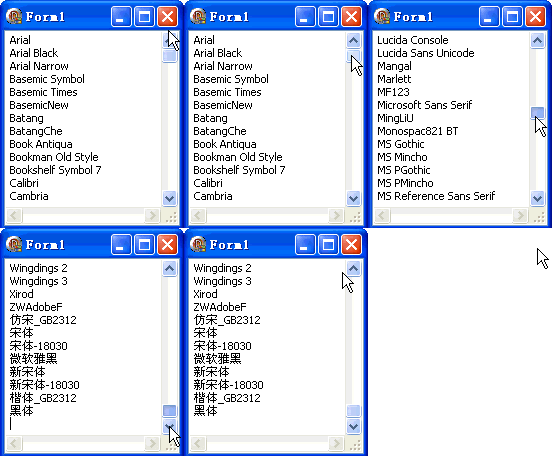
TGPInstalledFontCollection 是 GDI+ 官方提供的專業字體列舉類別,直接從系統字體資料庫讀取,不包含垂直字體,適合專業排版應用。本文示範完整列舉流程並輸出至 Memo。
fonts := TGPInstalledFontCollection.CreatefontCount := fonts.GetFamilyCountTGPFontFamily 陣列fonts.GetFamilies(count, arr, actualCount) 批量填充GetFamilyName 取得名稱TGPFontFamily 及 fontsprocedure TForm1.FormCreate(Sender: TObject);
var
fontFamilyArr: array of TGPFontFamily;
fonts: TGPFontCollection;
fontCount: Integer;
str: string;
i: Integer;
begin
fonts := TGPInstalledFontCollection.Create;
fontCount := fonts.GetFamilyCount;
SetLength(fontFamilyArr, fontCount);
for i := 0 to fontCount - 1 do fontFamilyArr[i] := TGPFontFamily.Create;
fonts.GetFamilies(fontCount, fontFamilyArr, fontCount);
Memo1.Clear;
for i := 0 to fontCount - 1 do begin
fontFamilyArr[i].GetFamilyName(str);
Memo1.Lines.Add(str);
end;
for i := 0 to fontCount - 1 do fontFamilyArr[i].Free;
fonts.Free;
end;
| 特性 | TGPInstalledFontCollection | Screen.Fonts |
|---|---|---|
| 來源 | GDI+ 字體引擎直接讀取 | VCL 封裝 EnumFontFamiliesEx |
| 垂直字體 | 自動過濾 | 包含 @ 開頭垂直字體 |
| 字體家族物件 | 直接產出 TGPFontFamily | 需手動建立 |
| 效能 | 批量 GetFamilies 較快 | 逐個字串處理 |
| 適用場景 | 專業排版、字體管理工具 | 一般應用、快速原型 |
object Form1: TForm1
  Left = 0
  Top = 0
  Caption = 'Form1'
  ClientHeight = 196
  ClientWidth = 176
  Color = clBtnFace
  Font.Charset = DEFAULT_CHARSET
  Font.Color = clWindowText
  Font.Height = -11
  Font.Name = 'Tahoma'
  Font.Style = []
  OldCreateOrder = False
  Position = poDesktopCenter
  OnCreate = FormCreate
  PixelsPerInch = 96
  TextHeight = 13
  object Memo1: TMemo ... {AlClient 顯示字體清單}
end