TGPFont 建構子接受 TUnit 參數指定字號單位。GDI+ 支援七種度量單位,從像素到毫米,滿足螢幕顯示、列印輸出、文檔排版等多樣需求。
| Delphi 常數 | 微軟常數 | 定義 | 典型用途 |
|---|---|---|---|
| UnitWorld | World | 世界座標單位(自定義) | 向量圖形、CAD |
| UnitDisplay | Display | 顯示設備單位(螢幕像素/印表機 1/100 吋) | 裝置無關繪圖 |
| UnitPixel | Pixel | 設備像素(預設) | 螢幕 UI、遊戲 |
| UnitPoint | Point | 印刷點(1/72 吋) | 傳統排版、CSS pt |
| UnitInch | Inch | 英吋 | 實體尺寸設計 |
| UnitDocument | Document | 文檔單位(1/300 吋) | 高解析列印 |
| UnitMillimeter | Millimeter | 毫米 | 公制設計、工程圖 |
procedure TForm1.FormPaint(Sender: TObject);
var
  g: TGPGraphics;
  b: TGPBrush;
  font: TGPFont;
begin
  g := TGPGraphics.Create(Canvas.Handle);
  b := TGPSolidBrush.Create(aclDarkOrange);
  font := TGPFont.Create('Arial Black',
    TrackBar1.Position,
    FontStyleBoldItalic,
    TUnit(RadioGroup1.ItemIndex)  {關鍵:指定字號單位}
  );
  g.DrawString('Delphi', -1, font, MakePoint(5.0, 5), b);
  b.Free; font.Free; g.Free;
end;
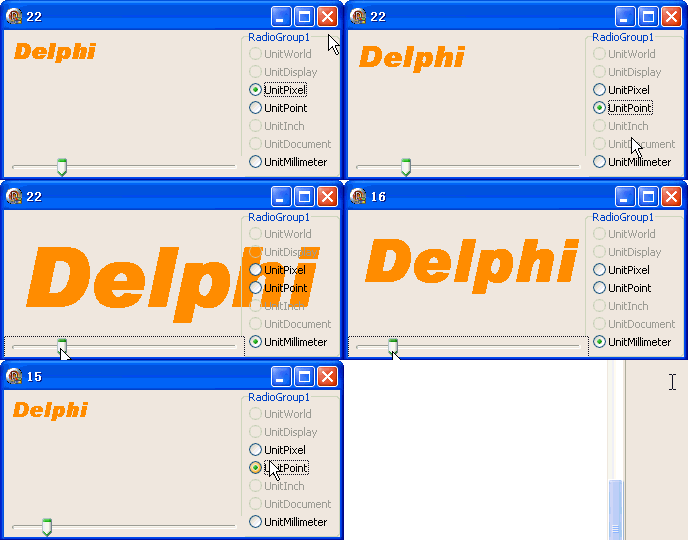
Graphics.SetTransform 實現任意縮放座標系object Form1: TForm1
Left = 0
Top = 0
Caption = 'Form1'
ClientHeight = 147
ClientWidth = 336
Color = clBtnFace
Font.Charset = DEFAULT_CHARSET
Font.Color = clWindowText
Font.Height = -11
Font.Name = 'Tahoma'
Font.Style = []
OldCreateOrder = False
Position = poDesktopCenter
OnCreate = FormCreate
OnPaint = FormPaint
PixelsPerInch = 96
TextHeight = 13
object RadioGroup1: TRadioGroup ... {右側單位選擇}
object TrackBar1: TTrackBar ... {底部字號滑桿}
end