TGPGraphics.SetTextRenderingHint 控制文字光柵化品質。本文提供六種模式即時切換對比,從系統預設到 ClearType 最高品質,幫助開發者在效能與視覺品質間取得最佳平衡。
| 索引 | Delphi 列舉 | 微軟列舉 | 技術特點 | 品質 | 速度 |
|---|---|---|---|---|---|
| 0 | TextRenderingHintSystemDefault | SystemDefault | 跟隨系統字體平滑設定 | 視系統而定 | 快 |
| 1 | TextRenderingHintSingleBitPerPixelGridFit | SingleBitPerPixelGridFit | 單位素位圖 + 網格適配(無抗鋸齒) | 低 | 最快 |
| 2 | TextRenderingHintSingleBitPerPixel | SingleBitPerPixel | 單位素位圖(無提示、無抗鋸齒) | 最低 | 極快 |
| 3 | TextRenderingHintAntiAliasGridFit | AntiAliasGridFit | 抗鋸齒 + 網格適配(推薦通用) | 高 | 中 |
| 4 | TextRenderingHintAntiAlias | AntiAlias | 抗鋸齒(無提示,主幹寬度可能不均) | 中高 | 中 |
| 5 | TextRenderingHintClearTypeGridFit | ClearTypeGridFit | ClearType 次像素渲染 + 提示(最高品質) | 最高 | 較慢 |
繪製大號 "@" 字符(150pt Arial Black),放大觀察邊緣品質差異。
procedure TForm1.FormPaint(Sender: TObject);
var
  g: TGPGraphics;
  b: TGPBrush;
  font: TGPFont;
begin
  g := TGPGraphics.Create(Canvas.Handle);
  b := TGPSolidBrush.Create(aclRed);
  font := TGPFont.Create('Arial Black', 150);
  g.SetTextRenderingHint(TTextRenderingHint(ComboBox1.ItemIndex));
  g.DrawString('@', -1, font, MakePoint(0.0, -40.0), b);
  font.Free; b.Free; g.Free;
end;
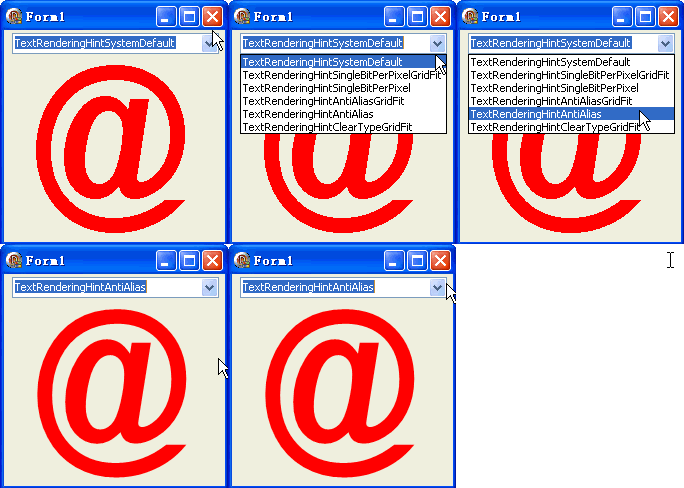
ClearTypeGridFit (5) - 標準最高品質AntiAliasGridFit (3) - 相容性最佳平衡SingleBitPerPixelGridFit (1) - 銳利像素感SystemDefault (0) - 交由系統決定SingleBitPerPixel (2)、AntiAlias (4) 缺乏提示,主幹寬度不穩文字渲染提示不受 SetSmoothingMode 影響,兩者獨立控制幾何圖形與文字品質。
object Form1: TForm1
  Left = 0
  Top = 0
  Caption = 'Form1'
  ClientHeight = 212
  ClientWidth = 221
  Color = clBtnFace
  Font.Charset = DEFAULT_CHARSET
  Font.Color = clWindowText
  Font.Height = -11
  Font.Name = 'Tahoma'
  Font.Style = []
  OldCreateOrder = False
  Position = poDesktopCenter
  OnCreate = FormCreate
  OnPaint = FormPaint
  PixelsPerInch = 96
  TextHeight = 13
  object ComboBox1: TComboBox ... {六個模式項目}
end