TGPStringFormat 是 GDI+ 文字排版的核心控制類別。本文延續上篇,深入探討格式旗標與雙軸對齊的組合效果,提供三組 RadioGroup 即時切換:水平對齊、垂直對齊、格式旗標。
| Delphi | 微軟 | 水平含義 | 垂直含義 |
|---|---|---|---|
| StringAlignmentNear | Near | 靠左 / 靠近原點 | 靠上 / 靠近原點 |
| StringAlignmentCenter | Center | 置中 | 置中 |
| StringAlignmentFar | Far | 靠右 / 遠離原點 | 靠下 / 遠離原點 |
| Delphi 常數 | 微軟常數 | 功能說明 |
|---|---|---|
| StringFormatFlagsDirectionRightToLeft | DirectionRightToLeft | 右到左閱讀順序(阿拉伯文/希伯來文) |
| StringFormatFlagsDirectionVertical | DirectionVertical | 垂直排版(日文/中文直排) |
| StringFormatFlagsNoFitBlackBox | NoFitBlackBox | 允許字符超出版面矩形(預設裁剪) |
| StringFormatFlagsDisplayFormatControl | DisplayFormatControl | 顯示控制字符(如 LRM/RLM 標記) |
| StringFormatFlagsNoFontFallback | NoFontFallback | 缺字不回退替換字體,顯示缺字符號 |
| StringFormatFlagsMeasureTrailingSpaces | MeasureTrailingSpaces | 測量包含行尾空格 |
| StringFormatFlagsNoWrap | NoWrap | 禁用自動換行(單行模式) |
| StringFormatFlagsLineLimit | LineLimit | 僅顯示完整行,截斷部分行 |
| StringFormatFlagsNoClip | NoClip | 允許超出版面矩形繪製(預設裁剪) |
procedure TForm1.PaintBox1Paint(Sender: TObject);
var
  g: TGPGraphics;
  b: TGPBrush;
  font: TGPFont;
  sf: TGPStringFormat;
  rect: TGPRectF;
begin
  g := TGPGraphics.Create(PaintBox1.Canvas.Handle);
  b := TGPSolidBrush.Create($FF000000);
  g.SetTextRenderingHint(TextRenderingHintAntiAlias);
  font := TGPFont.Create('Arial Black', 22);
  sf := TGPStringFormat.Create;
  sf.SetFormatFlags(StringFormatFlagsNoClip);  {基礎旗標}
  sf.SetAlignment(TStringAlignment(RadioGroup1.ItemIndex));
  sf.SetLineAlignment(TStringAlignment(RadioGroup2.ItemIndex));
  sf.SetFormatFlags(sfFlag);  {RadioGroup3 選中的旗標}
  rect := MakeRect(0, 0, PaintBox1.ClientWidth, PaintBox1.ClientHeight);
  g.DrawString('Delphi', -1, font, rect, sf, b);
  sf.Free; font.Free; b.Free; g.Free;
end;
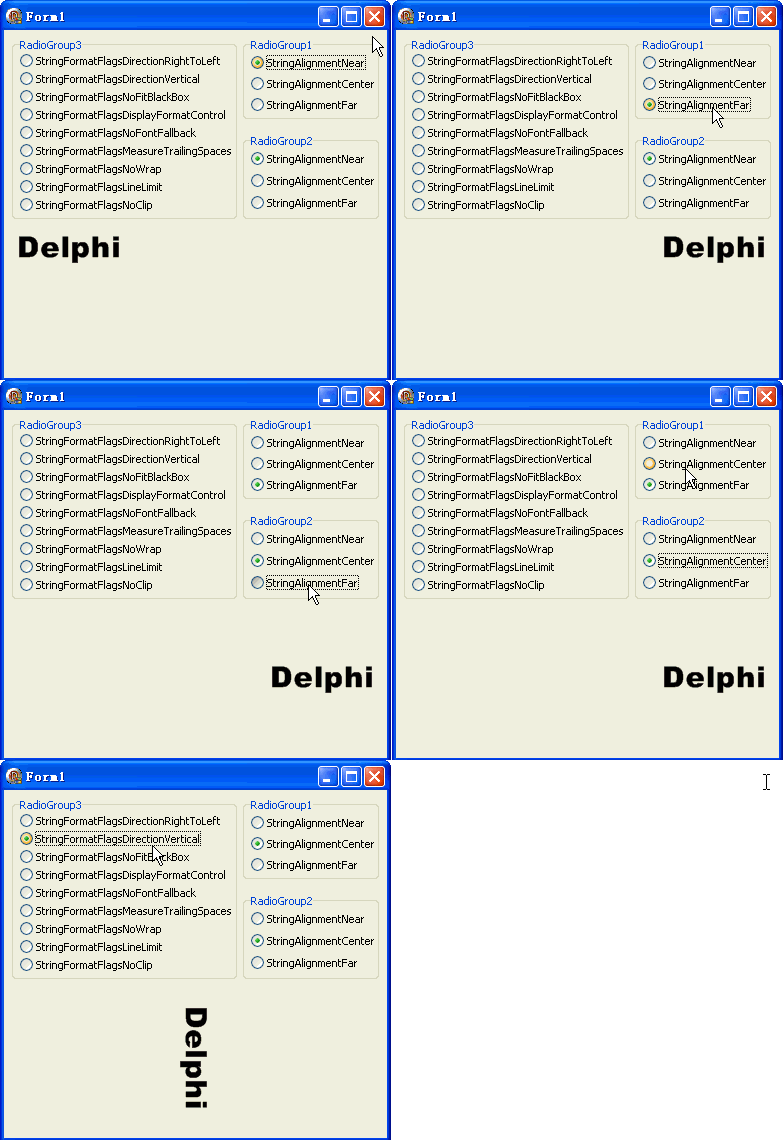
NoWrap + LineLimit + NoClipDirectionVertical + Center/CenterDirectionRightToLeft + Far/NearNoFitBlackBox + 關閉抗鋸齒NoClip(避免字符被意外裁剪)object Form1: TForm1
Left = 0
Top = 0
Caption = 'Form1'
ClientHeight = 348
ClientWidth = 383
Color = clBtnFace
Font.Charset = DEFAULT_CHARSET
Font.Color = clWindowText
Font.Height = -11
Font.Name = 'Tahoma'
Font.Style = []
OldCreateOrder = False
Position = poDesktopCenter
OnCreate = FormCreate
PixelsPerInch = 96
TextHeight = 13
object PaintBox1: TPaintBox ... {繪圖區}
object RadioGroup1: TRadioGroup ... {水平對齊}
object RadioGroup2: TRadioGroup ... {垂直對齊}
object RadioGroup3: TRadioGroup ... {9 項旗標}
end