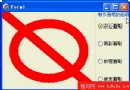
GDI+ 路徑(TGPGraphicsPath)是向量圖形的核心容器。本文展示最基礎的三步驟:建立路徑 → 添加圖形 → 填充/描邊繪製,包含直線、矩形、橢圓三種基本圖元的混合路徑。
path := TGPGraphicsPath.Create - 建立空路徑path.AddLine / AddRectangle / AddEllipse ... - 累加幾何圖元g.FillPath(brush, path) / g.DrawPath(pen, path) - 填充與/或描邊procedure TForm1.FormPaint(Sender: TObject);
var
g: TGPGraphics;
path: TGPGraphicsPath;
p: TGPPen;
b: TGPBrush;
begin
g := TGPGraphics.Create(Canvas.Handle);
path := TGPGraphicsPath.Create;
{添加三種基本圖元:同中心、同尺寸}
path.AddLine(10, 10, 110, 110); {對角線}
path.AddRectangle(MakeRect(10, 10, 100, 100)); {矩形}
path.AddEllipse(MakeRect(10, 10, 100, 100)); {橢圓}
p := TGPPen.Create(aclRed);
b := TGPSolidBrush.Create(aclYellow);
g.FillPath(b, path); {黃色填充}
g.DrawPath(p, path); {紅色描邊}
b.Free; p.Free; path.Free; g.Free;
end;
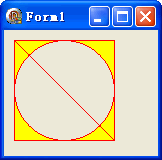
| 方法 | 參數 | 說明 |
|---|---|---|
| AddLine | x1,y1,x2,y2 或 Point 結構 | 直線段 |
| AddLines | 點陣列 | 連續折線 |
| AddRectangle | TGPRect | 矩形(自動閉合) |
| AddRectangles | 矩形陣列 | 多個矩形 |
| AddEllipse | TGPRect | 橢圓/圓(自動閉合) |
| AddArc | 矩形+起始角+掃過角 | 橢圓弧 |
| AddPie | 矩形+起始角+掃過角 | 扇形(含中心線) |
| AddPolygon | 點陣列 | 多邊形(自動閉合) |
| AddBezier | 4 點 | 三次貝塞爾曲線 |
| AddString | 字串+字體+版面矩形 | 文字輪廓路徑 |
object Form1: TForm1
  Left = 0
  Top = 0
  Caption = 'Form1'
  ClientHeight = 179
  ClientWidth = 243
  Color = clBtnFace
  Font.Charset = DEFAULT_CHARSET
  Font.Color = clWindowText
  Font.Height = -11
  Font.Name = 'Tahoma'
  Font.Style = []
  OldCreateOrder = False
  Position = poDesktopCenter
  OnPaint = FormPaint
  PixelsPerInch = 96
  TextHeight = 13
end