路徑漸層筆刷的中心點決定漸層輻射的原點位置。SetCenterPoint 允許將中心點移動至任意座標(甚至路徑外部),配合滑鼠拖曳可實現直觀的漸層中心控制介面。
TGPPointF,座標為世界座標系按下滑鼠記錄位置 → 移動時更新中心點 → 釋放停止更新,全程即時重繪。
var
  rect: TGPRect;
  pt: TGPPoint;      {目前中心點}
  pb: TGPPathGradientBrush;

procedure TForm1.FormCreate(Sender: TObject);
var
  path: TGPGraphicsPath;
  ColorSurround: TGPColor;
  num: Integer;
begin
  rect := MakeRect(10, 10, ClientWidth-20, ClientHeight-20);
  path := TGPGraphicsPath.Create;
  path.AddEllipse(rect);
  pb := TGPPathGradientBrush.Create(path);
  pb.SetCenterColor(aclLime);
  pb.GetCenterPoint(pt);  {取得預設中心點}
  ColorSurround := aclBlack;
  num := 1;
  pb.SetSurroundColors(@ColorSurround, num);
  path.Free;
  DoubleBuffered := True;
end;

procedure TForm1.FormMouseDown(Sender: TObject; ...);
begin
  pt.X := X; pt.Y := Y; Repaint;
end;

procedure TForm1.FormPaint(Sender: TObject);
var
  g: TGPGraphics;
  p: TGPPen;
begin
  g := TGPGraphics.Create(Canvas.Handle);
  p := TGPPen.Create(aclRed);
  g.FillEllipse(pb, rect);
  pb.SetCenterPoint(pt);  {套用新中心點}
  g.DrawRectangle(p, pt.X-3, pt.Y-3, 6, 6);  {標示中心點位置}
  p.Free; g.Free;
end;
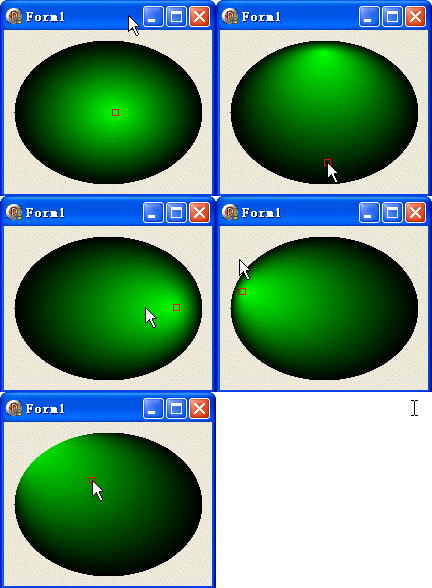
| 中心點位置 | 視覺效果 | 應用場景 |
|---|---|---|
| 幾何中心 | 對稱輻射漸層 | 標準按鈕、面板背景 |
| 偏向邊緣 | 單側亮、對側暗 | 按鈕按下狀態、3D 凸起感 |
| 路徑外部 | 類似方向光照射 | 日光、舞台燈光模擬 |
| 動態移動 | 跟隨滑鼠/焦點 | 互動式 UI 回饋、遊戲光標 |
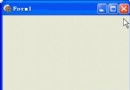
object Form1: TForm1
  Left = 0
  Top = 0
  Caption = 'Form1'
  ClientHeight = 164
  ClientWidth = 208
  Color = clBtnFace
  Font.Charset = DEFAULT_CHARSET
  Font.Color = clWindowText
  Font.Height = -11
  Font.Name = 'Tahoma'
  Font.Style = []
  OldCreateOrder = False
  Position = poDesktopCenter
  OnCreate = FormCreate
  OnDestroy = FormDestroy
  OnMouseDown = FormMouseDown
  OnMouseUp = FormMouseUp
  OnPaint = FormPaint
  PixelsPerInch = 96
  TextHeight = 13
end