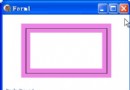
SetFocusScales 是路徑漸層筆刷獨有的強大功能,允許獨立控制焦點區域(中心純色範圍)的水平與垂直縮放比例。配合滑鼠拖曳中心點,可實現即時互動的聚光燈、光暈效果。
procedure SetFocusScales(xScale, yScale: Single);  {0.0 ~ 1.0}
procedure GetFocusScales(var xScale, yScale: Single);
var
  rect: TGPRect;
  pb: TGPPathGradientBrush;  {全域保持筆刷狀態}

procedure TForm1.FormCreate(Sender: TObject);
var
  path: TGPGraphicsPath;
  ColorSurround: TGPColor;
  num: Integer;
begin
  rect := MakeRect(10, 10, ClientWidth-40, ClientHeight-40);
  path := TGPGraphicsPath.Create;
  path.AddEllipse(rect);
  pb := TGPPathGradientBrush.Create(path);
  pb.SetCenterColor(aclLime);
  ColorSurround := aclBlack;
  num := 1;
  pb.SetSurroundColors(@ColorSurround, num);
  path.Free;
  DoubleBuffered := True;
  TrackBar1.Max := 100; TrackBar1.Position := 100;
  TrackBar2.Max := 100; TrackBar2.Position := 100;
end;

procedure TForm1.FormPaint(Sender: TObject);
var
  g: TGPGraphics;
  p: TGPPen;
  x, y: Single;
begin
  g := TGPGraphics.Create(Canvas.Handle);
  p := TGPPen.Create(aclRed);
  g.FillEllipse(pb, rect);
  pb.SetCenterPoint(MakePoint(rect.X + rect.Width div 2, rect.Y + rect.Height div 2));
  {套用焦點縮放}
  pb.SetFocusScales(TrackBar1.Position / 100, TrackBar2.Position / 100);
  {讀回驗證}
  pb.GetFocusScales(x, y);
  Caption := Format('FocusScales: %.2f, %.2f', [x, y]);
  p.Free; g.Free;
end;

procedure TForm1.FormMouseDown(Sender: TObject; ...);
begin
  pt.X := X; pt.Y := Y; Repaint;
end;
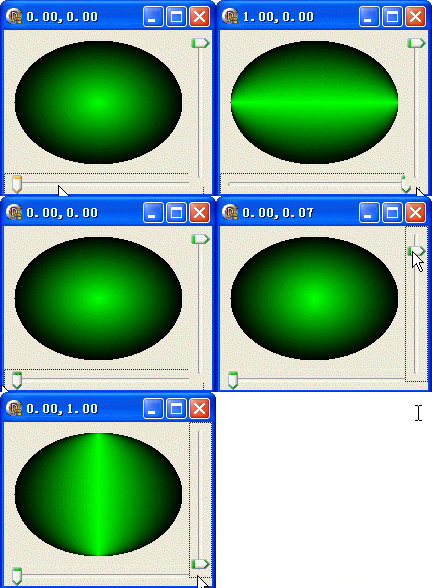
object Form1: TForm1
  Left = 0
  Top = 0
  Caption = 'Form1'
  ClientHeight = 164
  ClientWidth = 208
  Color = clBtnFace
  Font.Charset = DEFAULT_CHARSET
  Font.Color = clWindowText
  Font.Height = -11
  Font.Name = 'Tahoma'
  Font.Style = []
  OldCreateOrder = False
  Position = poDesktopCenter
  OnCreate = FormCreate
  OnDestroy = FormDestroy
  OnPaint = FormPaint
  PixelsPerInch = 96
  TextHeight = 13
  object TrackBar1: TTrackBar ... {水平 + 垂直兩個 TrackBar}
end