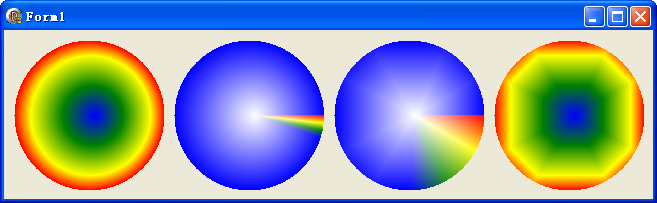
路徑漸層筆刷提供兩種設定顏色的方法:SetSurroundColors 與 SetInterpolationColors。雖然都能建立漸層,但運作機制、適用場景、參數需求截然不同。本文透過四連畫面並排比較,徹底釐清兩者差異。
| 特性 | SetSurroundColors | SetInterpolationColors |
|---|---|---|
| 參數結構 | 顏色陣列 + 個數 | 顏色陣列 + 位置陣列 + 個數 |
| 位置控制 | 自動平均分佈(無法自訂) | 精確指定每個顏色的相對位置 (0.0~1.0) |
| 中心色處理 | 預設白色,可用 SetCenterColor 修改 | 不使用中心色,直接由插值定義整個漸層 |
| 路徑建立方式影響 | 受路徑點數與順序影響大 | 僅受路徑形狀影響,不受點數影響 |
| 適用場景 | 簡單均勻漸層、多邊形頂點對應顏色 | 精細漸層控制、非線性色彩變化、複雜路徑 |
程式在單一視窗中並排繪製四種情境:
procedure TForm1.FormPaint(Sender: TObject);
const
  colors: array[0..3] of TGPColor = (aclRed, aclYellow, aclGreen, aclBlue);
  pos: array[0..3] of Single = (0.0, 0.2, 0.6, 1.0);  {兩端必須為 0 和 1}
var
  g: TGPGraphics;
  path: TGPGraphicsPath;
  pb: TGPPathGradientBrush;
  num: Integer;
  pts: array of TGPPoint;
begin
  g := TGPGraphics.Create(Canvas.Handle);
  path := TGPGraphicsPath.Create;

  {第 1 組:橢圓路徑 + SetInterpolationColors}
  path.AddEllipse(MakeRect(10,10,150,150));
  pb := TGPPathGradientBrush.Create(path);
  pb.SetInterpolationColors(@colors, @pos, Length(pos));
  g.FillPath(pb, path);

  {第 2 組:同路徑 + SetSurroundColors}
  pb.Free;
  pb := TGPPathGradientBrush.Create(path);
  num := Length(pos);
  pb.SetSurroundColors(@colors, num);
  g.TranslateTransform(160, 0);
  g.FillPath(pb, path);

  {第 3 組:提取路徑點建立 + SetSurroundColors}
  SetLength(pts, path.GetPointCount);
  path.GetPathPoints(PGPPoint(pts), Length(pts));
  pb.Free;
  pb := TGPPathGradientBrush.Create(PGPPoint(pts), Length(pts));
  pb.SetCenterColor(aclWhite);  {此模式必須設定中心色}
  num := Length(colors);
  pb.SetSurroundColors(@colors, num);
  g.TranslateTransform(160, 0);
  g.FillPath(pb, path);

  {第 4 組:提取路徑點建立 + SetInterpolationColors}
  pb.Free;
  pb := TGPPathGradientBrush.Create(PGPPoint(pts), Length(pts));
  pb.SetInterpolationColors(@colors, @pos, Length(pos));
  g.TranslateTransform(160, 0);
  g.FillPath(pb, path);

  {清理資源}
  pb.Free; path.Free; g.Free;
end;
object Form1: TForm1
  Left = 0
  Top = 0
  Caption = 'Form1'
  ClientHeight = 169
  ClientWidth = 649
  Color = clBtnFace
  Font.Charset = DEFAULT_CHARSET
  Font.Color = clWindowText
  Font.Height = -11
  Font.Name = 'Tahoma'
  Font.Style = []
  OldCreateOrder = False
  Position = poDesktopCenter
  OnPaint = FormPaint
  PixelsPerInch = 96
  TextHeight = 13
end