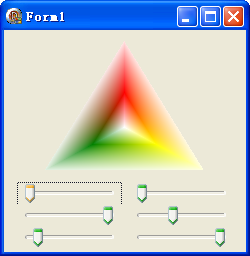
SetBlend 方法提供了對路徑漸層筆刷最精細的顏色混合控制,允許開發者為每個環繞顏色指定混合因子與位置。本文透過六個軌條條即時調整三組顏色的混合參數,展示如何打造客製化漸層效果。
procedure SetBlend(blendFactors, positions: PSingle; count: Integer);
SetSurroundColors 設定的顏色數一致| 軌條 | 控制參數 | 對應顏色索引 | 範圍 |
|---|---|---|---|
| TrackBar1 | blendFactors[0] | 紅色 (aclRed) | 0.0~1.0 |
| TrackBar2 | blendFactors[1] | 綠色 (aclGreen) | 0.0~1.0 |
| TrackBar3 | blendFactors[2] | 黃色 (aclYellow) | 0.0~1.0 |
| TrackBar4 | positions[0] | 紅色位置 | 0.0~1.0 |
| TrackBar5 | positions[1] | 綠色位置 | 0.0~1.0 |
| TrackBar6 | positions[2] | 黃色位置 | 0.0~1.0 |
procedure TForm1.FormPaint(Sender: TObject);
const
  pts: array[0..2] of TGPPoint = ((X:120; Y:10), (X:40; Y:140), (X:200; Y:140));
  colors: array[0..2] of TGPColor = (aclRed, aclGreen, aclYellow);
var
  g: TGPGraphics;
  path: TGPGraphicsPath;
  pb: TGPPathGradientBrush;
  blendFactors: array[0..2] of Single;
  pos: array[0..2] of Single;
  num: Integer;
begin
  g := TGPGraphics.Create(Canvas.Handle);
  path := TGPGraphicsPath.Create;
  path.AddPolygon(PGPPoint(@pts), Length(pts));
  pb := TGPPathGradientBrush.Create(path);
  num := Length(colors);
  pb.SetSurroundColors(@colors, num);  {必須先設定環繞顏色}

  {從軌條讀取參數}
  blendFactors[0] := TrackBar1.Position / 10;
  blendFactors[1] := TrackBar2.Position / 10;
  blendFactors[2] := TrackBar3.Position / 10;
  pos[0] := TrackBar4.Position / 10;
  pos[1] := TrackBar5.Position / 10;
  pos[2] := TrackBar6.Position / 10;

  {套用混合設定}
  pb.SetBlend(@blendFactors, PSingle(@pos), Length(blendFactors));

  g.FillPath(pb, path);
  pb.Free; path.Free; g.Free;
end;
SetSurroundColors 定義顏色陣列,SetBlend 才會生效positions 陣列數值必須遞增(0.0 到 1.0),否則結果不可預期object Form1: TForm1
Left = 0
Top = 0
Caption = 'Form1'
ClientHeight = 222
ClientWidth = 242
Color = clBtnFace
Font.Charset = DEFAULT_CHARSET
Font.Color = clWindowText
Font.Height = -11
Font.Name = 'Tahoma'
Font.Style = []
OldCreateOrder = False
Position = poDesktopCenter
OnCreate = FormCreate
OnPaint = FormPaint
PixelsPerInch = 96
TextHeight = 13
object TrackBar1: TTrackBar ... {六個 TrackBar 定義略}
end
StrToInt 一行搞定,無需自寫函數
Delphi 視窗與控件截圖實作教學(七):建立目標選取視窗
Delphi 繪圖功能 [6] - Polygon 與 Polyline (2) - 多邊形與折線繪製
Delphi 內嵌組合語言:8/16/32 位寄存器關係圖解
DevExpress TcxGrid 動態建立 Image Column 完整範例 (OnGetGraphicClass + Stream 資料綁定)