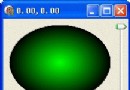
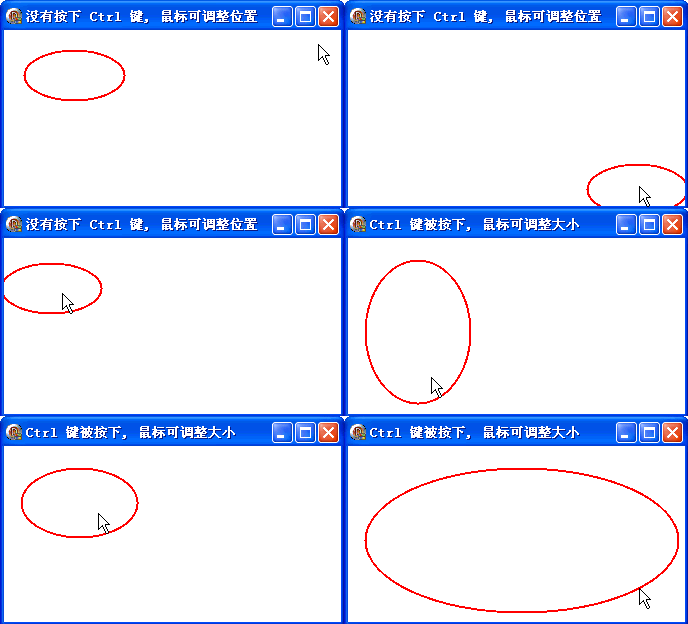
DrawEllipse 在指定矩形邊界內繪製橢圓。本範例示範完整的滑鼠互動邏輯:左鍵拖曳移動橢圓位置,Ctrl+左鍵拖曳調整寬高,實現基本的圖形編輯器操作模式。
OnMouseDown:記錄起始滑鼠座標,進入拖曳狀態OnMouseMove:根據 ssCtrl 判斷移動模式或縮放模式,累加偏移量並 RepaintOnMouseUp:結束拖曳狀態OnPaint:套用累積偏移量繪製橢圓unit Unit1;
interface
uses
Windows, Messages, SysUtils, Variants, Classes, Graphics, Controls, Forms,
Dialogs;
type
TForm1 = class(TForm)
procedure FormPaint(Sender: TObject);
procedure FormCreate(Sender: TObject);
procedure FormDestroy(Sender: TObject);
procedure FormMouseDown(Sender: TObject; Button: TMouseButton;
Shift: TShiftState; X, Y: Integer);
procedure FormMouseMove(Sender: TObject; Shift: TShiftState; X, Y: Integer);
procedure FormMouseUp(Sender: TObject; Button: TMouseButton;
Shift: TShiftState; X, Y: Integer);
end;
var
Form1: TForm1;
implementation
{$R *.dfm}
uses GDIPOBJ, GDIPAPI;
var
x: Integer = 20;
y: Integer = 20;
w: Integer = 100;
h: Integer = 50;
f: Byte;
a, b: Integer;
p: TGPPen;
procedure TForm1.FormCreate(Sender: TObject);
begin
p := TGPPen.Create(MakeColor(255, 0, 0), 2);
end;
procedure TForm1.FormDestroy(Sender: TObject);
begin
p.Free;
end;
procedure TForm1.FormMouseDown(Sender: TObject; Button: TMouseButton;
Shift: TShiftState; X, Y: Integer);
begin
f := 1;
a := X;
b := Y;
end;
procedure TForm1.FormMouseMove(Sender: TObject; Shift: TShiftState; X, Y: Integer);
begin
if (f = 0) then Exit;
if ssCtrl in Shift then
begin
f := 2;
Text := 'Ctrl 鍵被按下,滑鼠可調整大小';
end
else
Text := '沒有按下 Ctrl 鍵,滑鼠可調整位置';
a := X - a;
b := Y - b;
Repaint;
a := X;
b := Y;
end;
procedure TForm1.FormMouseUp(Sender: TObject; Button: TMouseButton;
Shift: TShiftState; X, Y: Integer);
begin
f := 0;
end;
procedure TForm1.FormPaint(Sender: TObject);
var
g: TGPGraphics;
begin
g := TGPGraphics.Create(Canvas.Handle);
g.Clear(MakeColor(255, 255, 255));
case f of
1: begin Inc(x, a); Inc(y, b); end; { 移動模式 }
2: begin Inc(w, a); Inc(h, b); end; { 縮放模式 }
end;
g.DrawEllipse(p, x, y, w, h);
g.Free;
end;
end.
object Form1: TForm1
  Left = 0
  Top = 0
  Caption = 'Form1'
  ClientHeight = 176
  ClientWidth = 337
  Color = clBtnFace
  Font.Charset = DEFAULT_CHARSET
  Font.Color = clWindowText
  Font.Height = -11
  Font.Name = 'Tahoma'
  Font.Style = []
  OldCreateOrder = False
  Position = poDesktopCenter
  OnCreate = FormCreate
  OnDestroy = FormDestroy
  OnMouseDown = FormMouseDown
  OnMouseMove = FormMouseMove
  OnMouseUp = FormMouseUp
  OnPaint = FormPaint
  PixelsPerInch = 96
  TextHeight = 13
end
TGPPen 在 FormCreate 建立、FormDestroy 釋放,避免重複建構開銷Canvas.DrawFocusRect 或直接 Repaint 回饋