DrawArc 繪製橢圓邊界上的弧段,不連接圓心。參數與 DrawPie 相同,但僅繪製弧線本身,適合繪製圓弧、儀表盤刻度、進度環等。
g.DrawArc(p, x, y, w, h, startAngle, sweepAngle);
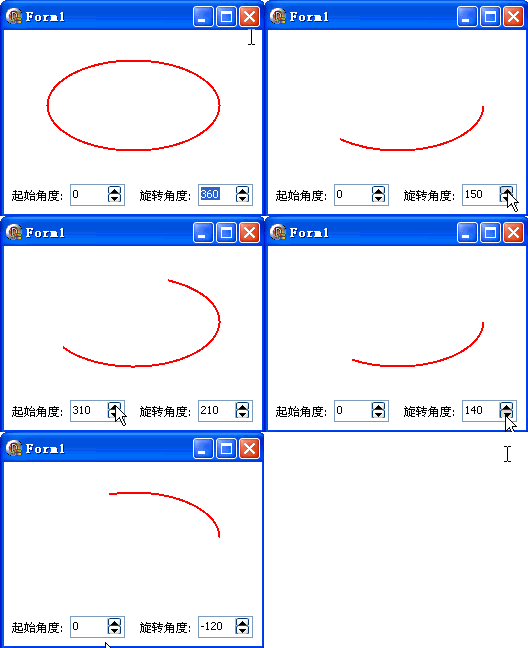
x, y, w, h:外接矩形startAngle:起始角度 (度),X 軸正方向為 0°sweepAngle:掃掠角度 (度),順時針為正兩 SpinEdit 控制起始/掃掠角度 (0-360°,步進 10°):
unit Unit1;

interface

uses
  Windows, Messages, SysUtils, Variants, Classes, Graphics, Controls, Forms,
  Dialogs, StdCtrls, Spin, ExtCtrls;

type
  TForm1 = class(TForm)
    Panel1: TPanel;
    Label1: TLabel;
    Label2: TLabel;
    SpinEdit1: TSpinEdit;
    SpinEdit2: TSpinEdit;
    procedure FormCreate(Sender: TObject);
    procedure FormPaint(Sender: TObject);
  end;

var
  Form1: TForm1;

implementation

{$R *.dfm}
uses GDIPOBJ, GDIPAPI;

var
  a1, a2: Integer;

procedure TForm1.FormCreate(Sender: TObject);
begin
  a1 := 0;
  a2 := 360;
  SpinEdit1.Text := IntToStr(a1);
  SpinEdit2.Text := IntToStr(a2);
  SpinEdit1.Increment := 10;
  SpinEdit2.Increment := 10;
  SpinEdit1.OnChange := FormPaint;
  SpinEdit2.OnChange := FormPaint;
end;

procedure TForm1.FormPaint(Sender: TObject);
var
  g: TGPGraphics;
  p: TGPPen;
  x, y, w, h: Integer;
begin
  g := TGPGraphics.Create(Canvas.Handle);
  p := TGPPen.Create(aclRed, 2);
  g.Clear(aclWhite);
  x := ClientWidth div 6;
  y := ClientHeight div 6;
  w := x * 4;
  h := y * 3;
  a1 := StrToIntDef(SpinEdit1.Text, 0);
  a2 := StrToIntDef(SpinEdit2.Text, 360);
  g.DrawArc(p, x, y, w, h, a1, a2);
  g.Free;
  p.Free;
end;

end.
object Form1: TForm1
  Left = 0
  Top = 0
  Caption = 'Form1'
  ClientHeight = 184
  ClientWidth = 258
  Color = clBtnFace
  Font.Charset = DEFAULT_CHARSET
  Font.Color = clWindowText
  Font.Height = -11
  Font.Name = 'Tahoma'
  Font.Style = []
  OldCreateOrder = False
  Position = poDesktopCenter
  OnCreate = FormCreate
  OnPaint = FormPaint
  PixelsPerInch = 96
  TextHeight = 13
  object Panel1: TPanel
    Left = 0
    Top = 151
    Width = 258
    Height = 33
    Align = alBottom
    BevelOuter = bvNone
    TabOrder = 0
    ExplicitLeft = 8
    ExplicitTop = 96
    ExplicitWidth = 257
    object Label2: TLabel
      Left = 136
      Top = 8
      Width = 52
      Height = 13
      Caption = #26059#36716#35282#24230:
    end
    object Label1: TLabel
      Left = 8
      Top = 8
      Width = 52
      Height = 13
      Caption = #36215#22987#35282#24230:
    end
    object SpinEdit2: TSpinEdit
      Left = 194
      Top = 3
      Width = 55
      Height = 22
      MaxValue = 0
      MinValue = 0
      TabOrder = 0
      Value = 0
    end
    object SpinEdit1: TSpinEdit
      Left = 66
      Top = 3
      Width = 55
      Height = 22
      MaxValue = 0
      MinValue = 0
      TabOrder = 1
      Value = 0
    end
  end
| 特性 | DrawArc | DrawPie |
|---|---|---|
| 連接圓心 | 否 | 是 (兩條半徑線) |
| 形狀 | 開放弧線 | 閉合餅形 |
| 填充對應 | 無 | FillPie |
| 典型用途 | 圓弧、進度環、刻度 | 餅圖切片、扇形區域 |
繪製完整圓/橢圓請使用 DrawEllipse;需帶箭頭的弧線請配合 SetStartCap/SetEndCap。