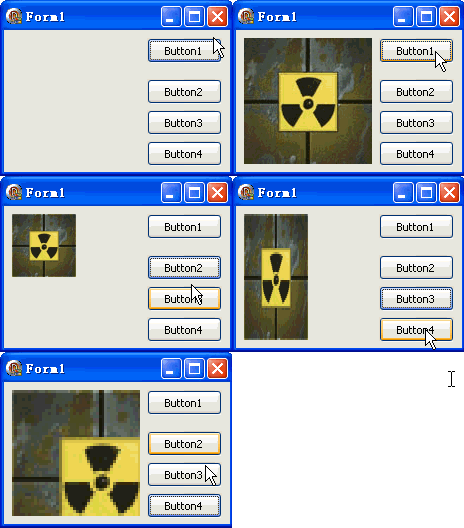
TDIB.DoResample 以指定濾鏡模式將影像重採樣至新尺寸,支援縮放、拉伸、非等比縮放。本文提供縮小、橫向壓縮、放大三種模式對比範例。
unit Unit1;
interface
uses Windows, Messages, SysUtils, Variants, Classes, Graphics, Controls, Forms,
  Dialogs, DIB, StdCtrls;
type
  TForm1 = class(TForm)
    DXPaintBox1: TDXPaintBox;
    Button1: TButton; // 載入圖片
    Button2: TButton; // 等比縮小 1/2
    Button3: TButton; // 橫向壓縮 1/2
    Button4: TButton; // 等比放大 1.4x
    procedure Button1Click(Sender: TObject);
    procedure Button2Click(Sender: TObject);
    procedure Button3Click(Sender: TObject);
    procedure Button4Click(Sender: TObject);
  end;
var Form1: TForm1;
implementation {$R *.dfm}

procedure TForm1.Button1Click(Sender: TObject);
const ImgPath1 = 'C:\Temp\DX.jpg';
begin
  DXPaintBox1.DIB.LoadFromFile(ImgPath1);
  DXPaintBox1.Width := DXPaintBox1.DIB.Width;
  DXPaintBox1.Height := DXPaintBox1.DIB.Height;
  DXPaintBox1.Repaint;
end;

procedure TForm1.Button2Click(Sender: TObject); // 等比縮小
var w, h: Integer;
begin
  w := DXPaintBox1.Width div 2; h := DXPaintBox1.Height div 2;
  DXPaintBox1.DIB.DoResample(w, h, TFilterTypeResample(0));
  DXPaintBox1.Repaint;
end;

procedure TForm1.Button3Click(Sender: TObject); // 非等比:寬 1/2、高不變
var w, h: Integer;
begin
  w := DXPaintBox1.Width div 2; h := DXPaintBox1.Height;
  DXPaintBox1.DIB.DoResample(w, h, TFilterTypeResample(0));
  DXPaintBox1.Repaint;
end;

procedure TForm1.Button4Click(Sender: TObject); // 等比放大
var w, h: Integer;
begin
  w := Trunc(DXPaintBox1.Width * 1.4); h := Trunc(DXPaintBox1.Height * 1.4);
  DXPaintBox1.DIB.DoResample(w, h, TFilterTypeResample(0));
  DXPaintBox1.Repaint;
end;
end.
DoResample(NewWidth, NewHeight: Integer; FilterType: TFilterTypeResample)
TFilterTypeResample(0) 為預設(通常雙線性)| 值 | 常數 | 品質 | 速度 | 適用 |
|---|---|---|---|---|
| 0 | rfBox / rfBilinear | 中 | 快 | 即時縮放、縮圖 |
| 1 | rfBicubic | 高 | 中 | 高品質放大 |
| 2 | rfLanczos | 最高 | 慢 | 專業級、離線處理 |
| 3 | rfMitchell | 高 | 中 | 銳化傾向放大 |