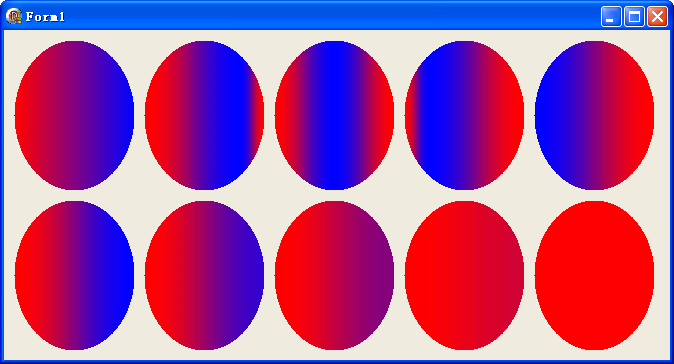
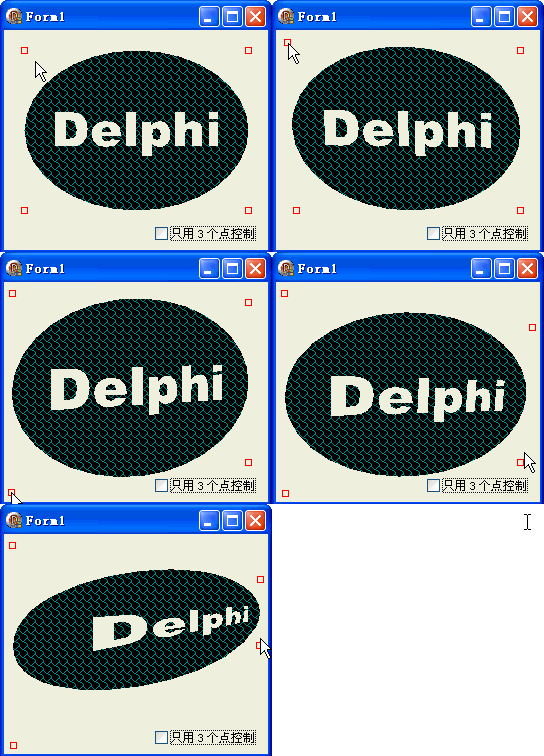
TGPGraphicsPath.Warp 允許將路徑從原始矩形區域扭曲映射到任意四邊形(或三角形自動補全為平行四邊形)。這是實現透視變換、旗幟飄動、紋理映射等效果的核心方法。
procedure Warp(destPoints: PGPPointF; count: Integer; srcRect: TGPRectF;
  matrix: TGPMatrix = nil; warpMode: TWarpMode = WarpModePerspective; flatness: Single = 0.25);
| 參數 | 說明 |
|---|---|
| destPoints | 目標區域 3 或 4 個頂點(順序:左上、右上、左下、右下) |
| count | 3 或 4(3 點時自動推算第 4 點形成平行四邊形) |
| srcRect | 源路徑外接矩形(通常用 path.GetBounds 取得) |
| matrix | 額外矩陣變換(可選) |
| warpMode | WarpModePerspective(透視,預設)或 WarpModeBilinear(雙線性) |
| flatness | 曲線平坦化精度 |
procedure TForm1.FormPaint(Sender: TObject);
var
  g: TGPGraphics;
  p: TGPPen;
  b: TGPBrush;
  path: TGPGraphicsPath;
  fontFamily: TGPFontFamily;
  StringFormat: TGPStringFormat;
  rectf: TGPRectF;
  i: Integer;
begin
  g := TGPGraphics.Create(Canvas.Handle);
  p := TGPPen.Create(aclRed, 1);
  b := TGPHatchBrush.Create(HatchStyleShingle, aclDarkCyan);
  path := TGPGraphicsPath.Create;
  path.AddEllipse(MakeRect(R));
  fontFamily := TGPFontFamily.Create('Arial Black');
  StringFormat := TGPStringFormat.Create;
  StringFormat.SetAlignment(StringAlignmentCenter);
  StringFormat.SetLineAlignment(StringAlignmentCenter);
  path.GetBounds(rectf);
  path.AddString('Delphi', -1, fontFamily, FontStyleRegular, 48, rectf, StringFormat);

  {關鍵:Warp 扭曲}
  path.Warp(PGPPointF(@ptfs), Length(ptfs), rectf);

  g.FillPath(b, path);
  for i := 0 to ptCount - 1 do
    g.DrawRectangle(p, MakeRect(ptfs[i].X-3, ptfs[i].Y-3, 6, 6));

  StringFormat.Free; fontFamily.Free; path.Free; b.Free; p.Free; g.Free;
end;
object Form1: TForm1
  Left = 0
  Top = 0
  Caption = 'Form1'
  ClientHeight = 220
  ClientWidth = 264
  Color = clBtnFace
  Font.Charset = DEFAULT_CHARSET
  Font.Color = clWindowText
  Font.Height = -11
  Font.Name = 'Tahoma'
  Font.Style = []
  OldCreateOrder = False
  Position = poDesktopCenter
  OnCreate = FormCreate
  OnMouseDown = FormMouseDown
  OnMouseMove = FormMouseMove
  OnMouseUp = FormMouseUp
  OnPaint = FormPaint
  PixelsPerInch = 96
  TextHeight = 13
  object CheckBox1: TCheckBox ... {3/4 點模式切換}
end