TGPGraphicsPath.Flatten 將路徑中的所有曲線(貝塞爾曲線、弧線、橢圓弧)近似轉換為多段直線。透過 flatness 參數控制近似精度,是路徑簡化、碰撞偵測、向量轉光柵的關鍵步驟。
procedure Flatten(matrix: TGPMatrix = nil; flatness: Single = 0.25);
procedure TForm1.FormPaint(Sender: TObject);
var
  g: TGPGraphics;
  p: TGPPen;
  path: TGPGraphicsPath;
  f: Single;
begin
  g := TGPGraphics.Create(Canvas.Handle);
  p := TGPPen.Create(aclBlue, 2);
  path := TGPGraphicsPath.Create;
  path.AddEllipse(20, 20, ClientWidth-40, ClientHeight-80);
  f := TrackBar1.Position / 100;  {轉換為 Single}
  path.Flatten(nil, f);           {關鍵:拉直曲線}
  Caption := Format('Flatness: %.3f', [f]);
  g.DrawPath(p, path);            {繪製拉直後的多段線}
  path.Free; p.Free; g.Free;
end;
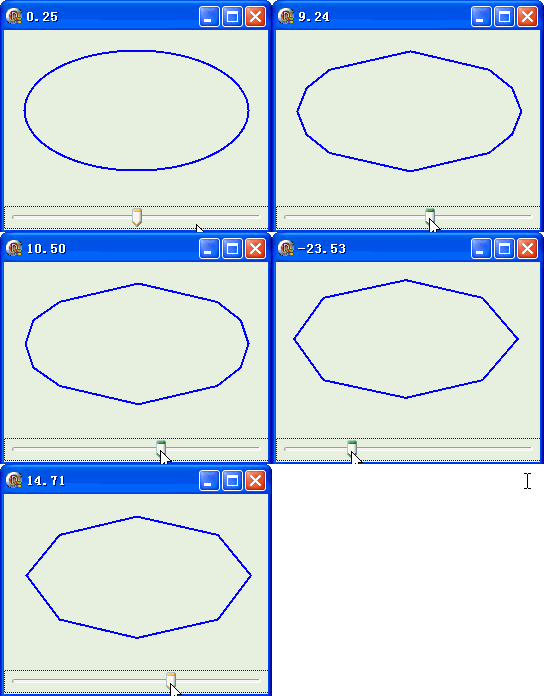
| Flatness 值 | 視覺效果 | 頂點數 | 適用場景 |
|---|---|---|---|
| 0.01 ~ 0.1 | 極平滑,肉眼不可辨別直線段 | 極多 | 高精度輸出、列印、CNC |
| 0.25 (預設) | 良好平衡 | 適中 | 通用 UI、螢幕顯示 |
| 1.0 ~ 5.0 | 明顯多邊形感 | 少 | 低解析度、快速碰撞偵測 |
| > 10 | 幾乎變成正方形/少邊形 | 極少 | 極度簡化、包圍盒近似 |
AddString 產生的字形路徑同樣適用 Flattenobject Form1: TForm1
Left = 0
Top = 0
Caption = 'Form1'
ClientHeight = 200
ClientWidth = 264
Color = clBtnFace
Font.Charset = DEFAULT_CHARSET
Font.Color = clWindowText
Font.Height = -11
Font.Name = 'Tahoma'
Font.Style = []
OldCreateOrder = False
Position = poDesktopCenter
OnCreate = FormCreate
OnPaint = FormPaint
PixelsPerInch = 96
TextHeight = 13
object TrackBar1: TTrackBar ... {範圍 -5000~5000}
end