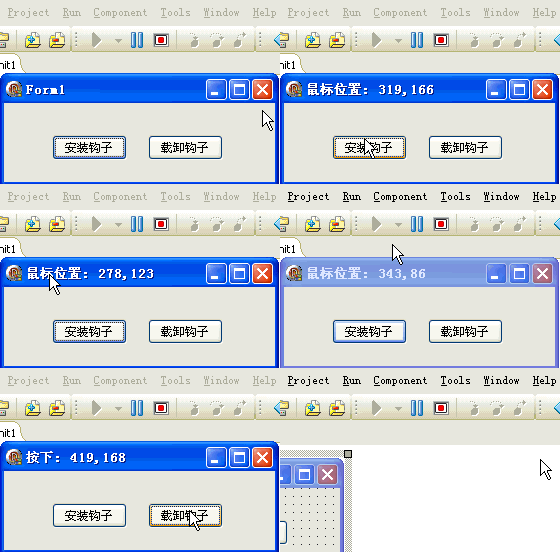
鉤子開發的核心難點在於 DLL 如何將攔截資料傳回主程式。本文示範最基礎的方案:DLL 內部緩衝字串,匯出 GetInfo 函數供 EXE 定期用 Timer 輪詢讀取。雖非最佳效能,但邏輯清晰適合入門理解。
WH_MOUSE_LL=14)info: stringTimer (100ms)Timer 週期呼叫 GetInfo 取得最新資料顯示library MyHook;
uses
SysUtils, Windows, Messages, Classes;
{$R *.res}
var
hook: HHOOK;
info: string; // 全域緩衝區
{ 匯出函數:供 EXE 讀取最新資訊 }
function GetInfo: PChar; stdcall;
begin
Result := PChar(info);
end;
{ 滑鼠鉤子回調 }
function MouseHook(nCode: Integer; wParam: WPARAM; lParam: LPARAM): LRESULT; stdcall;
begin
case wParam of
WM_MOUSEMOVE: info := '滑鼠位置';
WM_LBUTTONDOWN: info := '按下';
WM_LBUTTONUP: info := '放開';
end;
info := Format('%s: %d,%d', [info, PMouseHookStruct(lParam)^.pt.X, PMouseHookStruct(lParam)^.pt.Y]);
{ 資訊已寫入 info,等待 EXE 透過 GetInfo 取走 }
Result := CallNextHookEx(hook, nCode, wParam, lParam);
end;
{ 安裝鉤子 }
function SetHook: Boolean; stdcall;
const
WH_MOUSE_LL = 14; // Delphi 缺少常數
begin
hook := SetWindowsHookEx(WH_MOUSE_LL, @MouseHook, HInstance, 0); // 0 = 全域
Result := hook <> 0;
end;
{ 移除鉤子 }
function DelHook: Boolean; stdcall;
begin
Result := UnhookWindowsHookEx(hook);
end;
exports
SetHook name 'SetHook',
DelHook name 'DelHook',
MouseHook name 'MouseHook',
GetInfo name 'GetInfo';
begin
end.
unit Unit1;

interface

uses
  Windows, Messages, SysUtils, Variants, Classes, Graphics, Controls, Forms,
  Dialogs, StdCtrls, ExtCtrls;

type
  TForm1 = class(TForm)
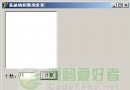
    Button1: TButton;
    Button2: TButton;
    Timer1: TTimer;
    procedure FormCreate(Sender: TObject);
    procedure Button1Click(Sender: TObject);
    procedure Button2Click(Sender: TObject);
    procedure Timer1Timer(Sender: TObject);
    procedure FormDestroy(Sender: TObject);
  end;

function SetHook: Boolean; stdcall;
function DelHook: Boolean; stdcall;
function GetInfo: PChar; stdcall;

var
  Form1: TForm1;

implementation

{$R *.dfm}

function SetHook; external 'MyHook.dll';
function DelHook; external 'MyHook.dll';
function GetInfo; external 'MyHook.dll';

procedure TForm1.Button1Click(Sender: TObject);
begin
  SetHook;
  Timer1.Enabled := True;  // 開始輪詢
end;

procedure TForm1.Button2Click(Sender: TObject);
begin
  Timer1.Enabled := False;
  DelHook;
end;

procedure TForm1.FormCreate(Sender: TObject);
begin
  Button1.Caption := '安裝鉤子';
  Button2.Caption := '移除鉤子';
  Timer1.Interval := 100;  // 100ms 輪詢一次
  Timer1.Enabled := False;
  FormStyle := fsStayOnTop;
end;

procedure TForm1.FormDestroy(Sender: TObject);
begin
  DelHook;
end;

{ Timer 輪詢讀取 DLL 緩衝資料 }
procedure TForm1.Timer1Timer(Sender: TObject);
begin
  Caption := GetInfo;  // 直接顯示於標題
end;

end.
object Form1: TForm1
  Left = 0
  Top = 0
  Caption = 'Form1'
  ClientHeight = 78
  ClientWidth = 271
  Color = clBtnFace
  Font.Charset = DEFAULT_CHARSET
  Font.Color = clWindowText
  Font.Height = -11
  Font.Name = 'Tahoma'
  Font.Style = []
  OldCreateOrder = False
  OnCreate = FormCreate
  OnDestroy = FormDestroy
  PixelsPerInch = 96
  TextHeight = 13
  object Button1: TButton
    Left = 48
    Top = 32
    Width = 75
    Height = 25
    Caption = 'Button1'
    TabOrder = 0
    OnClick = Button1Click
  end
  object Button2: TButton
    Left = 144
    Top = 32
    Width = 75
    Height = 25
    Caption = 'Button2'
    TabOrder = 1
    OnClick = Button2Click
  end
  object Timer1: TTimer
    OnTimer = Timer1Timer
    Left = 128
    Top = 8
  end
end
| 優點 | 缺點 |
|---|---|
| 邏輯簡單,易理解實作 | Timer 輪詢浪費 CPU (即使無事件) |
| 無需處理視窗訊息機制 | 資料延遲 = Timer Interval (此例 100ms) |
| 適合低頻事件監控 | 高頻事件 (滑鼠移動) 會丟失中間狀態 |
| DLL/EXE 介面極簡單 | 字串緩衝區非執行緒安全 (單執行緒鉤子尚可) |
PostMessage + 自訂訊息 (WM_USER+1) 替代 Timer,實現事件驅動即時推送。SetHWnd),避免硬編碼目標視窗。WM_COPYDATA 傳遞結構化資料而非字串指標。PChar 為 PWideChar。SetWindowsHookEx 回傳值,常見原因:DLL 未置於同目錄、32/64 位元不匹配、系統策略禁止全域鉤子。此 Timer 輪詢模式雖有缺陷,但完整展示了「DLL 緩衝資料 → EXE 定期讀取」的基本資料流模型,是理解更高階訊息推送機制的基石。