TGPGraphicsPath.Widen 是一個獨特且強大的方法:根據指定畫筆的寬度、線帽、連接樣式、虛線模式,將路徑中的「線條」展開為「填充區域」。轉換後的路徑只能用 FillPath 繪製,不再適用 DrawPath。
procedure Widen(const pen: TGPPen; matrix: TGPMatrix = nil; flatness: Single = 0.25);
procedure TForm1.FormPaint(Sender: TObject);
var
  g: TGPGraphics;
  p: TGPPen;
  b1, b2: TGPBrush;
  path: TGPGraphicsPath;
  pts: array of TGPPoint;
  i: Integer;
begin
  g := TGPGraphics.Create(Canvas.Handle);
  p := TGPPen.Create(aclSlateGray, 20);  {寬 20 像素}
  p.SetEndCap(LineCapArrowAnchor);       {箭頭終點}
  b1 := TGPSolidBrush.Create(aclRed);
  b2 := TGPHatchBrush.Create(HatchStyleDiagonalCross, aclSilver, aclSlateGray);
  path := TGPGraphicsPath.Create;
  path.AddLine(40, 50, ClientWidth-40, 50);  {水平線}

  if CheckBox1.Checked then begin
    path.Widen(p);           {關鍵:線條→區域}
    g.FillPath(b2, path);    {必須用 FillPath}
  end else
    g.DrawPath(p, path);     {原始線條用 DrawPath}

  if CheckBox2.Checked then begin
    SetLength(pts, path.GetPointCount);
    path.GetPathPoints(PGPPoint(pts), Length(pts));
    TGPSolidBrush(b1).SetColor(aclRed);
    for i := 0 to Length(pts) - 1 do
      g.FillRectangle(b1, pts[i].X-3, pts[i].Y-3, 6, 6);
  end;

  path.Free; b1.Free; b2.Free; p.Free; g.Free;
end;
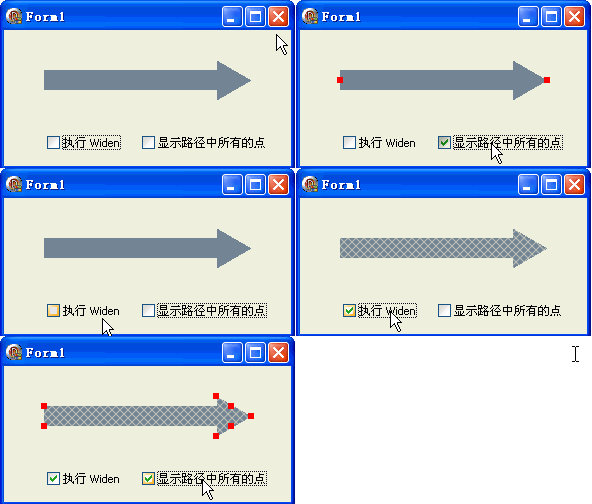
| 場景 | 說明 |
|---|---|
| 線條碰撞偵測 | 將細線擴寬為區域,簡化點擊/碰撞測試 |
| 筆觸效果 | 模擬毛筆、鋼筆筆觸的寬度變化 |
| 虛線區域化 | 虛線畫筆 Widen 後產生獨立矩形區域陣列 |
| 文字輪廓 | 文字路徑 Widen 產生描邊效果 |
| 路徑布林運算 | 將線條轉區域後可參與 Union/Intersect 等運算 |
FillPath,DrawPath 會產生錯誤結果object Form1: TForm1
Left = 0
Top = 0
Caption = 'Form1'
ClientHeight = 136
ClientWidth = 287
Color = clBtnFace
Font.Charset = DEFAULT_CHARSET
Font.Color = clWindowText
Font.Height = -11
Font.Name = 'Tahoma'
Font.Style = []
OldCreateOrder = False
Position = poDesktopCenter
OnCreate = FormCreate
OnPaint = FormPaint
PixelsPerInch = 96
TextHeight = 13
object CheckBox1: TCheckBox ... {兩個 CheckBox}
end