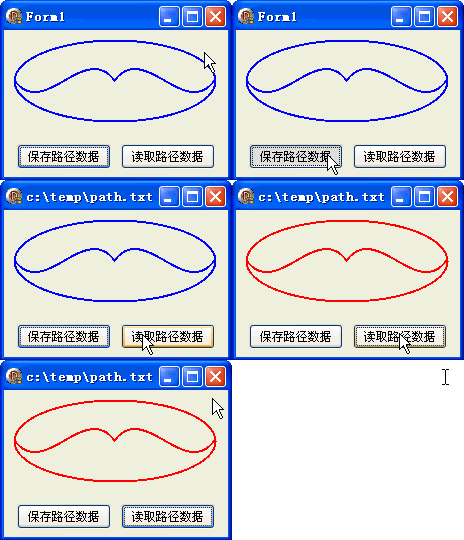
路徑資料持久化是向量圖形編輯器、CAD 系統的基礎功能。本文示範如何將 TGPGraphicsPath 的點座標陣列與點類型陣列序列化為文字檔,再完整還原重建路徑。
GetPointCount 取得點數points: array of TGPPoint, types: array of ByteGetPathPoints、GetPathTypes 填充陣列TStringList → SaveToFileLoadFromFile 讀取文字檔path.Reset; path.Free 釋放舊路徑TGPGraphicsPath.Create(PGPPoint(points), PByte(types), count) 重建新路徑const FilePath = 'c:\temp\path.txt';
procedure TForm1.Button1Click(Sender: TObject); {保存}
var
points: array of TGPPoint;
types: array of Byte;
List: TStringList;
i: Integer;
begin
SetLength(points, path.GetPointCount);
SetLength(types, path.GetPointCount);
path.GetPathPoints(PGPPoint(points), Length(points));
path.GetPathTypes(PByte(types), Length(types));
List := TStringList.Create;
for i := 0 to Length(points) - 1 do
List.Add(Format('%d,%d,%d', [points[i].X, points[i].Y, types[i]]));
List.SaveToFile(FilePath);
List.Free;
Caption := FilePath;
end;
procedure TForm1.Button2Click(Sender: TObject); {讀取}
var
points: array of TGPPoint;
types: array of Byte;
List1, List2: TStringList;
i: Integer;
begin
List1 := TStringList.Create;
List2 := TStringList.Create;
if not FileExists(FilePath) then Exit;
List1.LoadFromFile(FilePath);
SetLength(points, List1.Count);
SetLength(types, List1.Count);
for i := 0 to List1.Count - 1 do begin
if List1[i] = '' then Break;
List2.CommaText := List1[i];
points[i].X := StrToIntDef(List2[0], 0);
points[i].Y := StrToIntDef(List2[1], 0);
types[i] := StrToIntDef(List2[2], 0);
end;
path.Reset; path.Free;
path := TGPGraphicsPath.Create(PGPPoint(points), PByte(types), List1.Count);
p.SetColor(aclRed); {改色驗證}
Repaint;
List1.Free; List2.Free;
end;
GDI+ 也提供 TPathData 類別封裝點/類型陣列,操作更簡潔:
var PathData: TPathData;
PathData := TPathData.Create;
path.GetPathData(PathData);  {一次取得 Points、Types、Count}
{直接存取 PathData.Points^, PathData.Types^, PathData.Count}
PathData.Free;
Create(points, types, count) 完整還原幾何與拓撲object Form1: TForm1
Left = 0
Top = 0
Caption = 'Form1'
ClientHeight = 147
ClientWidth = 224
Color = clBtnFace
Font.Charset = DEFAULT_CHARSET
Font.Color = clWindowText
Font.Height = -11
Font.Name = 'Tahoma'
Font.Style = []
OldCreateOrder = False
Position = poDesktopCenter
OnCreate = FormCreate
OnDestroy = FormDestroy
OnPaint = FormPaint
PixelsPerInch = 96
TextHeight = 13
object Button1: TButton ... {保存/讀取兩按鈕}
end