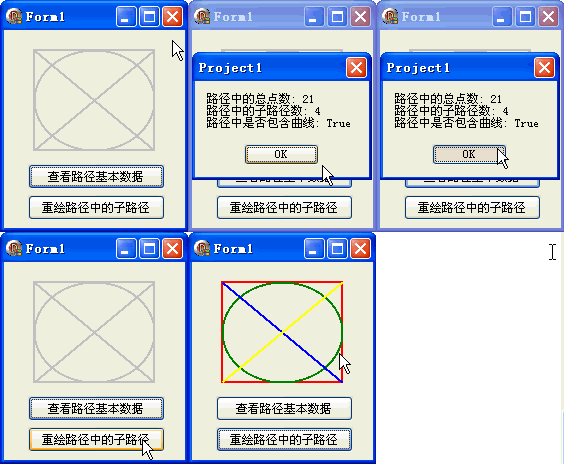
TGPGraphicsPathIterator 是路徑的輔助類別,提供強大的子路徑枚舉、點數統計、曲線偵測等進階功能。本文示範如何建立包含多個子圖形的複合路徑,並透過迭代器逐一提取、著色繪製每個子路徑。
| 方法 | 功能 | 回傳值 |
|---|---|---|
GetCount | 路徑總點數 | Integer |
GetSubpathCount | 子路徑個數 | Integer |
HasCurve | 是否包含貝塞爾曲線 | Boolean |
NextSubpath(path, closed) | 提取下一個子路徑 | Integer (點數) |
Rewind | 重置迭代器到起始 | - |
建立包含矩形、橢圓、對角線、反對角線四個獨立子路徑的複合路徑。
procedure TForm1.FormCreate(Sender: TObject);
var
  pt1, pt2: TPoint;
begin
  pt1 := Point(30, 20); pt2 := Point(150, 120);
  path := TGPGraphicsPath.Create;

  path.StartFigure;  {子路徑 1: 矩形}
  path.AddRectangle(MakeRect(Rect(pt1, pt2)));
  path.CloseFigure;

  path.StartFigure;  {子路徑 2: 橢圓}
  path.AddEllipse(MakeRect(Rect(pt1, pt2)));
  path.CloseFigure;

  path.StartFigure;  {子路徑 3: 對角線}
  path.AddLine(pt1.X, pt1.Y, pt2.X, pt2.Y);
  path.CloseFigure;

  path.StartFigure;  {子路徑 4: 反對角線}
  path.AddLine(pt1.X, pt2.Y, pt2.X, pt1.Y);
  path.CloseFigure;
end;
procedure TForm1.Button1Click(Sender: TObject);
var
  PathIterator: TGPGraphicsPathIterator;
  str: string;
begin
  PathIterator := TGPGraphicsPathIterator.Create(path);
  str := Format('路徑總點數: %d', [PathIterator.GetCount]);
  str := str + Format(#13#10 + '子路徑數: %d', [PathIterator.GetSubpathCount]);
  str := str + Format(#13#10 + '包含曲線: %s', [BoolToStr(PathIterator.HasCurve, True)]);
  ShowMessage(str);
  PathIterator.Free;
end;
procedure TForm1.Button2Click(Sender: TObject);
const
  ColorArr: array[0..3] of TGPColor = (aclRed, aclGreen, aclBlue, aclYellow);
var
  PathIterator: TGPGraphicsPathIterator;
  PathSection: TGPGraphicsPath;
  closed: LongBool;
  g: TGPGraphics;
  p: TGPPen;
  i: Integer;
begin
  g := TGPGraphics.Create(Canvas.Handle);
  p := TGPPen.Create(aclRed, 2);
  PathIterator := TGPGraphicsPathIterator.Create(path);
  PathIterator.Rewind;

  for i := 0 to PathIterator.GetSubpathCount - 1 do begin
    PathSection := TGPGraphicsPath.Create;
    PathIterator.NextSubpath(PathSection, closed);
    p.SetColor(ColorArr[i]);
    g.DrawPath(p, PathSection);
    PathSection.Free;
  end;

  PathIterator.Free; p.Free; g.Free;
end;
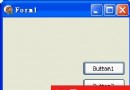
object Form1: TForm1
  Left = 0
  Top = 0
  Caption = 'Form1'
  ClientHeight = 198
  ClientWidth = 181
  Color = clBtnFace
  Font.Charset = DEFAULT_CHARSET
  Font.Color = clWindowText
  Font.Height = -11
  Font.Name = 'Tahoma'
  Font.Style = []
  OldCreateOrder = False
  Position = poDesktopCenter
  OnCreate = FormCreate
  OnDestroy = FormDestroy
  OnPaint = FormPaint
  PixelsPerInch = 96
  TextHeight = 13
  object Button1: TButton ... {兩個按鈕定義}
end