TGPPathGradientBrush 的強大之處在於:同一組漸層定義可套用至不同形狀。本文示範如何建立一個三角形路徑筆刷,透過 GetRectangle 取得其外接矩形,再將相同漸層設定套用至矩形與橢圓,實現跨形狀漸層一致性。
SetInterpolationColorsGetRectangle 取得外接矩形procedure TForm1.FormPaint(Sender: TObject);
var
g: TGPGraphics;
path: TGPGraphicsPath;
pb: TGPPathGradientBrush;
rt: TGPRect;
const
pts: array[0..2] of TGPPoint = ((X:90; Y:10), (X:10; Y:160), (X:160; Y:160));
colors: array[0..2] of TGPColor = (aclGreen, aclAqua, aclBlue);
pos: array[0..2] of Single = (0.0, 0.25, 1.0); {位置需在 0~1 之間}
begin
g := TGPGraphics.Create(Canvas.Handle);
path := TGPGraphicsPath.Create;
{=== 三角形 ===}
path.AddPolygon(PGPPoint(@pts), Length(pts));
pb := TGPPathGradientBrush.Create(path);
pb.SetInterpolationColors(@colors, @pos, Length(colors));
g.FillPath(pb, path);
{=== 取得外接矩形 ===}
pb.GetRectangle(rt); {關鍵:取得筆刷定義的外接矩形}
path.Reset;
path.AddRectangle(rt);
pb.Free;
pb := TGPPathGradientBrush.Create(path);
pb.SetInterpolationColors(@colors, @pos, Length(colors));
g.TranslateTransform(160, 0); {右移繪製}
g.FillPath(pb, path);
{=== 橢圓 ===}
path.Reset;
path.AddEllipse(rt);
pb.Free;
pb := TGPPathGradientBrush.Create(path);
pb.SetInterpolationColors(@colors, @pos, Length(colors));
g.TranslateTransform(160, 0);
g.FillPath(pb, path);
pb.Free; path.Free; g.Free;
end;
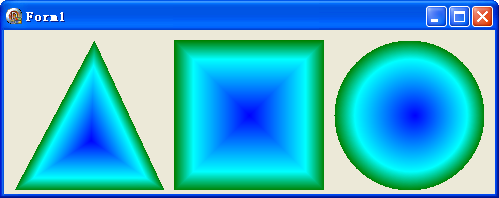
| 方法/屬性 | 作用 | 注意事項 |
|---|---|---|
SetInterpolationColors | 定義精確漸層色帶(顏色+位置) | 位置陣列首尾必須為 0.0 和 1.0 |
GetRectangle | 取得筆刷定義時的外接矩形 | 僅在路徑建立筆刷後有效 |
path.Reset | 清空路徑點,重複使用 path 物件 | 避免頻繁 Create/Free 開銷 |
g.TranslateTransform | 平移繪圖原點,實現並排顯示 | 累積效果,注意還原或重建 Graphics |
object Form1: TForm1
  Left = 0
  Top = 0
  Caption = 'Form1'
  ClientHeight = 164
  ClientWidth = 491
  Color = clBtnFace
  Font.Charset = DEFAULT_CHARSET
  Font.Color = clWindowText
  Font.Height = -11
  Font.Name = 'Tahoma'
  Font.Style = []
  OldCreateOrder = False
  Position = poDesktopCenter
  OnPaint = FormPaint
  PixelsPerInch = 96
  TextHeight = 13
end