顯示裝置的亮度響應非線性,直接線性插值顏色會導致中間灰階偏暗。SetGammaCorrection(True) 啟用 sRGB Gamma 校正(γ≈2.2),讓漸層視覺亮度符合人眼感知,顏色過渡更自然。
同一個三角形路徑筆刷,左側無校正,右側啟用 SetGammaCorrection(True)。
procedure TForm1.FormPaint(Sender: TObject);
const
  ColorArr: array[0..2] of TGPColor = (aclRed, aclGreen, aclBlue);
var
  pts: array[0..2] of TGPPoint;
  g: TGPGraphics;
  path: TGPGraphicsPath;
  pb: TGPPathGradientBrush;
  num: Integer;
begin
  pts[0] := MakePoint(80, 10);
  pts[1] := MakePoint(10, 150);
  pts[2] := MakePoint(150, 150);

  g := TGPGraphics.Create(Canvas.Handle);
  path := TGPGraphicsPath.Create;
  path.AddPolygon(PGPPoint(@pts), Length(pts));

  {根據點陣列建立筆刷 - 中心預設黑色}
  pb := TGPPathGradientBrush.Create(PGPPoint(@pts), Length(pts));
  pb.SetCenterColor(aclWhite);  {改為白色中心}
  num := Length(pts);
  pb.SetSurroundColors(PARGB(@ColorArr), num);

  {左側:無 Gamma 校正}
  g.FillPath(pb, path);

  {右側:啟用 Gamma 校正}
  pb.SetGammaCorrection(True);
  g.TranslateTransform(150, 0);
  g.FillPath(pb, path);

  pb.Free; path.Free; g.Free;
end;
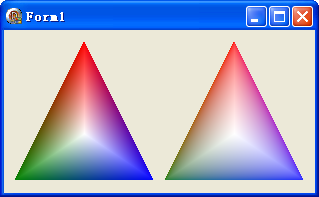
SetGammaCorrection 影響所有後續繪製操作,屬於筆刷狀態FillPath、FillEllipse 等填充操作有效,不影響路徑幾何SetInterpolationColors 使用時,位置參數仍為線性空間object Form1: TForm1
Left = 0
Top = 0
Caption = 'Form1'
ClientHeight = 163
ClientWidth = 311
Color = clBtnFace
Font.Charset = DEFAULT_CHARSET
Font.Color = clWindowText
Font.Height = -11
Font.Name = 'Tahoma'
Font.Style = []
OldCreateOrder = False
Position = poDesktopCenter
OnPaint = FormPaint
PixelsPerInch = 96
TextHeight = 13
end