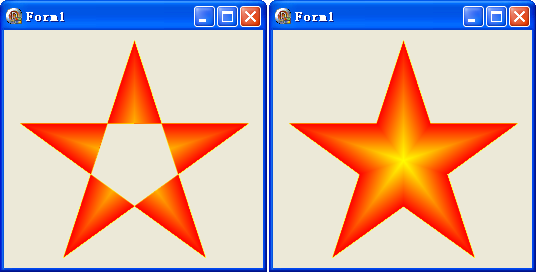
路徑漸層筆刷不僅能填充簡單幾何形狀,更能處理複雜多邊形。本文提供兩個版本的五角星繪製範例:標準五角星(5 點)與正五角星(10 點,應用黃金分割比例),展示如何計算頂點座標並套用漸層填充。
以圓周等角分佈 5 個點,連接每隔一點形成星形。
procedure TForm1.FormPaint(Sender: TObject);
const
  pt: TPoint = (X:130; Y:130);  {中心點}
  r = 120;                      {外接圓半徑}
  colors: array[0..0] of TGPColor = (aclRed);
var
  g: TGPGraphics;
  p: TGPPen;
  path: TGPGraphicsPath;
  pb: TGPPathGradientBrush;
  pts: array[0..4] of TGPPoint;
  radian: Single;
  i, num: Integer;
begin
  {計算 5 個頂點 - 每隔 72 度}
  for i := 0 to 4 do begin
    radian := i * (360*2/5) * (Pi/180);  {跳過一個點,乘 2}
    pts[i].X := pt.X + Round(Sin(radian) * r);
    pts[i].Y := pt.Y - Round(Cos(radian) * r);
  end;

  g := TGPGraphics.Create(Canvas.Handle);
  path := TGPGraphicsPath.Create;
  path.AddPolygon(PGPPoint(@pts), Length(pts));
  pb := TGPPathGradientBrush.Create(path);
  num := Length(colors);
  pb.SetSurroundColors(@colors, num);
  pb.SetCenterColor(aclYellow);

  p := TGPPen.Create(aclYellow);
  g.SetSmoothingMode(SmoothingModeAntiAlias);  {抗鋸齒}
  g.DrawPath(p, path);
  g.FillPath(pb, path);

  pb.Free; path.Free; p.Free; g.Free;
end;
正五角星需內外兩圈頂點交替,內圈半徑為外圈的 黃金分割比例 (φ-1) ≈ 0.382(或說外圈為內圈的 φ ≈ 1.618)。
for i := 0 to 9 do begin
  rx := r;
  if Odd(i) then rx := r * (1 - (Sqrt(5)-1)/2);  {內圈半徑 = r * 0.382}
  radian := i * (360/10) * (Pi/180);  {每 36 度一個點}
  pts[i].X := pt.X + Round(Sin(radian) * rx);
  pts[i].Y := pt.Y - Round(Cos(radian) * rx);
end;
object Form1: TForm1
  Left = 0
  Top = 0
  Caption = 'Form1'
  ClientHeight = 238
  ClientWidth = 259
  Color = clBtnFace
  Font.Charset = DEFAULT_CHARSET
  Font.Color = clWindowText
  Font.Height = -11
  Font.Name = 'Tahoma'
  Font.Style = []
  OldCreateOrder = False
  Position = poDesktopCenter
  OnPaint = FormPaint
  PixelsPerInch = 96
  TextHeight = 13
end