進行日誌傳送實驗時,若中斷設定流程,某些資料仍會殘留在各伺服器的日誌傳送資料表中,影響後續設定。為確保殘餘資料被清除,必須手動刪除每台伺服器 msdb 資料庫中日誌傳送相關資料表的資料。
常見錯誤訊息:
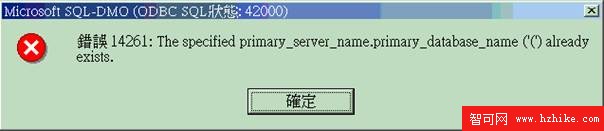
圖示:錯誤畫面範例
處理方法: 必須手動執行下列預存程序來刪除 Log Shipping 在資料庫中記錄的資訊:
msdb.dbo.log_shipping_primary 表中的 Primary Server 資訊msdb.dbo.log_shipping_secondaries 表中的 Secondary Server 資訊msdb.dbo.log_shipping_monitor若正確設定 Log Shipping 卻無法正常執行,SQL Server 記錄中可能出現類似以下訊息:
Microsoft (R) SQLMaint Utility (Unicode), Version
Logged on to SQL Server 'ZTAO-1' as 'ZTAO-1\Administrator' (trusted)
Starting maintenance plan 'LOG_Plan_9' on 2003-9-4 14:42:02
Backup can not be performed on database 'ERPLogShipping'. This sub task is ignored.
Deleting old text reports... 0 file(s) deleted.
End of maintenance plan 'LOG_Plan_9' on 2003-9-4 14:42:02
SQLMAINT.EXE Process Exit Code: 1 (Failed)
此問題通常因資料庫復原模式設定錯誤導致。請檢查資料庫是否設為 完整復原模式 或 大量記錄復原模式,單純的簡單復原模式無法支援日誌傳送操作。