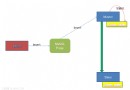
MHA (Master High Availability) 是由日本 MySQL 專家松信嘉範開發的 Perl 故障轉移框架,在 10-30 秒內完成主庫故障檢測、差異 Relay Log 補齊、新主提升、VIP 漂移,實現近零數據丟失的高可用。本文涵蓋架構原理、三節點部署、SSH 互信、權限配置、Manager/Node 安裝、故障轉移腳本、VIP 漂移驗證的完整實戰。
| 特性 | 說明 |
|---|---|
| 秒級故障轉移 | 9-12s 檢測 + 7s 電源隔離 + 10-30s 恢復 = 總停機 < 30s |
| 自動一致性修復 | 從最新 Slave 補齊差異 Relay Log,所有 Slave 統一到同一 GTID/位點 |
| 在線切主 | 0.5-2s 只阻塞寫,讀不受影響,適合硬件維護窗口 |
| 無侵入部署 | 不修改 MySQL 配置,支援 5.0+/5.5/5.6/5.7,任意存儲引擎 |
| 低資源佔用 | Manager 單獨部署或共置 Slave,3s 心跳 ping,無大查詢 |
# 每台執行
ssh-keygen -t rsa
ssh-copy-id -i ~/.ssh/id_rsa.pub root@192.168.216.50
ssh-copy-id -i ~/.ssh/id_rsa.pub root@192.168.216.51
ssh-copy-id -i ~/.ssh/id_rsa.pub root@192.168.216.52
# 驗證
ssh 192.168.216.50 date && ssh 192.168.216.51 date && ssh 192.168.216.52 date
groupadd mysql; useradd -g mysql -s /sbin/nologin -M mysql
mkdir -p /data/mysql
tar -zxvf mysql-5.6.16-linux-glibc2.5-x86_64.tar.gz
mv mysql-5.6.16-linux-glibc2.5-x86_64 /usr/local/mysql
cd /usr/local/mysql/scripts
./mysql_install_db --user=mysql --basedir=/usr/local/mysql --datadir=/data/mysql
# /usr/local/mysql/my.cnf 關鍵差異:server_id
[mysqld]
user=mysql
default-storage-engine=InnoDB
socket=/tmp/mysql.sock
pid-file=/data/mysql/mysql.pid
datadir=/data/mysql
server_id=1  # 51→1, 52→2, 50→3
log-bin=/data/mysql/mysql-bin
expire-logs-days=14
sync-binlog=1
innodb_flush_log_at_trx_commit=1
innodb_buffer_pool_size=592M
slow_query_log=1
slow_query_log_file=/data/mysql/mysql-slow.log
log_queries_not_using_indexes=1
GRANT ALL PRIVILEGES ON *.* TO 'root'@'127.0.0.1' IDENTIFIED BY 'root';
GRANT ALL PRIVILEGES ON *.* TO 'root'@'localhost' IDENTIFIED BY 'root';
GRANT ALL PRIVILEGES ON *.* TO 'root'@'192.168.216.50' IDENTIFIED BY 'root';
GRANT ALL PRIVILEGES ON *.* TO 'root'@'192.168.216.51' IDENTIFIED BY 'root';
GRANT ALL PRIVILEGES ON *.* TO 'root'@'192.168.216.52' IDENTIFIED BY 'root';
GRANT REPLICATION SLAVE ON *.* TO 'slave'@'192.168.216.50' IDENTIFIED BY 'slave';
GRANT REPLICATION SLAVE ON *.* TO 'slave'@'192.168.216.51' IDENTIFIED BY 'slave';
GRANT REPLICATION SLAVE ON *.* TO 'slave'@'192.168.216.52' IDENTIFIED BY 'slave';
# Manager 節點全裝
yum -y install perl-CPAN
cpan -i Config::Tiny Params::Validate Parallel::ForkManager Log::Dispatch MIME::Lite Mail::Sender Net::SSLeay IO::Socket::SSL

# Node 節點輕量
yum -y install perl-DBD-MySQL
# 若 rpm 衝突,手工編譯 DBD::mysql
tar -zxvf DBD-mysql-4.027.tar.gz
cd DBD-mysql-4.027; perl Makefile.PL; make && make install
ln -s /usr/local/mysql/bin/mysql /usr/bin/mysql
ln -s /usr/local/mysql/bin/mysqlbinlog /usr/bin/mysqlbinlog
echo "/usr/local/mysql/lib" > /etc/ld.so.conf.d/mysql-x86_64.conf
ldconfig
tar -zxvf mha4mysql-node-0.54.tar.gz
cd mha4mysql-node-0.54
perl Makefile.PL; make && make install
tar -zxvf mha4mysql-manager-0.54.tar.gz
cd mha4mysql-manager-0.54
perl Makefile.PL; make && make install
mkdir -p /etc/masterha /masterha/app1
cp samples/conf/* /etc/masterha
cp samples/scripts/* /usr/local/bin
# /etc/masterha/app1.cnf
[server default]
manager_workdir=/masterha/app1
manager_log=/masterha/app1/manager.log
user=root
password=root
ssh_user=root
repl_user=slave
repl_password=slave
shutdown_script=""
master_ip_failover_script=/usr/local/bin/masterha_ip_failover
master_ip_online_change_script=/usr/local/bin/masterha_ip_failover
report_script=""

[server1]
hostname=192.168.216.50
master_binlog_dir=/data/mysql/
candidate_master=1

[server2]
hostname=192.168.216.51
master_binlog_dir=/data/mysql/
candidate_master=1

[server3]
hostname=192.168.216.52
master_binlog_dir=/data/mysql/
candidate_master=1
masterha_check_ssh --conf=/etc/masterha/app1.cnf
masterha_check_repl --conf=/etc/masterha/app1.cnf
nohup masterha_manager --conf=/etc/masterha/app1.cnf --ignore_last_failover < /dev/null > /masterha/app1/manager.log 2>&1 &
/usr/local/bin/masterha_ip_failover#!/usr/bin/env perl
use strict; use warnings FATAL => 'all'; use Getopt::Long;
my ($command,$ssh_user,$orig_master_host,$orig_master_ip,$orig_master_port,
$new_master_host,$new_master_ip,$new_master_port);
my $vip = '192.168.216.100/24';
my $key = "1";
my $ssh_start_vip = "/sbin/ifconfig eth0:$key $vip";
my $ssh_stop_vip = "/sbin/ifconfig eth0:$key down";
GetOptions('command=s'=>\$command,'ssh_user=s'=>\$ssh_user,
'orig_master_host=s'=>\$orig_master_host,'orig_master_ip=s'=>\$orig_master_ip,
'orig_master_port=i'=>\$orig_master_port,'new_master_host=s'=>\$new_master_host,
'new_master_ip=s'=>\$new_master_ip,'new_master_port=i'=>\$new_master_port);
exit main();
sub main {
if ($command eq 'stop' || $command eq 'stopssh') {
print "Disabling VIP on old master: $orig_master_host\n";
system("ssh $ssh_user\@$orig_master_host \"$ssh_stop_vip\"");
exit $? >> 8;
} elsif ($command eq 'start') {
print "Enabling VIP on new master: $new_master_host\n";
system("ssh $ssh_user\@$new_master_host \"$ssh_start_vip\"");
exit $? >> 8;
} elsif ($command eq 'status') {
system("ssh $ssh_user\@$orig_master_host \"$ssh_start_vip\"");
exit 0;
} else { die "Usage: ..."; }
}
chmod +x /usr/local/bin/masterha_ip_failover
# 測試
/usr/local/bin/masterha_ip_failover --command=status --ssh_user=root --orig_master_host=192.168.216.51 --orig_master_ip=192.168.216.51 --orig_master_port=3306
service mysql stop 在 Master (51)rpl_semi_sync_master=ON + rpl_semi_sync_slave=ON,極大降低數據丟失窗口。