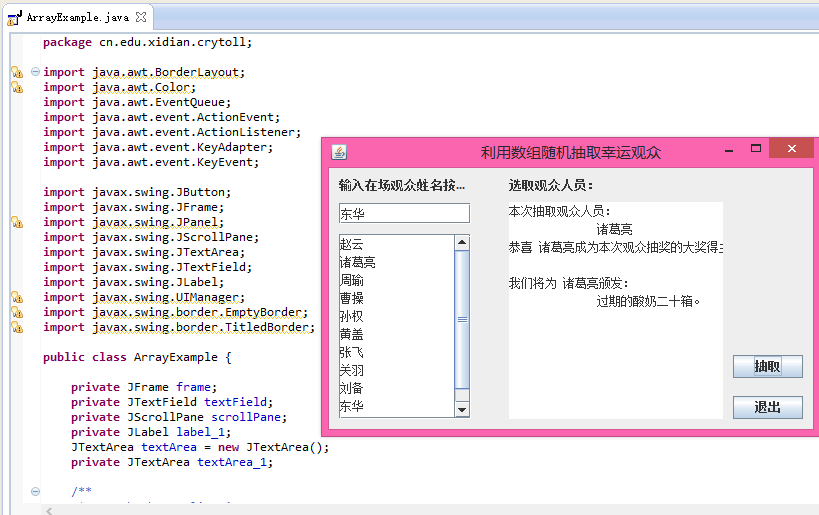
互動式 Swing 應用程式,讓使用者在文字欄位輸入觀眾姓名(按 Enter 確認),名單顯示於左側清單區;點擊「抽取」按鈕從名單中隨機挑選一位幸運觀眾,結果以格式化訊息顯示於右側文字區域;「退出」按鈕結束程式。
KeyListener 偵測 Enter 鍵,非空白則追加至 JTextArea 清單並全選輸入框內容方便下一筆輸入。getText() 取得完整清單字串,split("\\n+") 依換行切割成陣列。Math.random() * length 產生隨機索引,取得對應姓名。String.format() 套用多行格式化字串,輸出得獎資訊。import java.awt.*;
import java.awt.event.*;
import javax.swing.*;
public class LuckyDrawDemo extends JFrame {
private final JTextField inputField = new JTextField(10);
private final JTextArea listArea = new JTextArea();
private final JTextArea resultArea = new JTextArea();
public LuckyDrawDemo() {
setTitle("隨機抽取幸運觀眾");
setDefaultCloseOperation(EXIT_ON_CLOSE);
setBounds(100, 100, 500, 320);
setLayout(null); // 絕對佈局以符合原範例
JLabel lblInput = new JLabel("輸入現場觀眾姓名按 Enter");
lblInput.setBounds(10, 10, 180, 15);
add(lblInput);
inputField.setBounds(10, 35, 130, 25);
inputField.addKeyListener(new KeyAdapter() {
@Override public void keyPressed(KeyEvent e) {
if (e.getKeyChar() != '\n') return;
String name = inputField.getText().trim();
if (name.isEmpty()) return;
listArea.append(name + "\n");
inputField.selectAll();
}
});
add(inputField);
JScrollPane scroll = new JScrollPane(listArea);
scroll.setBounds(10, 66, 130, 185);
add(scroll);
JLabel lblResult = new JLabel("抽取觀眾人員:");
lblResult.setBounds(180, 10, 120, 15);
add(lblResult);
resultArea.setBounds(180, 34, 280, 217);
resultArea.setEditable(false);
add(resultArea);
JButton btnDraw = new JButton("抽取");
btnDraw.setBounds(470, 187, 70, 25);
btnDraw.addActionListener(e -> doDraw());
add(btnDraw);
JButton btnExit = new JButton("退出");
btnExit.setBounds(470, 228, 70, 25);
btnExit.addActionListener(e -> System.exit(0));
add(btnExit);
setVisible(true);
}
private void doDraw() {
String text = listArea.getText().trim();
if (text.isEmpty()) {
JOptionPane.showMessageDialog(this, "請先輸入觀眾名單");
return;
}
String[] names = text.split("\\n+");
int idx = (int) (Math.random() * names.length);
String winner = names[idx];
String msg = String.format(
"本次抽取觀眾人員:\n\t%s\n恭喜 %s 成為本次觀眾抽獎的大獎得主。\n\n我們將為 %s 頒發:\n\t過期的酸奶二十箱。",
winner, winner, winner);
resultArea.setText(msg);
}
public static void main(String[] args) {
SwingUtilities.invokeLater(LuckyDrawDemo::new);
}
}
BorderLayout + GridBagLayout 取代絕對座標,提升跨平台相容性。SecureRandom 取代 Math.random() 提高隨機性。