建立一個 Swing 視窗應用程式,包含兩個文字區域與兩個按鈕:
// 選擇排序:每趟找出未排序區間最大值,交換到區間末尾
for (int i = 1; i < array.length; i++) {
    int maxIdx = 0;
    for (int j = 1; j <= array.length - i; j++) {
        if (array[j] > array[maxIdx]) maxIdx = j;
    }
    // 交換
    int temp = array[array.length - i];
    array[array.length - i] = array[maxIdx];
    array[maxIdx] = temp;
}
import java.awt.*;
import java.awt.event.*;
import java.util.Random;
import javax.swing.*;

public class SelectSortDemo extends JFrame {
    private final int[] array = new int[10];
    private final JTextArea areaUnsorted = new JTextArea();
    private final JTextArea areaSorted = new JTextArea();

    public SelectSortDemo() {
        setTitle("選擇排序法示範");
        setDefaultCloseOperation(EXIT_ON_CLOSE);
        setBounds(100, 100, 450, 350);
        setLayout(new GridBagLayout());
        GridBagConstraints c = new GridBagConstraints();
        c.fill = GridBagConstraints.BOTH;
        c.insets = new Insets(5,5,5,5);
        c.weightx = 1.0;

        // 上方:未排序
        c.gridy = 0; c.weighty = 1.0;
        add(new JScrollPane(areaUnsorted), c);
        // 產生隨機數按鈕
        c.gridy = 1; c.weighty = 0;
        JButton btnGen = new JButton("產生隨機數");
        btnGen.addActionListener(e -> generateRandom());
        add(btnGen, c);
        // 下方:已排序
        c.gridy = 2; c.weighty = 1.0;
        add(new JScrollPane(areaSorted), c);
        // 排序按鈕
        c.gridy = 3; c.weighty = 0;
        JButton btnSort = new JButton("排序");
        btnSort.addActionListener(e -> doSort());
        add(btnSort, c);

        setVisible(true);
    }

    private void generateRandom() {
        Random r = new Random();
        areaUnsorted.setText("");
        for (int i = 0; i < array.length; i++) {
            array[i] = r.nextInt(50);
            areaUnsorted.append(array[i] + "  ");
        }
    }

    private void doSort() {
        areaSorted.setText("");
        // 選擇排序(遞減)
        for (int i = 1; i < array.length; i++) {
            int maxIdx = 0;
            for (int j = 1; j <= array.length - i; j++) {
                if (array[j] > array[maxIdx]) maxIdx = j;
            }
            int temp = array[array.length - i];
            array[array.length - i] = array[maxIdx];
            array[maxIdx] = temp;
        }
        for (int v : array) areaSorted.append(v + "  ");
    }

    public static void main(String[] args) {
        SwingUtilities.invokeLater(SelectSortDemo::new);
    }
}
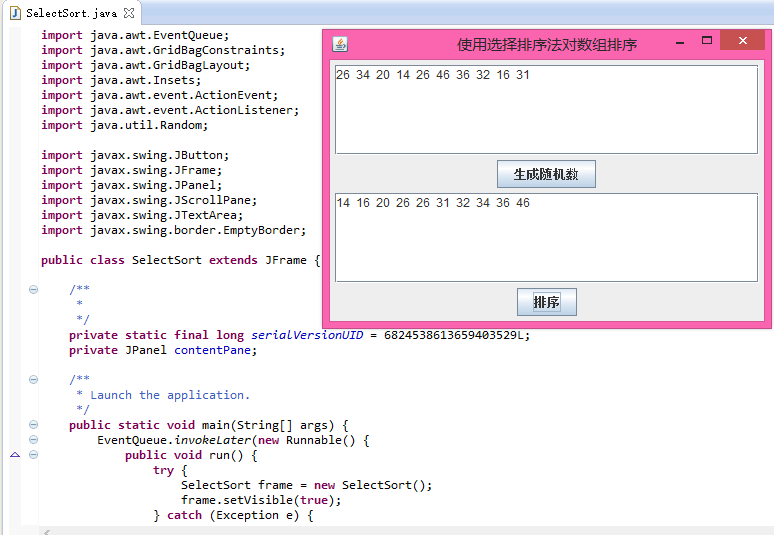
GridBagLayout 彈性配置。Random.nextInt(bound)。